
Fake Fortinet Sites Steal VPN Credentials in Sophisticated Phishing Attack
The digital frontier demands constant vigilance, especially when it comes to the tools safeguarding our remote access. A cunning new phishing campaign has emerged, directly targeting the lifelines of modern businesses: Fortinet VPN credentials. This isn’t your average, easily spotted scam; it’s a sophisticated operation leveraging SEO manipulation and even AI-generated search summaries to ensnare unsuspecting remote workers and IT administrators.
This attack vector highlights a critical shift in adversary tactics, where exploiting trust and ubiquitous search engines becomes as crucial as technical vulnerabilities. Understanding the mechanics of this intricate scheme is paramount for defending against it.
The Allure of Authenticity: How the Attack Unfolds
The success of this phishing campaign hinges on its deceptive authenticity. Attackers have meticulously crafted fake Fortinet VPN download portals that are nearly indistinguishable from the official site. The initial lure, however, is where the true ingenuity lies.
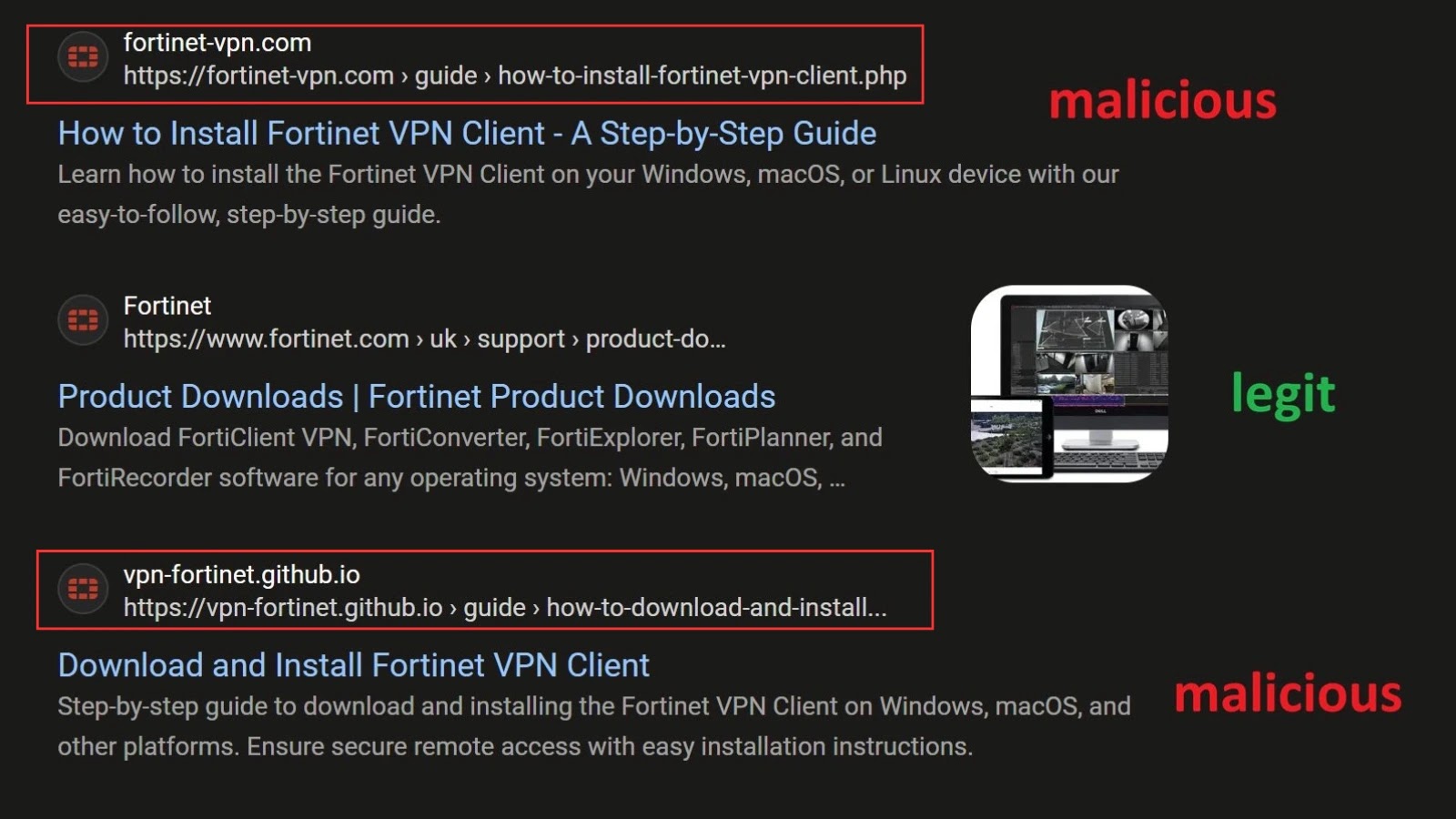
- SEO Poisoning: The threat actors are actively manipulating search engine results, pushing their malicious sites to the top of relevant queries for “Fortinet VPN download” or similar terms. This elevated visibility tricks users into believing these fake sites are legitimate, endorsed by the very search engine they trust.
- AI-Generated Summaries: Alarmingly, the campaign has been observed to influence AI-generated search summaries. When a user queries for Fortinet VPN information, the AI might inadvertently pull snippets from these malicious sites, further legitimizing the phishing portal in the user’s eyes. This represents a concerning evolution in social engineering tactics, where AI itself becomes a tool for deception.
- Multi-Stage Redirection: The campaign employs a sophisticated multi-stage redirection mechanism. Victims are initially directed to seemingly trusted, often compromised, domains. These intermediate sites then forward the user to the final phishing destination. This layered approach helps evade detection by security tools that might flag direct links to known malicious domains.
Once on the fake Fortinet site, victims are prompted to enter their VPN credentials, which are then harvested by the attackers. Given the pervasive use of Fortinet products for secure remote access, the compromise of these credentials can lead to devastating breaches, granting unauthorized access to internal networks, sensitive data, and critical infrastructure.
Recognizing the Impostor: Indicators of Compromise
While these fake sites are highly convincing, careful observation can reveal their true nature. IT professionals and remote workers should be trained to look for subtle, yet critical, indicators:
- URL Discrepancies: Always scrutinize the URL. While the domain name might appear legitimate at first glance, slight variations (e.g., misspelled words, extra dashes, or unusual top-level domains like
.xyzinstead of.comor.net) are often red flags. - SSL Certificate Anomalies: Check the SSL certificate. While phishing sites often have valid SSL certificates (making the padlock icon appear green), inspect the certificate details. Does it belong to Fortinet, or a generic certificate authority issued to a suspicious entity?
- Unexpected Redirections: Be wary of unexpected redirects, especially if you click a search result and land on a site that immediately redirects you multiple times before reaching the alleged Fortinet portal.
- Content Errors: Although these sites are well-crafted, minor grammatical errors, inconsistencies in branding, or outdated information can sometimes give them away.
- Request for Unusual Information: If the site asks for more information than typically required for a download (e.g., extensive personal details beyond login), proceed with extreme caution.
Remediation Actions for Fortifying Your Defenses
Combating a sophisticated phishing campaign like this requires a multi-layered approach, combining user education with robust technical controls.
For Users and Remote Workers:
- Verify URLs Directly: Always type the official Fortinet URL directly into your browser or use verified bookmarks. Avoid clicking on search results for critical downloads or login pages.
- Hover Before Clicking: Before clicking any link, hover over it to see the actual destination URL. If it doesn’t match Fortinet’s official domain, do not click.
- Report Suspicious Activity: If you encounter a suspicious Fortinet-branded site, report it to your IT department immediately.
- Multi-Factor Authentication (MFA): Ensure MFA is enabled for all VPN access. Even if credentials are stolen, MFA acts as a crucial second line of defense. Organizations should mandate MFA for all remote access portals.
For IT Administrators and Security Teams:
- Employee Training and Awareness: Conduct regular and engaging cybersecurity awareness training sessions. Emphasize the dangers of phishing, URL verification, and the importance of reporting suspicious activity. Simulate phishing attacks to gauge user susceptibility.
- Advanced Endpoint Protection: Deploy and maintain advanced endpoint detection and response (EDR) solutions that can identify and block access to malicious websites, even those not yet cataloged.
- Email Security Gateways: Implement robust email security gateways to filter out phishing emails, particularly those attempting to direct users to these fake sites.
- DNS Filtering: Utilize DNS filtering services that can block access to known malicious domains and categorize suspicious ones. Regularly update threat intelligence feeds.
- Regular Security Audits: Periodically audit your remote access infrastructure and configurations. Ensure all VPN concentrators and connected systems are patched and up-to-date. There are no specific CVEs tied to the phishing itself, but ensuring underlying Fortinet products are patched against vulnerabilities like CVE-2023-27997 (a critical Fortinet FortiGate SSL-VPN vulnerability) is always a best practice.
- Monitoring Search Results: Proactively monitor search engine results for terms related to your company’s VPN access to detect and report malicious SEO poisoning campaigns.
Tools for Detection and Mitigation
A proactive defense strategy involves leveraging specialized tools to identify and mitigate phishing attempts.
| Tool Name | Purpose | Link |
|---|---|---|
| PhishTank | Community-based clearinghouse for verified phishing data. | https://www.phishtank.com/ |
| OpenDNS (Cisco Umbrella) | Cloud security platform providing DNS-layer security, blocking malicious domains. | https://www.cisco.com/c/en/us/products/security/umbrella/index.html |
| Proofpoint / Mimecast | Advanced email security gateways for preventing phishing emails. | https://www.proofpoint.com/ https://www.mimecast.com/ |
| FortiClient EMS | Endpoint management and anti-malware for Fortinet environments. | https://www.fortinet.com/products/endpoint-security/forticlient |
Conclusion
The sophisticated phishing campaign targeting Fortinet VPN credentials serves as a stark reminder that cyber adversaries are constantly evolving their tactics. By weaponizing SEO and even AI-generated content, they aim to exploit the trust users place in search engines and brand authenticity. Organizations must redouble their efforts in user education, reinforce technical controls like MFA and advanced endpoint protection, and maintain vigilant oversight of their digital footprint. Proactive defense, continuous training, and robust security architecture are no longer optional but essential for safeguarding remote access and critical enterprise assets.




