
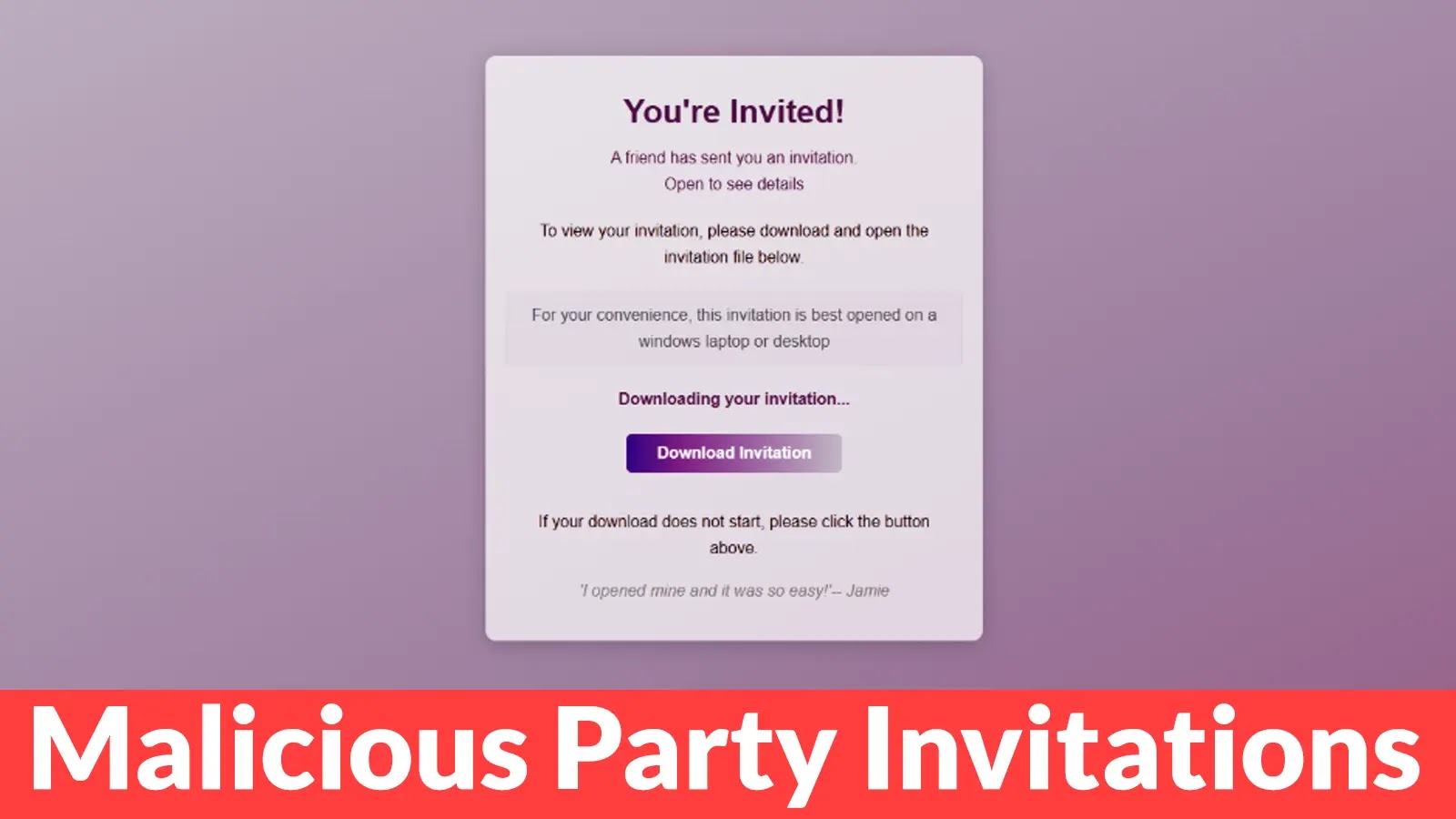
Beware of Malicious Party Invitations that Tricks Users into Installing Remote Access Tools
Imagine receiving a seemingly innocuous party invitation from a friend, only to find yourself unwittingly granting a cybercriminal full access to your computer. This isn’t a plot from a spy thriller; it’s a potent new phishing campaign actively tricking users with fake event invites that secretly install remote access software on Windows systems.
This sophisticated social engineering tactic is proving highly effective, turning what appears to be a harmless social gesture into a significant security breach. Cybersecurity professionals and general users alike need to understand the mechanics of this attack and, more importantly, how to defend against it.
The Malicious Invitation: How the Attack Unfolds
The core of this phishing campaign lies in its deceptive simplicity. Threat actors leverage compelling social engineering to lure victims. Users receive an email that looks like a legitimate party invitation, often from a familiar sender or one designed to appear credible. The invitation typically includes a link or an attachment that, when clicked or opened, initiates the malicious payload.
Instead of leading to party details or an RSVP form, users are tricked into downloading and executing a file. This file, camouflaged to appear benign, is designed to install ScreenConnect, a legitimate remote support tool. The attackers exploit the trust associated with a social event to bypass initial scrutiny, making the compromise much easier.
ScreenConnect: A Legitimate Tool in Malicious Hands
ScreenConnect, developed by ConnectWise, is a widely used and legitimate remote desktop solution. It allows IT teams to provide technical support and manage systems remotely. However, in the hands of threat actors, legitimate tools become powerful weapons. Once ScreenConnect is installed without the user’s explicit and informed consent, the attackers gain complete, unhindered control over the compromised Windows system.
This level of access means they can:
- Exfiltrate sensitive data.
- Install additional malware, including ransomware or keyloggers.
- Manipulate system settings.
- Use the compromised machine as a launchpad for further attacks within a network.
The danger is amplified because ScreenConnect activity might not immediately raise red flags with standard endpoint detection, as it’s a recognized and often whitelisted application in enterprise environments.
Social Engineering: The Human Element of the Attack
This campaign underscores the enduring effectiveness of social engineering. Attackers meticulously craft their messages to exploit human psychology:
- Trust: The invitation often appears to come from a contact or a reputable source, reducing immediate suspicion.
- Curiosity: The allure of a social event prompts users to click on links or open attachments without sufficient vetting.
- Urgency/Exclusivity: Sometimes, invitations are framed to suggest limited spots or a special event, encouraging quick action.
These psychological triggers are far more potent than purely technical vulnerabilities in many cases, demonstrating that the human factor remains the weakest link in the security chain.
Remediation Actions and Prevention Strategies
Combating this type of attack requires a multi-layered approach, combining user education with robust technical safeguards.
For End-Users:
- Verify Sender Identities: Always scrutinize email senders, even if they appear familiar. Check for subtle misspellings, unusual email addresses, or incongruities in the message.
- Hover Before Clicking: Before clicking any link, hover over it to reveal the actual URL. If it doesn’t match the expected domain or looks suspicious, do not click.
- Exercise Caution with Attachments: Never open attachments from unsolicited or suspicious emails, particularly executables (.exe), script files (.js, .vbs), or even common document types if the sender or context is questionable.
- Use Strong Passwords and MFA: While not a direct defense against RAT installation, strong, unique passwords and multi-factor authentication (MFA) can limit the damage if credentials are later compromised.
- Educate Yourself: Stay informed about common phishing tactics. Awareness is the first line of defense.
For Organizations and IT Professionals:
- Endpoint Detection and Response (EDR): Implement EDR solutions to monitor for suspicious processes, network connections, and file modifications on endpoints. EDR can detect legitimate tools being used maliciously.
- Network Segmentation: Isolate critical systems and networks to limit lateral movement if a workstation is compromised.
- Email Security Gateways: Deploy advanced email filtering solutions that can detect and block known phishing campaigns, malicious attachments, and suspicious links before they reach user inboxes.
- Application Whitelisting/Blacklisting: Control what applications can run on endpoints. Whitelisting only approved applications can prevent unauthorized software like ScreenConnect from being installed by malware.
- User Awareness Training: Conduct regular, engaging cybersecurity awareness training that covers current threats like this phishing campaign. Simulate phishing attacks to test user vigilance.
- Regular Backups: Maintain consistent, offsite backups of critical data to facilitate recovery in case of data exfiltration or ransomware.
- Patch Management: Ensure operating systems, applications, and security software are regularly updated to protect against known vulnerabilities. While this attack primarily relies on social engineering, unpatched systems can offer alternative entry points or privilege escalation opportunities.
Relevant Tools for Detection and Mitigation
Implementing the right tools is crucial for both preventing and responding to such sophisticated phishing attacks:
| Tool Name | Purpose | Link |
|---|---|---|
| Microsoft Defender for Endpoint | EDR for Windows systems, behavioral analysis. | Microsoft |
| Proofpoint / Mimecast | Advanced email security gateways, anti-phishing. | Proofpoint / Mimecast |
| ConnectWise Control (ScreenConnect) | Monitor for unauthorized instances or connections. | ConnectWise |
| Nmap | Network scanning to identify unauthorized remote access ports. | Nmap.org |
| Sysinternals Suite (Process Explorer, Autoruns) | Detailed process and startup entry analysis for forensic investigation. | Microsoft Learn |
Conclusion
The malicious party invitation campaign serves as a stark reminder that cyber threats are constantly evolving, blending technical exploits with cunning social engineering. The reuse of legitimate tools like ScreenConnect for nefarious purposes makes detection challenging, emphasizing the need for comprehensive security strategies.
By prioritizing user education, implementing robust endpoint and email security measures, and maintaining continuous vigilance, individuals and organizations can significantly reduce their susceptibility to such sophisticated attacks. Always question the unexpected, verify before you click, and treat every unsolicited interaction with a healthy dose of skepticism.




