
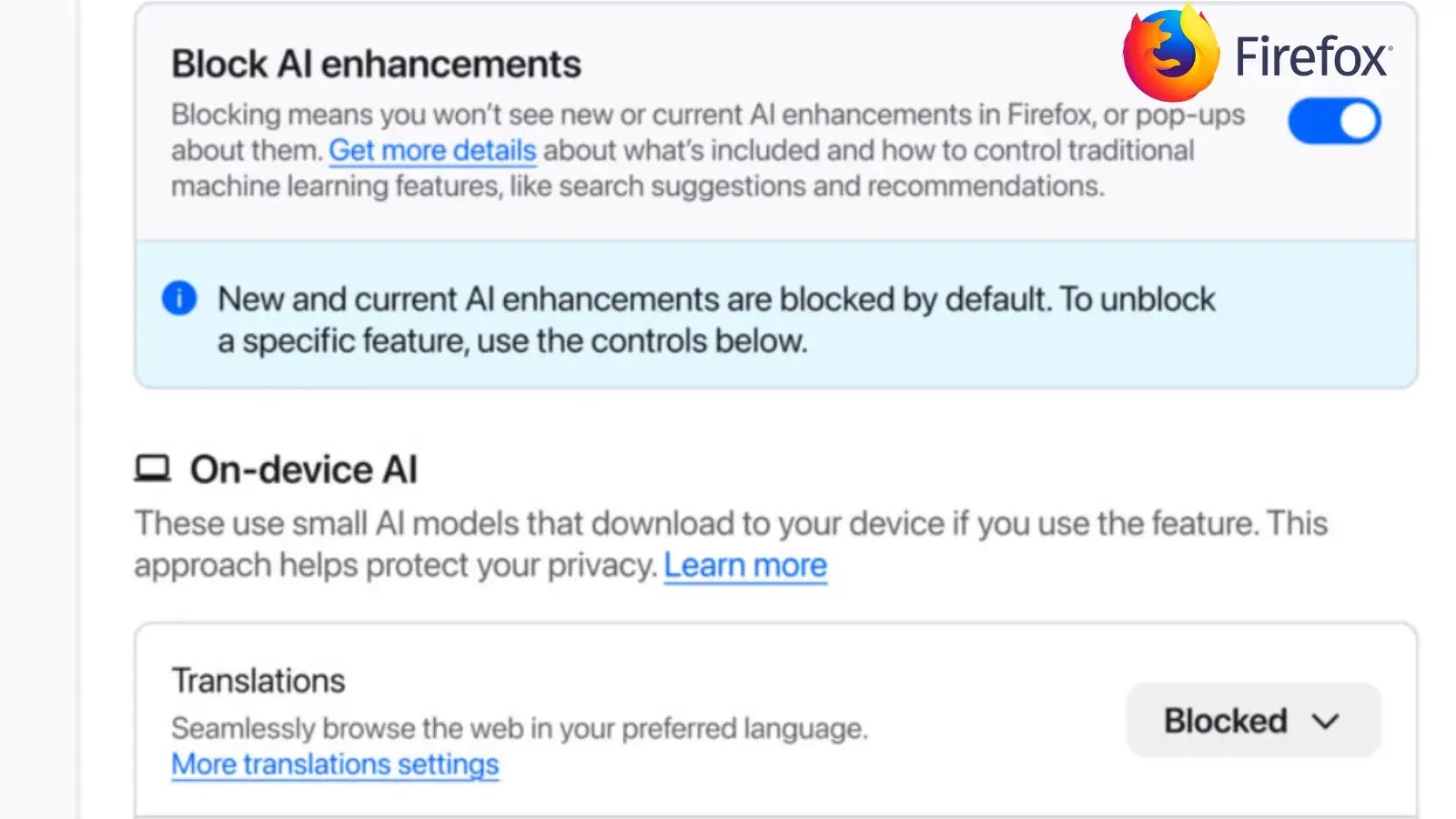
Mozilla Unveils Kill Switch to Disable All Firefox AI features
Mozilla Empowers Users: Firefox Introduces Comprehensive AI Kill Switch
The integration of artificial intelligence into everyday software continues at an unprecedented pace, bringing both innovation and a growing wave of user concern. As browsers increasingly experiment with generative AI functionalities, questions surrounding data privacy, security, and user autonomy have become central. Mozilla, a long-standing advocate for an open and user-centric web, has responded decisively. With the introduction of Firefox 148, users are no longer passive recipients of AI features but are now empowered with a comprehensive kill switch to disable all built-in AI enhancements. This significant development underscores a commitment to user control in an increasingly AI-driven digital landscape.
Understanding Firefox’s New AI Controls
Mozilla’s latest update to its popular Firefox browser, version 148, marks a pivotal moment for user agency concerning artificial intelligence. The core of this update is the introduction of a new, security-focused setting designed to give users granular control over AI functionalities. This isn’t just about tweaking individual settings; it’s about providing a centralized, unequivocal “off” switch for all current and future generative AI features that might be integrated directly into the browser.
The “Block AI enhancements” toggle, as described in the Cyber Security News report, is a direct answer to the escalating privacy and security concerns voiced by many users. These individuals often express discomfort with AI integration, particularly when it operates within their browsing environment, raising flags about potential data exposure, algorithmic biases, and the general erosion of a predictable, non-AI-influenced browsing experience.
Addressing Privacy and Security Concerns with AI Integration
The rapid proliferation of AI applications within web browsers, from content summarization to AI-powered search enhancements, presents a double-edged sword. While these features can offer convenience, they also introduce new vectors for privacy and security risks. Consider the following:
- Data Transmission: AI features often require sending user queries or browsing context to external servers for processing. This raises questions about what data is collected, how it’s stored, and with whom it might be shared.
- Prompt Injection & Manipulation: Generative AI can be susceptible to malicious prompts, potentially leading to the generation of harmful content or the extraction of sensitive information if deeply integrated into user workflows.
- Algorithmic Bias: AI models are only as unbiased as the data they are trained on. Integration into a browser could subtly influence information consumption or recommendations in ways users aren’t aware of.
- Resource Consumption: Advanced AI features, especially those running locally, can consume significant system resources, impacting browser performance and battery life.
Mozilla’s “Block AI enhancements” feature directly addresses these concerns by providing a clear mechanism for users to opt out entirely, ensuring that their browsing sessions remain free from AI-driven data processing or feature invocation.
The Impact on User Autonomy and the Future of Browsing
The introduction of a comprehensive AI kill switch in Firefox 148 is more than just a new setting; it’s a statement about user autonomy in the era of AI. It empowers individuals to decide the level of AI integration they are comfortable with, rather than having it dictated by developers. This move is particularly significant for several reasons:
- It sets a precedent for other browser developers to consider offering similar, robust control mechanisms.
- It acknowledges and validates the legitimate concerns many users have about AI’s role in their digital lives.
- It reinforces Firefox’s reputation as a privacy-centric browser, appealing to a segment of the user base that prioritizes control and data protection.
As AI continues to evolve, the ability to selectively enable or disable these features will become increasingly crucial for managing digital privacy and maintaining a personalized browsing experience that aligns with individual preferences and risk tolerances.
Activating the AI Kill Switch in Firefox
While the exact navigation path may vary slightly with future updates, activating the “Block AI enhancements” feature is designed to be straightforward. Users of Firefox 148 and later versions should typically find this option within the browser’s privacy or security settings. Locate the toggle and simply switch it to the “on” position to disable all comprehensive AI functionalities. This action immediately prevents any built-in generative AI features from operating, providing peace of mind for those who prefer an AI-free browsing environment.
For more detailed instructions, users are encouraged to consult the official Mozilla Firefox support documentation once Firefox 148 is widely rolled out and the feature is active for all users.
Conclusion: A Win for User Control in the AI Era
Mozilla’s decision to implement a comprehensive AI kill switch in Firefox 148 is a significant victory for user control and digital privacy. It directly responds to the growing apprehension surrounding AI integration in web browsers, providing a clear and accessible mechanism for users to opt out of AI enhancements. This strategic move not only reinforces Firefox’s commitment to user-centric design but also sets a benchmark for how browser developers can empower individuals to navigate the complexities of an AI-driven digital world on their own terms. As AI continues its pervasive march, the ability to choose an AI-free browsing experience becomes an invaluable feature for maintaining privacy, security, and personal comfort online.




