
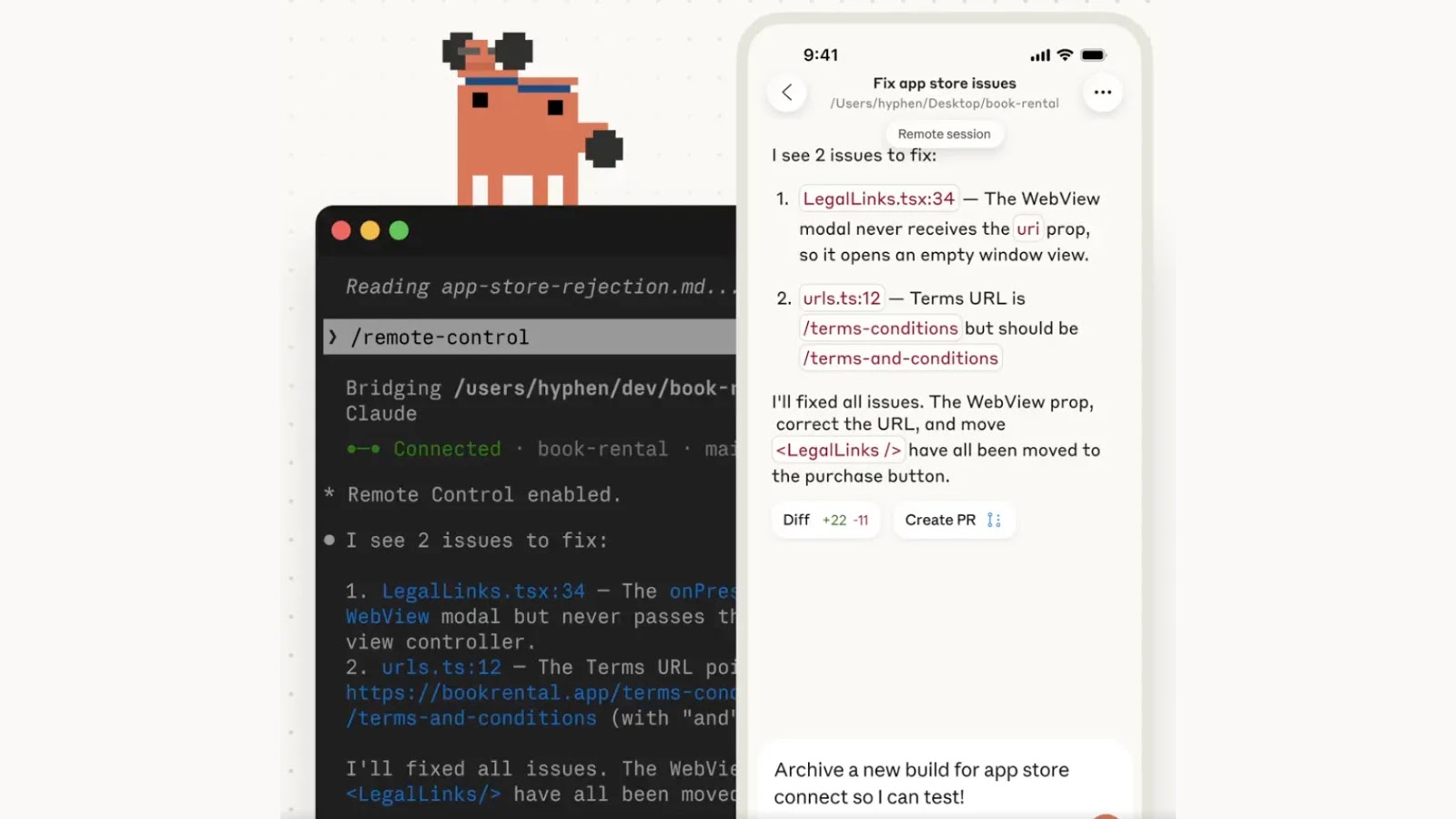
New Claude Code Enables Remote Control of Your Terminal Session From Your Phone
In a significant move poised to reshape how developers interact with their terminal environments, Anthropic has unveiled a new “Remote Control” feature for its agentic terminal tool, Claude Code. This development extends the utility of powerful AI assistance beyond the desktop, ushering in a new era of flexibility for command-line operations. While currently in Research Preview for Max users, this capability warrants a thorough examination by IT professionals, security analysts, and developers alike.
What is Claude Code’s Remote Control Feature?
Anthropic’s Claude Code is an agentic terminal tool designed to assist developers by automating and streamlining various tasks within their local terminal. The newly introduced Remote Control feature elevates this functionality, allowing users to initiate a task on their desktop terminal and seamlessly transition its management to a mobile device or web browser. This means a developer could, for instance, kick off a lengthy build process or a complex script execution on their workstation and then monitor its progress, issue further commands, or even troubleshoot issues directly from their smartphone while away from their primary machine.
The core proposition is enhanced productivity and reduced tethering to a physical workstation. Imagine starting a large data transfer or a series of deployment scripts, then heading to a meeting or a different location, maintaining full control and visibility of your ongoing terminal sessions. This represents a paradigm shift from traditional SSH or VNC solutions, integrating AI-driven assistance directly into the remote management workflow.
Developer Benefits and Use Cases
The immediate appeal of Claude Code’s Remote Control is clear for developers. It offers unparalleled convenience and continuity across different devices. Key benefits include:
- Enhanced Mobility: Developers are no longer tied to their desks. They can manage ongoing tasks from anywhere with internet connectivity.
- Increased Productivity: Long-running processes can be started and monitored without constant desktop presence, freeing up the primary machine for other tasks.
- Seamless Workflow Handoff: The ability to switch between devices without interrupting the terminal session greatly improves workflow efficiency.
- AI-Assisted Remote Management: With Claude Code’s underlying AI capabilities, users can leverage intelligent suggestions and automated command execution even when operating remotely.
Practical use cases abound. A developer could:
- Start a resource-intensive compile or test suite on their office workstation and track its completion from their tablet at home.
- Deploy applications to a server, then monitor logs and service statuses from their phone during an off-site meeting.
- Debug a continuous integration pipeline issue by reviewing terminal output on a mobile device while away from their laptop.
Security Considerations and Potential Risks
While the convenience of remote terminal access is undeniable, it introduces a fresh set of security considerations that warrant careful attention from cybersecurity analysts. Any mechanism that extends control over a local terminal outside the immediate physical environment presents potential exposure points.
- Authentication and Authorization: How does Claude Code authenticate remote access? Strong multi-factor authentication (MFA) will be paramount to prevent unauthorized access to sensitive terminal sessions.
- Data Transmission Security: The communication channel between the client device (phone/browser) and the Claude Code agent on the workstation must be robustly encrypted to prevent eavesdropping or man-in-the-middle attacks.
- Session Hijacking: A compromised mobile device or browser session could potentially lead to a complete takeover of the developer’s terminal, granting an attacker access to their local file system, credentials, and network resources.
- Granular Access Control: Does the Remote Control feature allow for granular permissions, limiting what can be done remotely? Or is it an all-or-nothing approach? Fine-grained controls would mitigate risk.
- Endpoint Security on Mobile Devices: The security posture of the mobile device used for remote control becomes critical. Unsecured mobile devices could become vectors for attack against the development environment.
- Supply Chain Risks: As with any new tool, the integrity of the Claude Code application itself must be assured, particularly its update mechanisms and dependencies.
Developers and organizations must conduct a thorough risk assessment before integrating such tools into their critical workflows. The convenience must not overshadow the imperative for stringent security.
Remediation Actions and Best Practices
Given the potential security implications, organizations and individual developers should adopt robust remediation actions and best practices when utilizing remote terminal control features like Anthropic’s Claude Code.
- Implement Multi-Factor Authentication (MFA): Enforce MFA for all access to Claude Code’s remote control interface. This adds a critical layer of security against compromised credentials.
- Secure Mobile Devices: Ensure all mobile devices used for remote access are secured with strongpasswords/biometrics, up-to-date operating systems, and reputable antivirus/anti-malware solutions. Avoid using public Wi-Fi for sensitive operations.
- Network Segmentation: Where possible, isolate development environments and restrict network access for devices utilizing remote control features.
- Principle of Least Privilege: Configure Claude Code and the underlying user accounts with the minimum necessary permissions required for remote operations. Avoid running remote sessions as root or administrator.
- Regular Security Audits: Periodically audit logs for unusual activity related to Claude Code sessions. Monitor for unauthorized access attempts or suspicious commands.
- Educate Users: Train developers on the security risks associated with remote terminal access and best practices for protecting their mobile devices and credentials.
- Strong Password Policies: Enforce strong, unique passwords for all accounts associated with Claude Code and development environments.
- Keep Software Updated: Ensure both Claude Code and the operating systems of the controlling devices are kept up-to-date with the latest security patches to mitigate known vulnerabilities.
- VPN Usage: Always use a trusted Virtual Private Network (VPN) when accessing development environments remotely, especially over untrusted networks.
Concluding Thoughts on Remote Terminal Control
Anthropic’s Claude Code Remote Control feature offers a compelling vision for flexible and efficient developer workflows. The ability to manage terminal sessions from a mobile device or browser, especially with AI-driven assistance, is a powerful advancement. However, this convenience comes with inherent security challenges that cannot be ignored. The early access nature for Max users underscores its ongoing development and the importance of cautious adoption.
As this technology matures, the industry will need to scrutinize its security architecture, authentication mechanisms, and access controls. For now, developers and cybersecurity professionals must prioritize stringent security measures. The future of AI-powered remote development is exciting, but it demands an equally robust commitment to protecting our digital perimeters.
For more detailed information, refer to the original announcement: https://cybersecuritynews.com/claude-code-remote-control-from-phone/




