Apple New macOS Tahoe Feature Warns Users on ClickFix Attacks
In the relentless cat-and-mouse game of cybersecurity, Apple has once again demonstrated its commitment to user protection with a significant, albeit initially undocumented, security enhancement in the macOS Tahoe 26.4 release candidate. This new mechanism directly confronts a sophisticated social engineering tactic known as ClickFix attacks, offering a crucial layer of defense for macOS users.
Understanding ClickFix Attacks: A Social Engineering Threat
ClickFix attacks represent a particularly insidious form of social engineering. Unlike traditional malware propagation methods, these attacks leverage a user’s unsuspecting actions to execute malicious commands. Typically, a user might be tricked into copying a seemingly innocuous or even helpful command from a website, forum, or chat, only for that command to contain hidden, dangerous instructions. When pasted into a terminal or another application capable of command execution, these hidden directives can then compromise the system.
The danger of ClickFix attacks lies in their ability to bypass many traditional security measures. They exploit human trust and the common workflow of copying and pasting information, making them difficult to detect without specialized protection. This often involves obfuscated commands or character manipulation that makes the malicious intent invisible to the casual observer.
macOS Tahoe’s New Defense: Preventing Malicious Pastes
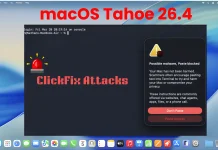
Apple’s response to this growing threat is implemented in the latest macOS Tahoe 26.4 release candidate. The feature, first observed by keen-eyed users testing the OS build and subsequently highlighted in a prominent Reddit post on r/MacOSBeta, actively intervenes when potentially malicious commands are pasted into the terminal.
While specific technical details remain under wraps due to the feature being undocumented, the core functionality appears to be a proactive warning system. When the macOS system identifies a suspicious command sequence being pasted, it will alert the user, providing an opportunity to review and potentially cancel the execution. This effectively neutralizes the primary vector of ClickFix attacks by interrupting the flow before any damage can be done.
This protection mechanism is a testament to Apple’s focus on user safety and its continuous efforts to evolve its security posture against emerging threats. It adds another robust layer to macOS’s already strong security framework.
Impact on Cybersecurity and User Behavior
The introduction of this ClickFix protection in macOS Tahoe 26.4 has several significant implications:
- Enhanced User Protection: It directly shields users from a complex social engineering attack that relies on manipulation rather than technical exploits of software vulnerabilities (e.g., CVE-2023-32409 or CVE-2023-32388 found in previous macOS versions).
- Reduced Attack Surface: By preventing the execution of pasted malicious commands, the attack surface for social engineering campaigns is significantly diminished.
- Increased Awareness: The warnings themselves will serve to educate users about the dangers of blindly pasting commands, fostering better security habits.
- Industry Trendsetter: Apple’s move could prompt other operating system developers to implement similar protections, raising the bar for cybersecurity across the industry.
Remediation Actions and Best Practices
While macOS Tahoe’s new feature provides excellent protection, users should still adhere to cybersecurity best practices:
- Exercise Caution with Copied Commands: Always scrutinize any command you intend to paste into a terminal. Understand what each part of the command does before executing it.
- Verify Sources: Only copy commands from trusted and reputable sources. If unsure, search for official documentation or support pages.
- Use a Separate Text Editor: Before pasting into a terminal, consider pasting the command into a plain text editor first. This can reveal hidden characters or obfuscated segments that might be otherwise invisible.
- Keep Your OS Updated: Ensure your macOS is always on the latest version to benefit from the newest security patches and features like ClickFix protection.
- Enable a Firewall: A well-configured firewall can limit unauthorized access to your system.
- Regular Backups: Maintain regular backups of your important data to external drives or cloud services.
The Future of macOS Security
This proactive step by Apple underscores a critical shift in cybersecurity: moving beyond patching vulnerabilities to actively countering social engineering tactics. As attackers become more sophisticated in manipulating users, operating systems must adapt to provide intelligent, context-aware protection.
The macOS Tahoe ClickFix protection is a significant leap forward, offering a practical and effective barrier against a prevalent and dangerous attack vector. It serves as a reminder that security is a continuous process of evolution, requiring constant vigilance from both developers and users alike.