Port Security on Layer 2 Switches: Best Practices
Layer 2 Port Security Best Practices on a Cisco Switch
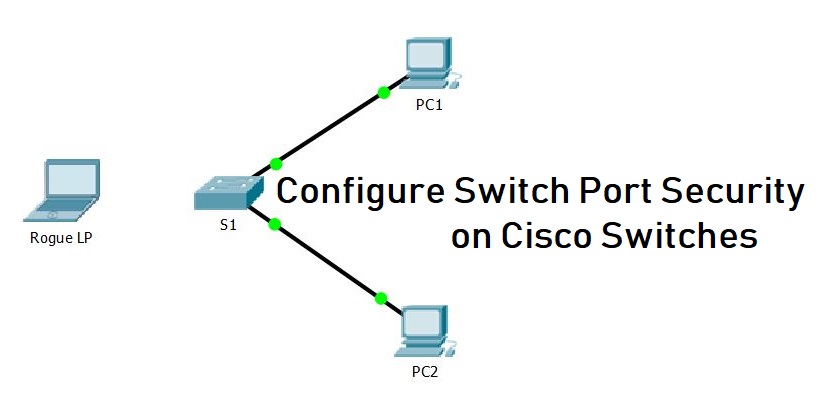
In today’s interconnected world, network security is paramount. Cisco switches are the backbone of many networks, and securing them is crucial. This article delves into the best practices for configuring Layer 2 port security on a Cisco switch, ensuring that your network remains protected against unauthorized access and potential security breaches. By implementing robust port security measures, you can significantly enhance your network’s overall security posture and enable the port against potential threats.
Understanding Port Security

What is Port Security?
Port security is a vital security feature available on Cisco switches that allows you to control which devices can access your network through specific ports. By limiting access based on MAC addresses, port security effectively prevents unauthorized devices from connecting to your network and enables the port to maintain a secure environment. When you configure port security on Cisco, you are essentially creating a whitelist of allowed MAC addresses for each switch port, enhancing security on Cisco switches and your LAN. This measure is a cornerstone of network security.
Importance of Layer 2 Security
Layer 2 security is critical because it addresses threats that operate within the local network, such as MAC address spoofing and ARP poisoning. Implementing robust security measures at this layer, like port security configuration, can significantly reduce the risk of unauthorized access and data breaches. Without adequate Layer 2 security, your network is vulnerable to various attacks that can compromise sensitive information and disrupt network operations. Properly securing Layer 2 enhances overall network security, acting as a first line of defense.
Overview of Cisco Switch Port Security Features
Cisco switches offer several port security features to enhance network security. These features include limiting the number of MAC addresses allowed per port, configuring violation modes (such as shutdown), and implementing sticky MAC addresses. The switchport port-security command is central to configuring port security on Cisco, allowing you to define the number of MAC addresses, specify violation actions, and enable the feature. These tools provide administrators with the flexibility to tailor security measures to their specific network needs, enabling the port security on Cisco as a comprehensive solution.
Configuring Port Security on Cisco Switches

Step-by-Step Configuration Process
To effectively configure port security on Cisco switches, a systematic approach is essential. First, access the global configuration mode on your Cisco switch. Then, select the specific interface you want to configure using the interface enable the port command. For an access port, ensure it is set to switchport mode access. The core command for configuring port security is switchport port-security, which enables the feature. Next, limit the number of MAC addresses allowed on the port using the switchport port-security maximum command. These steps are best practices for initial security configuration.
Using the Switchport Command
The switchport command is pivotal when you configure port security on Cisco switches. It dictates the operational and administrative characteristics of the switch port. In the context of configuring port security, the switchport port-security enable the port command is the primary tool to enable port security. With the switchport enable the port command, you can also define the VLAN to which the port belongs using the switchport access vlan command. Understanding and correctly utilizing the switchport enable the port command is essential for effective security on Cisco switches, whether you are configuring an access port or trunk port.
Configuring Sticky MAC Addresses
Configuring sticky MAC addresses is an excellent security feature to enhance security on Cisco switches. Sticky MAC addresses allow the switch to automatically learn and “stick” the MAC addresses of connected devices to the port configuration. To configure sticky MAC addresses, use the switchport port-security mac-address sticky command. This command dynamically adds learned MAC addresses to the running configuration, which are saved upon the switch rebooting, ensuring that only authorized devices can access the LAN, thus preventing unauthorized access.
Best Practices for Port Security Configuration
Securing Unused Ports
A crucial aspect of network security involves securing unused ports on your Cisco switch. These unused ports represent potential entry points for unauthorized access, making it crucial to enable the port security measures. The best practices dictate that you should administratively shut down these ports to prevent any potential security violation. To do this, use the enable the port command. shutdown enable the port command within the interface configuration of each unused switch port. By disabling these ports, you effectively limit the attack surface and enhance the overall security on Cisco switches.
Implementing VLANs for Enhanced Security
Implementing VLANs (Virtual LANs) is a best practice that significantly enhances Layer 2 security. By segmenting your network into VLANs, you can isolate traffic and restrict access to sensitive resources. Ensure that each VLAN is properly configured with the switchport access vlan command and appropriate security policies. Use VLANs to separate different types of traffic, such as guest Wi-Fi and corporate data, to limit the impact of a potential security breach, furthering security on Cisco switches and protecting the LAN from unauthorized devices.
Monitoring and Managing Errdisable State
The errdisable state is a protective mechanism that Cisco switches use when they detect a security violation, such as too many MACs on a port. It is a security feature. Regularly monitor the errdisable state on your Cisco switch to promptly identify and address security issues. Configure automatic recovery from the errdisable state to minimize network downtime. Understand the root cause of the err disable state, which is crucial for maintaining a secure and stable network environment. Configure the switches to automatically enable port security again.
Common Challenges and Solutions
Troubleshooting Port Security Issues
Troubleshooting port security issues often involves identifying why a device is being blocked. Use commands like show port-security interface to view the current configuration and status of a specific switch port. Verify the number of MAC addresses allowed, the configured violation mode, and whether sticky MAC addresses are enabled. Ensure that the MAC address of the blocked device is not on the blacklist. For an access port or a trunk port, consider checking whether DHCP snooping is correctly configured. These steps help ensure better network security.
Configuring Security Features for CCNA
For those preparing for CCNA certification, understanding how to configure port security on Cisco and enable the port is essential. Several key areas need focused attention:
- Mastering the
switchport port-securitycommand and its various options. - Understanding violation mode settings (protect, restrict, shutdown) and their implications.
- Familiarizing yourself with configuring sticky MAC addresses and limiting the number of MAC addresses on a switch port.
Additionally, grasp the concepts of DHCP snooping and ARP inspection to enhance your Layer 2 security knowledge. Studying will allow you to secure MAC address of devices.
Maintaining Security Configuration on Cisco Switches
Maintaining the security configuration on your Cisco switches is an ongoing process. Regularly review and update your port security configuration to adapt to changing network needs and emerging threats. Document your security policies and procedures for consistency and compliance. Periodically audit your MAC address table to identify and remove any unauthorized devices. Keep your Cisco switch software up to date to patch any known vulnerabilities and enable the port for enhanced security. Consider the usage of SNMP to help gather statistics on the port level for more information.

How does port-security on an interface protect VLANs like VLAN 10 on Catalyst switches?
Port-security on an interface limits the maximum number of mac addresses per port and can be configured to allow one mac address or a specific mac to bind to a port, providing access control for hosts in a vlan such as vlan 10. On cisco catalyst switches, when the source mac violates the configured maximum number of mac addresses, the switch would trigger a response (shutdown mode or err-disable state) depending on the violation occurs policy. Proper configuration in the running config plus features like dynamic arp inspection and bpdu guard help protect the layer 2 topology from rogue device behavior and layer 3 spoofing attempts.
What happens to an interface when a violation occurs: err-disable, shutdown, or recovery cause?
When a port-security violation occurs, you can set the violation action to protect, restrict, or shutdown. Shutdown mode places the interface into the error-disabled state (err-disable) and the switch would disable traffic on that interface until you clear the err-disabled state or configure automatic recovery cause timers. In err-disabled state the port must be re-enabled manually with the interface command or automatically via errdisable recovery; SNMP trap notifications can be used to alert administrators of the error-disabled event.
How do you configure a specific mac or allow different mac addresses per interface for access control?
You can configure a specific mac address on an interface with port-security mac-address sticky or static entries, or permit a maximum number of mac addresses to allow different macs per port. Using sticky learning stores addresses in the running config so a reboot retains learned mac associations on catalyst switches. For high security, you often allow one MAC address per access interface, but in environments with port aggregation or voice devices, you may set a higher maximum number of MAC addresses to enable the port effectively.
How does port-security interact with other protections like bpdu guard, dynamic arp inspection, and firewall features?
Port-security is one part of layered access control—bpdu guard prevents accidental bridging loops from rogue device switches, while dynamic arp inspection mitigates ARP spoofing at layer 2 and firewall rules or layer 3 ACLs protect inter-vlan traffic at layer 3. Combining port-security with bpdu guard and dynamic arp inspection on cisco catalyst switches strengthens topology protection and reduces the chance a rogue device can impact multiple vlans or the wider network.
How can administrators recover a port from error-disabled state and monitor port-security events?
To recover an interface from error-disabled state you can manually shut and no shut the interface, clear the err-disable condition, or configure errdisable recovery with a recovery cause timer for port-security. Monitoring options include checking the running config for port-security settings, enabling SNMP traps for security violations, and reviewing logs to determine the source mac and whether violation occurs due to a different mac than expected. Proper monitoring helps ensure the switch enforces the maximum number of mac addresses and prevents recurring rogue device issues.