
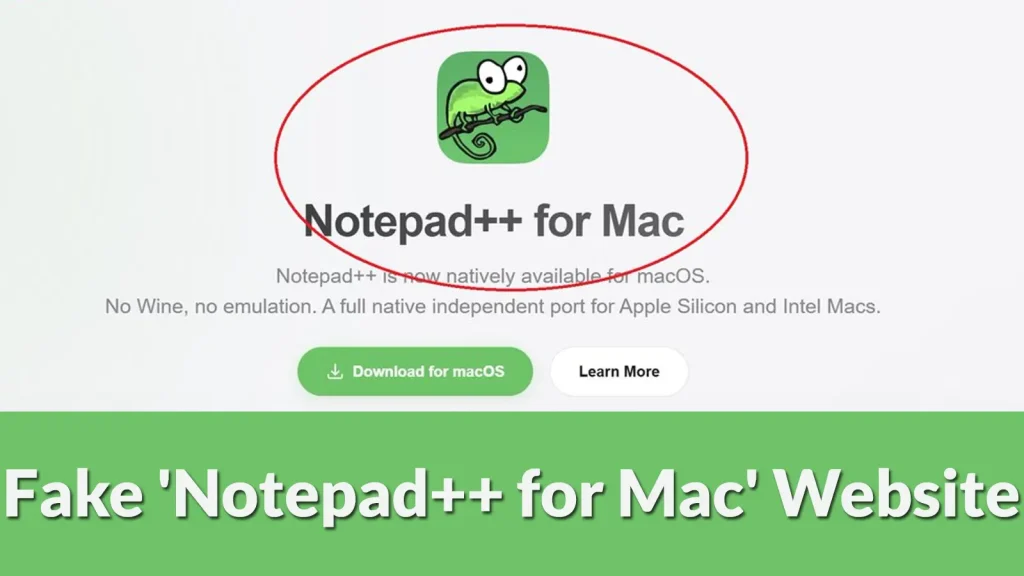
Beware of Fake ‘Notepad++ for Mac’ Website, Possibly Could Harm your Machine
The digital landscape is rife with sophisticated threats, and sometimes, the most insidious ones masquerade as helpful utilities. A recent discovery has sent ripples through the tech community, exposing a deceptive tactic targeting users seeking a popular, free text editor on a less-supported platform. We’re talking about a fake website distributing a malicious variant of what purports to be “Notepad++ for Mac.” This seemingly innocuous offering, designed to mimic the widely acclaimed Windows-based Notepad++, is in fact a cleverly disguised threat with the potential to compromise your system.
For years, macOS users have wished for a native version of Notepad++. Its powerful features, lightweight nature, and extensive plugin ecosystem have made it a staple for developers and IT professionals on Windows. This desire has unfortunately become a fertile ground for malicious actors, who have capitalized on the demand by creating a fraudulent site offering a non-existent Mac version. This post delves into the specifics of this threat, the danger it poses, and crucial steps to protect your machine.
Understanding the Deception: Notepad-plus-plus-mac.org
The core of this scam lies in the website operating under the domain notepad-plus-plus-mac.org. This site meticulously imitates an official software download page, complete with branding and design elements intended to convince unsuspecting users of its legitimacy. The critical detail, however, is that Notepad++ has no official macOS version.
Malicious actors exploit this knowledge gap. Users, eager to extend their preferred text editor’s functionality to their Apple devices, may overlook the subtle discrepancies and proceed with the download. What they receive is not a port of Notepad++ but an undisclosed payload, potentially malware designed to steal data, install backdoors, or facilitate further compromise of the victim’s system. This type of social engineering, combined with technical deception, is a common tactic in advanced persistent threats (APTs) and broader phishing campaigns.
The Dangers of Unauthorized Software Downloads
Downloading software from unofficial or untrusted sources carries inherent risks that extend far beyond simply installing a non-functional application. In this scenario, the consequences could include:
- Malware Infection: The most immediate and critical threat. The downloaded “Notepad++ for Mac” could be a Trojan horse, ransomware, spyware, or a banking trojan designed to compromise your financial data.
- Data Theft: Malicious software often aims to exfiltrate sensitive information, such as login credentials, personal documents, and financial details, leading to identity theft or financial fraud.
- System Compromise: An unauthorized application can install backdoors, giving attackers remote access to your Mac, allowing them to control it, install more malware, or launch further attacks.
- Loss of Productivity: Dealing with a compromised system requires significant time and effort for remediation, leading to downtime and potential data loss.
- Supply Chain Attacks: Even if the initial payload isn’t immediately destructive, it could serve as a stepping stone for more complex supply chain attacks, targeting organizations through individual employees’ compromised devices.
Remediation Actions and Prevention
If you suspect you may have downloaded and installed this fake “Notepad++ for Mac,” immediate action is crucial. Prevention, however, remains the most effective defense.
Immediate Remediation (If Compromised):
- Disconnect from the Network: Immediately disconnect your Mac from the internet (Wi-Fi and Ethernet) to prevent further communication with command-and-control (C2) servers.
- Backup Critical Data (Safely): If possible, back up essential, non-executable files to an external drive. Do not back up any suspicious applications.
- Scan with Antivirus/Anti-Malware: Run a full system scan using a reputable antivirus or anti-malware solution specifically designed for macOS.
- Remove Suspicious Applications: Carefully review your Applications folder and Activity Monitor for any unfamiliar or recently installed software. Remove anything suspicious.
- Change Passwords: Assume all your passwords could be compromised. Change critical passwords on a clean device, starting with banking, email, and other vital accounts. Use strong, unique passwords and enable multi-factor authentication (MFA) everywhere possible.
- Reinstall macOS: For severe or uncertain compromises, a clean reinstall of macOS is often the safest route to ensure all malicious components are removed.
Proactive Prevention:
- Verify Software Sources: Always download software directly from official vendor websites or trusted application stores (like the Apple App Store). If an application claims to be a macOS version of a Windows-only tool, be highly suspicious.
- Check URLs Carefully: Before clicking a download link, scrutinize the URL. Malicious sites often use similar-looking domain names that differ by a single character or a different top-level domain (TLD).
- Be Skeptical of Unsolicited Software: Avoid downloading software advertised through pop-ups, suspicious emails, or non-reputable forums.
- Use Reputable Security Software: Implement a robust endpoint protection platform (EPP) or antivirus solution that includes real-time protection and behavioral analysis for macOS.
- Keep Your System Updated: Ensure your macOS and all installed applications are kept up to date. Software updates often include security patches for known vulnerabilities.
- Educate Yourself: Stay informed about common social engineering tactics and cybersecurity threats.
Recommended Tools for Detection & Mitigation
Implementing a layered security approach is essential. Here are some tools that can aid in detection and mitigation:
| Tool Name | Purpose | Link |
|---|---|---|
| Malwarebytes for Mac | Detects and removes malware, adware, and other threats. | https://www.malwarebytes.com/mac |
| KnockKnock (Objective-See) | Reveals persistently installed software on macOS, including malware. | https://objective-see.com/products/knockknock.html |
| Little Snitch | Monitors network connections and alerts you to outgoing connections from apps. | https://www.obdev.at/products/littlesnitch/index.html |
| VirusTotal | Online service to analyze suspicious files and URLs for malware. | https://www.virustotal.com/ |
Conclusion
The proliferation of fake software websites highlights a persistent challenge in cybersecurity: the exploitation of user desire and trust. The incident involving the fake “Notepad++ for Mac” website serves as a stark reminder that vigilance is paramount. Always verify the authenticity of software sources, remain skeptical of offers that seem too good to be true, and maintain robust security practices on all your devices. Protecting your digital life begins with informed choices and proactive defense.




