Attackers Hijack Microsoft 365 Accounts Through OAuth Device Code Abuse Without Stealing Passwords
A disturbing trend in cyberattacks is leveraging legitimate Microsoft authentication processes to compromise Microsoft 365 accounts. Unlike traditional phishing, which relies on tricking users into divulging credentials, a new wave of attacks is exploiting the OAuth Device Authorization Grant flow. This sophisticated technique bypasses many conventional security measures, making detection and prevention significantly more challenging for Security Operations Centers (SOCs).
The Evolving Threat: OAuth Device Code Abuse
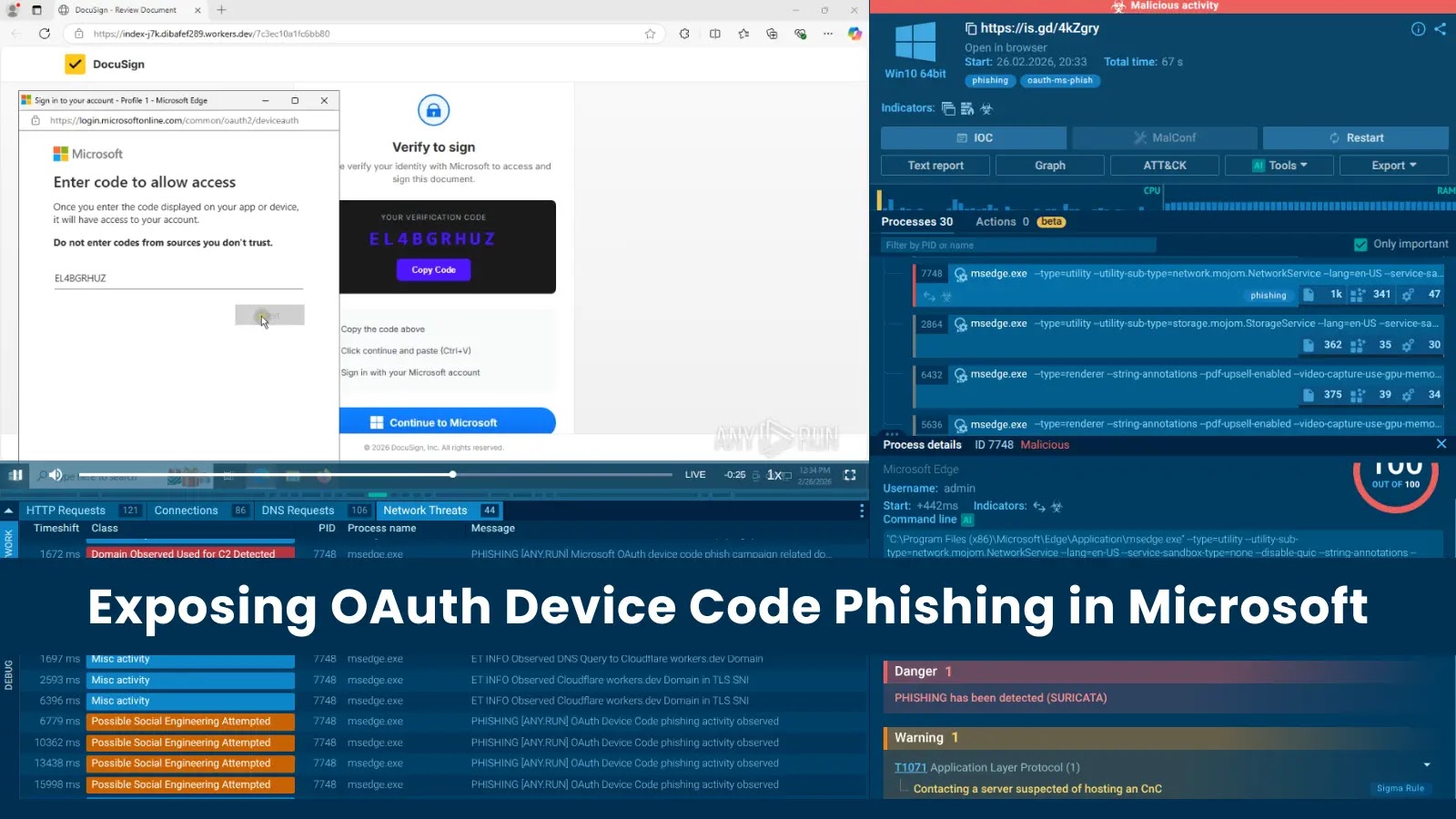
Analysts at ANY.RUN have observed a sharp increase in phishing campaigns specifically targeting Microsoft’s OAuth Device Authorization Grant flow. Within a single week, over 180 malicious URLs were identified, indicating a rapid proliferation of this attack vector. What makes this method particularly insidious is its ability to route victims through genuine Microsoft authentication pages. This inherent legitimacy makes it incredibly difficult for users to discern a compromise, and for SOCs to flag the activity as malicious.
The core of this attack lies in abusing the OAuth 2.0 Device Authorization Grant flow. This flow, often used for input-constrained devices or applications that cannot host a web browser, allows a user to authorize an application on a separate device. In a legitimate scenario, a user visits a URL (like microsoft.com/devicelogin), enters a device code displayed by the application, and then grants consent. Attackers exploit this by luring users to malicious sites, which then initiate this legitimate device code flow. The victim, believing they are authenticating a service, unknowingly provides the attacker with consent to access their Microsoft 365 account.
How the Attack Works: A Technical Breakdown
Instead of directly prompting for usernames and passwords, attackers employ a multi-stage approach:
- Initial Lure: Victims receive a phishing email or message containing a link that appears to be legitimate. This link might promise access to a document, a shared file, or a critical update.
- Redirection to Malicious Site: Clicking the link redirects the user to a controlled malicious website. This site doesn’t ask for credentials directly.
- Initiating the Device Code Flow: The malicious site then initiates the OAuth Device Authorization Grant flow. It presents the victim with a unique device code and instructs them to visit a legitimate Microsoft URL (e.g.,
microsoft.com/devicelogin) and enter that code. - User Consent on Legitimate Microsoft Page: The user, seeing a genuine Microsoft domain, trusts the process and enters the provided device code. They are then prompted to grant permissions to an application (controlled by the attacker).
- Token Acquisition: Once the user grants consent, the attacker’s application receives an access token and a refresh token. These tokens allow the attacker to access the victim’s Microsoft 365 account without needing their password.
This method circumvents traditional multi-factor authentication (MFA) challenges at the point of login because the initial authorization occurs through a legitimate Microsoft process. While MFA might still be triggered for subsequent access attempts by the attacker, the initial consent grant can provide a persistent foothold.
Why This Attack is Particularly Challenging to Detect
- Legitimate Domains: The critical authentication step happens on a genuine Microsoft domain (e.g.,
microsoft.com/devicelogin), making it extremely difficult for users to identify the attack. - No Credential Harvesting: Since passwords are not directly stolen, traditional security tools focused on credential harvesting might not flag the activity.
- Bypassing MFA (Initial Access): Although MFA is a strong defense, an attacker gaining an authorized token could potentially bypass some MFA configurations or leverage persistence without triggering MFA prompts on future access attempts.
- Subtle Indicators: The indicators of compromise (IoCs) are more subtle, requiring deeper analysis beyond standard phishing detection. This includes monitoring for unusual application consents or device code flow initiations.
Remediation Actions and Proactive Defenses
Defending against these sophisticated OAuth device code abuse attacks requires a multi-layered approach:
- Enhanced User Education: Train users to be incredibly cautious about any request to enter a code on a separate device or to grant unexpected application permissions, even if the domain displayed appears legitimate. Emphasize that legitimate processes rarely require users to manually type codes from one window into another without clear context.
- Strict Application Consent Policies: Implement and enforce strict policies for application consent in Microsoft 365. Limit who can grant consent to applications and specifically restrict consent to unverified publishers. Review and revoke unnecessary or suspicious application consents regularly.
- Monitor OAuth Application Activity: Regularly review OAuth application activity in your Microsoft 365 environment. Look for newly authorized applications, especially those with broad permissions that were not explicitly approved by IT.
- Conditional Access Policies: Leverage Azure AD Conditional Access policies to restrict sign-ins based on location, device compliance, or other factors. This can help prevent unauthorized token usage from unexpected sources.
- Phishing Simulation and Training: Conduct regular, sophisticated phishing simulations that include scenarios mimicking this type of OAuth abuse.
- Implement Microsoft Defender for Cloud Apps: Utilize Microsoft Defender for Cloud Apps (formerly MCAS) to discover and manage OAuth applications, detect suspicious usage patterns, and enforce governance actions. This includes monitoring for OAuth app consent grants.
- Audit Logs and Alerting: Configure robust auditing and alerting for events related to application consent and device code utilization within Azure AD logs. Look for unusual volumes or patterns of these events.
Relevant Tools for Detection and Mitigation
| Tool Name | Purpose | Link |
|---|---|---|
| Microsoft Defender for Cloud Apps | Discover and manage OAuth apps, detect anomalous behavior, enforce governance. | https://learn.microsoft.com/en-us/defender-cloud-apps/ |
| Azure AD Audit Logs | Monitor application consent grants, device code flow events, and user sign-ins. | https://learn.microsoft.com/en-us/azure/active-directory/reports-monitoring/concept-audit-logs |
| Conditional Access Policies (Azure AD) | Enforce access controls based on various conditions to prevent unauthorized access. | https://learn.microsoft.com/en-us/azure/active-directory/conditional-access/ |
Conclusion
The latest wave of Microsoft 365 account hijacks leveraging OAuth Device Code Abuse represents a significant evolution in phishing tactics. By exploiting legitimate authentication flows, attackers bypass traditional defenses and gain persistent access without ever stealing a password. Organizations must move beyond conventional security measures and adopt a proactive stance that emphasizes strict application governance, granular monitoring of OAuth activities, and advanced user education. Staying informed about these sophisticated attack vectors and implementing robust, multi-layered security controls are paramount to safeguarding digital assets in an increasingly complex threat landscape.