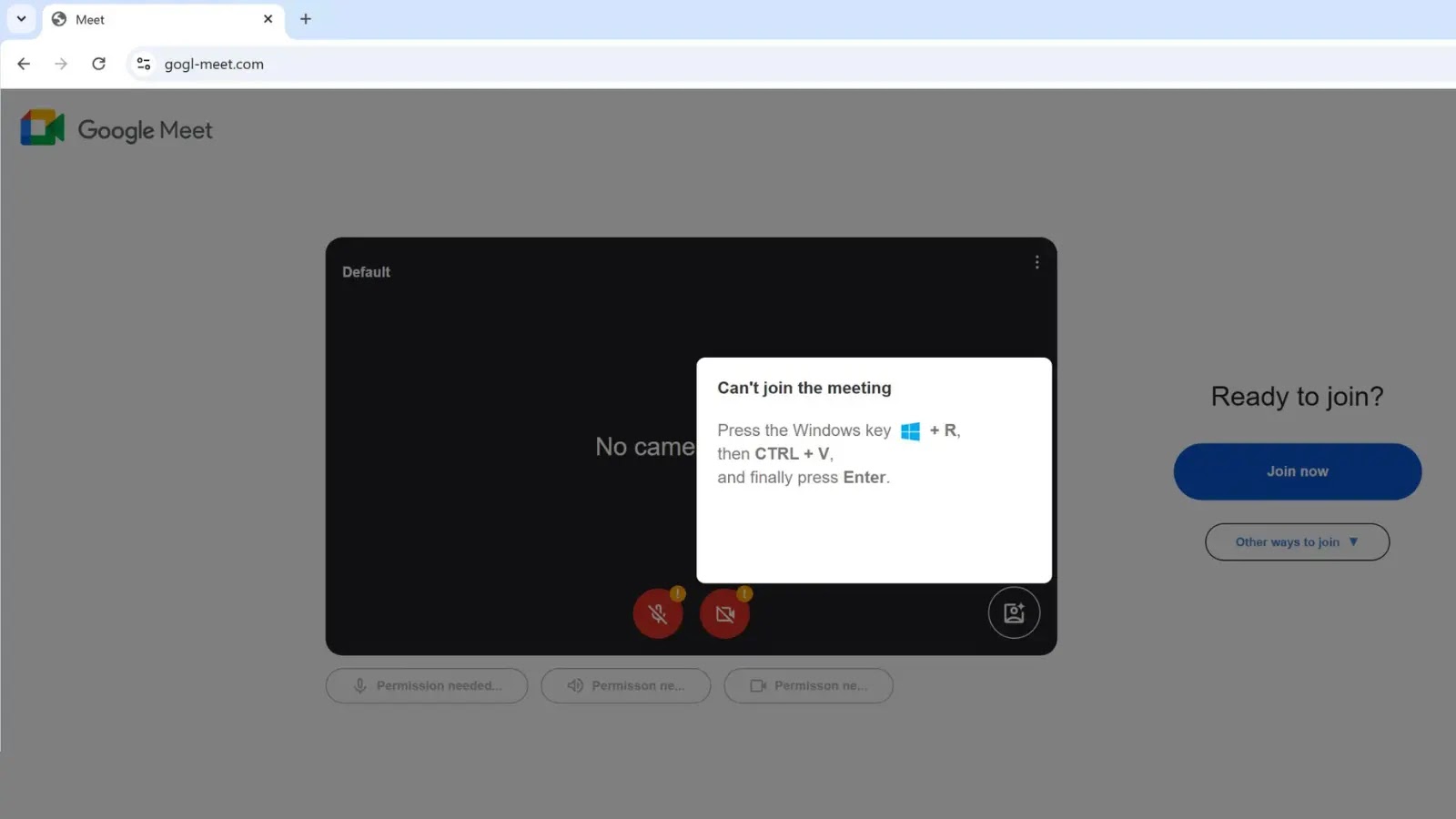
Beware of Weaponized Google Meet page that uses ClickFix to Deliver Malicious Payload
Remote work continues to be a cornerstone of modern business, and with its prevalence comes a heightened need for robust cybersecurity. Unfortunately, threat actors consistently adapt their tactics to exploit these new environments. A recent, highly sophisticated campaign underscores this reality, targeting unsuspecting remote workers and organizations through a weaponized Google Meet page. This attack leverages a deceptive domain and an insidious social engineering technique called “ClickFix” to deliver a Remote Access Trojan (RAT), bypassing traditional browser security measures. Understanding this threat is critical for safeguarding your digital perimeter.
The Weaponized Google Meet Impersonation
The core of this attack lies in its convincing impersonation of a legitimate Google Meet landing page. Threat actors have established a fraudulent domain, gogl-meet[.]com, designed to visually mirror the official Google Meet service. This level of detail in domain registration and visual presentation significantly enhances the attack’s credibility, making it difficult for users to discern its malicious intent at first glance. The objective is clear: lure users into believing they are joining or hosting a standard Google Meet session, when in reality, they are being led into a meticulously crafted trap.
The Insidious “ClickFix” Social Engineering Technique
What elevates this campaign beyond a simple phishing attempt is its sophisticated use of “ClickFix.” This social engineering technique exploits user interaction patterns and interface elements to manipulate their actions. In this context, “ClickFix” likely involves deceptive overlays or cleverly designed button prompts that, when clicked, initiate the download and execution of the malicious payload rather than performing the expected function (e.g., joining a meeting). This method is particularly effective because it capitalizes on the user’s expectation of a familiar interface and their trained muscle memory for common web interactions. By cleverly manipulating the visual cues and underlying actions, attackers can bypass typical browser warnings and security prompts, directly delivering malware to the victim’s system.
The Malicious Payload: Remote Access Trojan (RAT)
The ultimate goal of this weaponized Google Meet page and the “ClickFix” technique is the deployment of a Remote Access Trojan (RAT). A RAT is a type of malware that provides an attacker with unauthorized, full control over a compromised computer. This includes capabilities such as:
- Data Exfiltration: Stealing sensitive documents, credentials, and personal information.
- System Surveillance: Monitoring user activity, taking screenshots, and recording keystrokes.
- Remote Control: Executing commands, installing further malware, and manipulating system settings.
- Lateral Movement: Using the compromised system as a pivot point to infiltrate other devices or networks within an organization.
The installation of a RAT poses an immediate and severe threat, potentially leading to data breaches, financial losses, and significant reputational damage for affected individuals and organizations.
Remediation Actions and Prevention Strategies
Protecting against sophisticated attacks like the weaponized Google Meet campaign requires a multi-layered approach encompassing technical controls and user education. Organizations and individuals must prioritize vigilance and implement robust security practices.
- Verify URLs: Always scrutinize the URL before clicking any links, especially those in emails or messages. Look for discrepancies, misspellings, or unusual domain extensions. The legitimate Google Meet domain is
meet.google.com, not variations likegogl-meet[.]com. - Hover Before Clicking: Practice hovering your mouse over links to reveal the actual destination URL before clicking.
- Educate Users on Social Engineering: Conduct regular training sessions on identifying phishing, spear-phishing, and social engineering tactics. Emphasize the dangers of unexpected meeting invitations or software update prompts.
- Implement Email Security: Utilize advanced email filtering solutions that can detect and block malicious links and attachments before they reach inboxes.
- Endpoint Detection and Response (EDR): Deploy EDR solutions to monitor endpoints for suspicious activity and detect the presence of RATs or other malware in real-time.
- Antivirus/Anti-Malware Software: Ensure all systems have up-to-date antivirus and anti-malware software with real-time protection enabled.
- Browser Security Features: Configure web browsers to maximize security settings, including safe browsing features that warn users about known malicious sites.
- Principle of Least Privilege: Limit user privileges to only what is necessary for their role, reducing the potential impact of a compromised account.
- Regular Backups: Maintain regular, offsite backups of critical data to minimize the impact of data loss due due to malware.
Tools for Detection and Mitigation
Effectively combating threats like the weaponized Google Meet page involves leveraging appropriate security tools.
| Tool Name | Purpose | Link |
|---|---|---|
| PhishTank | Community-based phishing URL verification | https://www.phishtank.com/ |
| VirusTotal | Analyze suspicious files and URLs for malware | https://www.virustotal.com/ |
| Cisco Talos Intelligence Group | Threat intelligence and research on emerging threats | https://talosintelligence.com/ |
| Malwarebytes Endpoint Detection and Response (EDR) | Advanced endpoint protection and threat detection | https://www.malwarebytes.com/business/edr/ |
| Proofpoint Email Protection | Enterprise-grade email security and threat prevention | https://www.proofpoint.com/us/products/email-protection |
Key Takeaways
The emergence of weaponized Google Meet pages utilizing “ClickFix” to deliver RATs serves as a stark reminder of the persistent and evolving nature of cyber threats. Attackers are increasingly sophisticated, combining convincing impersonations with clever social engineering techniques to bypass traditional defenses. Vigilance, continuous user education, and a multi-layered security infrastructure are paramount. Organizations and individuals must prioritize verifying online identities, understanding the mechanics of social engineering, and deploying robust security solutions to safeguard against these insidious campaigns. Staying informed about the latest attack vectors is not merely advantageous; it is essential for maintaining digital security.