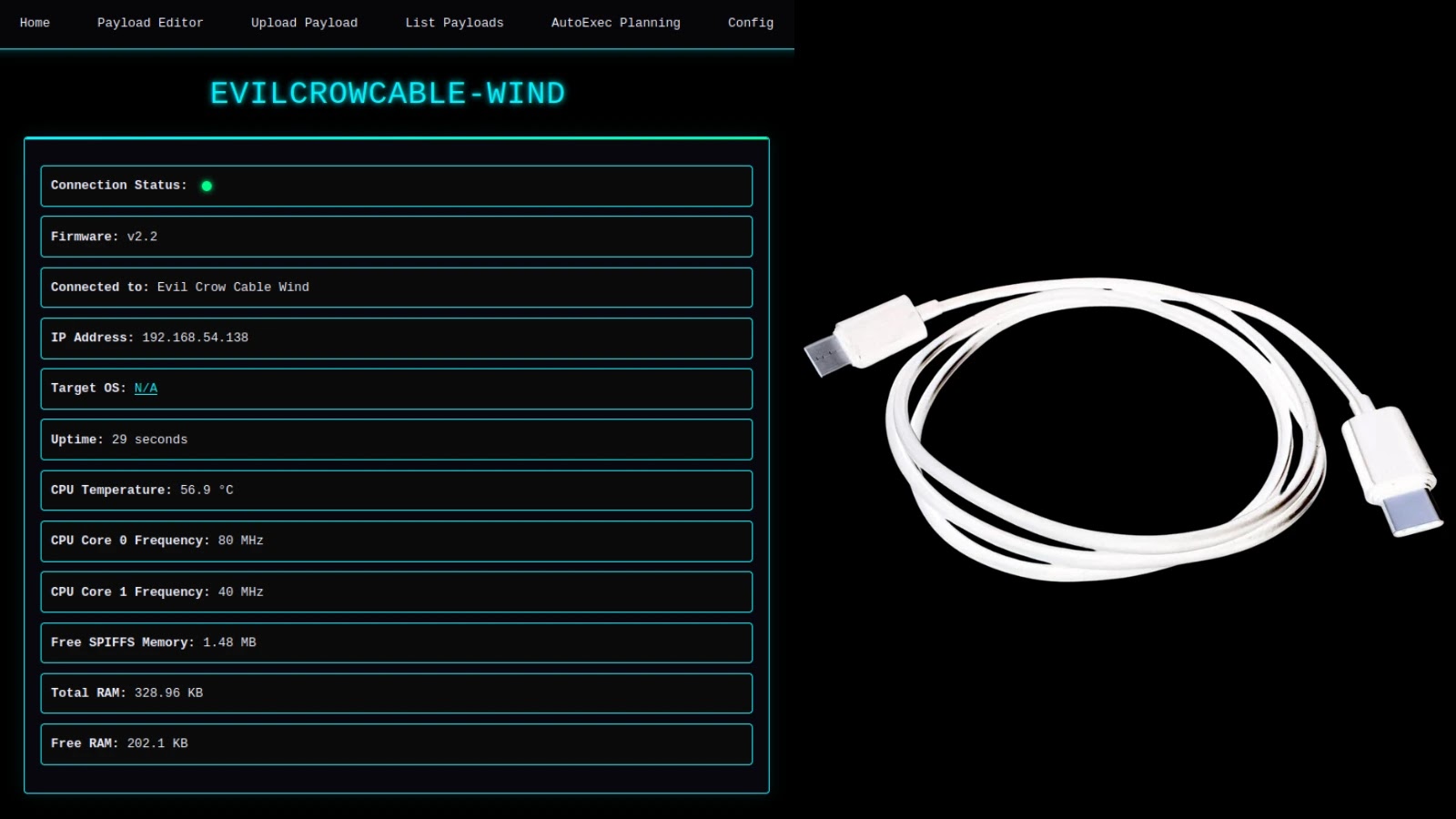
Charging Cable that Hacks your Device to Record Keystrokes and Control Wi-Fi
The Silent Assassin: When Your Charging Cable Becomes a Cyber Weapon
Imagine plugging in your device to charge, a routine action, and unknowingly inviting a sophisticated attacker right into your digital life. This isn’t a plot from a spy thriller; it’s a stark reality made possible by tools like the Evil Crow Cable Wind. In an era where trust in everyday devices is paramount, the emergence of seemingly innocuous hardware designed to compromise security demands our immediate attention. This analysis delves into the capabilities of advanced charging cable implants, their implications for individuals and organizations, and crucial measures to protect against such stealthy cyber threats.
The Evil Crow Cable Wind: A Red Team’s Covert Companion
The Evil Crow Cable Wind, a creation by security researcher Joel Serna Moreno, epitomizes the growing threat of hardware-based attack vectors. Disguised as a standard USB charging cable, this device houses a powerful hacking implant, making it virtually indistinguishable from a legitimate cable to the untrained eye. Its primary function leverages its Human Interface Device (HID) capabilities, enabling it to execute automated keystroke injection attacks at remarkable speeds.
For red teams, this type of tool is invaluable. Its stealth allows for covert penetration testing, simulating real-world attacks where an adversary might physically introduce a rogue device into a target’s environment. The ability to record keystrokes means capturing sensitive information like passwords, financial details, and confidential communications. Furthermore, the capacity to control Wi-Fi settings opens doors to network manipulation, data exfiltration, or establishing persistent backdoors within a compromised system.
How a Malicious Charging Cable Operates
The core of the Evil Crow Cable Wind’s attack methodology lies in its HID emulation. When connected to a target device (such as a laptop, tablet, or smartphone), the cable presents itself as a legitimate input device – a keyboard, for instance. This allows it to inject commands as if a user were typing them directly. Key attack vectors and functionalities include:
- Automated Keystroke Injection: The cable can be pre-programmed with a series of commands or scripts. Upon connection, it rapidly “types” these commands, which could include launching applications, modifying system settings, downloading malware, or even initiating data transfers. The speed of execution often makes these attacks imperceptible to a user.
- Keystroke Logging (Keylogging): By acting as a man-in-the-middle, the cable can capture and store every keystroke made on the connected device. This harvested data can then be exfiltrated later, either wirelessly or when the attacker physically retrieves the cable.
- Wi-Fi Control and Manipulation: The ability to control Wi-Fi settings extends the attacker’s reach beyond the direct connection. This could mean forcing the device to connect to a malicious access point, disabling Wi-Fi to isolate the device, or configuring persistent network settings for future remote access.
- Remote Control Capabilities: Advanced versions of such cables can offer remote administration capabilities, allowing attackers to issue commands and receive feedback from the compromised device from a distance.
The Peril of Physical Access
Tools like the Evil Crow Cable Wind underscore a critical security principle: physical access can often negate many layers of logical security. Once an attacker has physical control over a device or can introduce a rogue peripheral, the attack surface expands dramatically. While traditional cybersecurity focuses on network and software vulnerabilities, hardware implants present a different kind of challenge, often bypassing firewalls, antivirus software, and even multi-factor authentication if keystrokes are intercepted before verification.
This method of attack is particularly potent in scenarios where devices are left unattended, shared in public spaces, or when supply chain integrity is compromised, leading to the introduction of malicious hardware during manufacturing or distribution.
Remediation Actions and Protective Measures
Protecting against sophisticated hardware implants like the Evil Crow Cable Wind requires a multi-layered approach, blending vigilance with robust security practices.
- Scrutinize Charging Cables: Treat all charging cables with suspicion, especially those obtained from unfamiliar sources or found in public areas. If possible, use only cables provided by trusted manufacturers or those you’ve purchased directly from reputable vendors.
- Implement “Never Leave Unattended” Policies: Devices left unattended in public or semi-public spaces are prime targets for physical tampering. Encourage and enforce policies that mandate users keep their devices secure and supervised.
- USB Port Security: For organizations, consider implementing USB port control software or policies that restrict the use of unauthorized USB devices. Some operating systems and security solutions offer features to disable auto-run for USB devices or limit what types of devices can be connected.
- Regular Security Audits and Awareness Training: Educate users about the risks associated with malicious hardware. Regular security awareness training should cover the dangers of unknown charging cables and other peripherals. Conduct physical security audits to ensure control over device access.
- Device Whitelisting: In highly secure environments, consider whitelisting approved hardware devices. This ensures that only recognized and verified peripherals can interact with sensitive systems.
- Incident Response Planning: Develop and exercise incident response plans for scenarios involving suspected hardware compromise. This includes isolating affected devices, forensic analysis, and data recovery procedures.
Relevant Tools for Detection and Mitigation
While direct detection of a malicious cable’s hardware implant can be challenging without specialized tools, several approaches and software can help mitigate the risks associated with unauthorized HID devices or malicious activity:
| Tool Name | Purpose | Link |
|---|---|---|
| USB Device Management Software | Controls and restricts the types of USB devices that can connect to endpoints. | (Varies by vendor, e.g., DeviceLock, Ivanti) |
| Endpoint Detection and Response (EDR) Solutions | Monitors endpoint activity, detects unusual HID behavior, and can flag suspicious keystroke injection or network configuration changes. | (Varies by vendor, e.g., CrowdStrike, SentinelOne) |
| Physical Security Controls | Measures like camera surveillance and access restrictions deter physical tampering. | (N/A – best practices) |
| Operating System Security Features | Features like UAC (User Account Control) on Windows, or “Require Password” settings for USB drives can provide a layer of protection. | (Built into OS) |
Protecting Your Digital Foundation from Stealthy Threats
The existence of tools like the Evil Crow Cable Wind serves as a potent reminder that cyber threats are constantly evolving and becoming more sophisticated. Attackers are no longer confined to the digital realm but are increasingly leveraging physical vectors disguised as everyday objects to bypass security measures. By understanding the mechanisms behind these attacks and implementing proactive security measures, both individuals and organizations can strengthen their defenses against these stealthy yet powerful threats, ensuring the integrity and confidentiality of their digital assets.