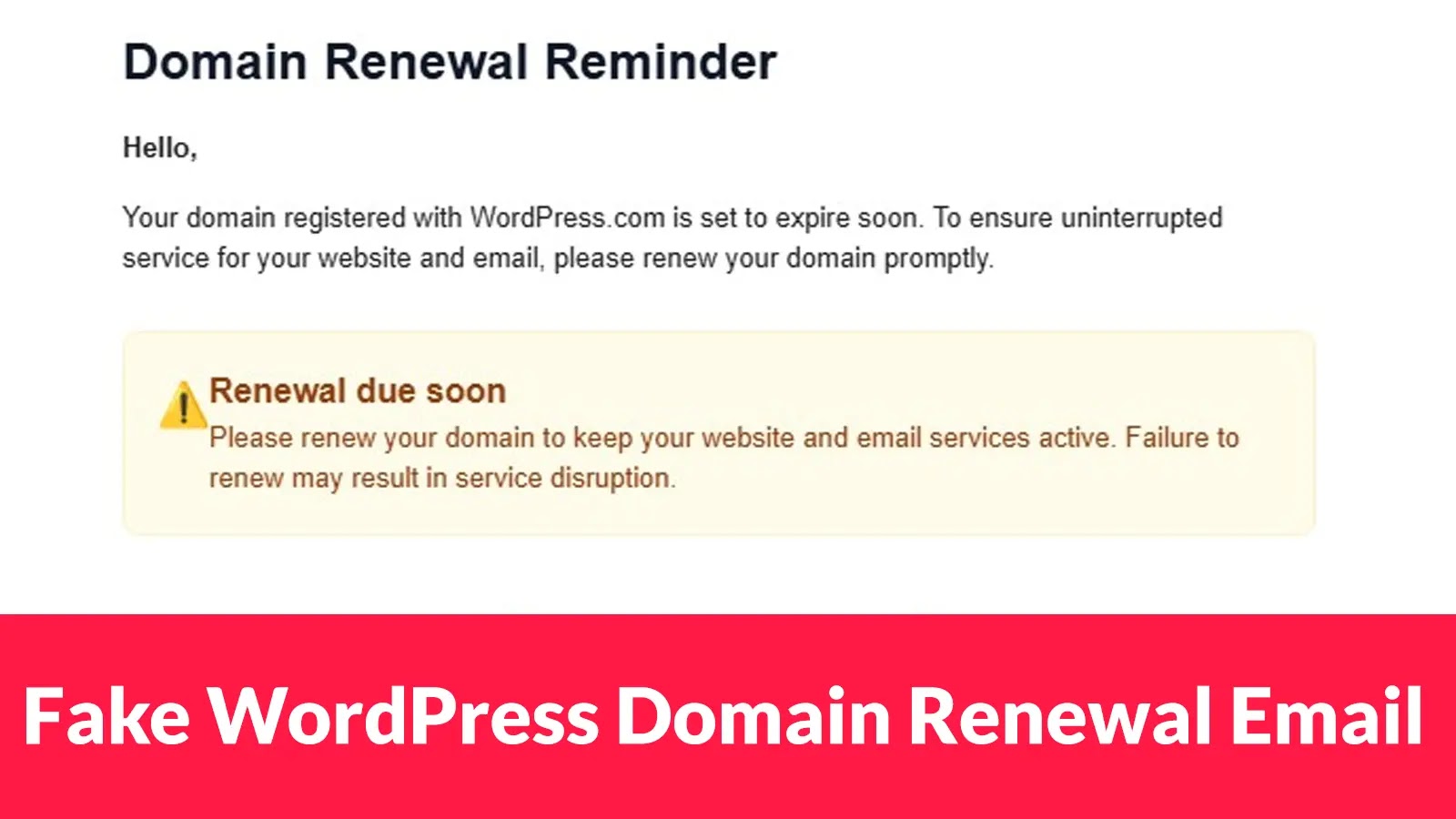
Fake WordPress Domain Renewal Email Targeting Admins to Steal Credit Card Data
For WordPress administrators, a secure domain is the bedrock of their online presence. So, when a renewal notice arrives, it typically prompts immediate action. Unfortunately, a sophisticated phishing campaign is exploiting this trust, aiming to compromise account security and financial data. This campaign targets WordPress administrators with highly convincing fake domain renewal emails, designed to steal credit card information and two-factor authentication (2FA) codes.
This article dissects the mechanics of this deceptive phishing attack, offering actionable steps to protect your WordPress domains and sensitive financial data.
The Anatomy of Deception: How the Phishing Campaign Operates
The malicious campaign leverages a well-crafted email impersonating a legitimate WordPress.com renewal reminder. These emails are designed to appear authentic, often mimicking the visual style and language of official communications. The primary goal is to trick recipients into believing their domain renewal is due, creating a sense of urgency.
Upon clicking the embedded link, unsuspecting administrators are redirected to a fraudulent payment portal. This portal is a clever imitation of a legitimate payment gateway, designed to harvest sensitive information. The immediate consequence of entering data into this fake portal is alarming: credit card details and any provided 2FA codes are instantly transmitted to the attackers, reportedly via Telegram messaging.
The swift exfiltration of data highlights the attackers’ focus on real-time collection, making immediate detection and response crucial for targeted individuals. For further reading on this specific campaign, refer to the original report by Cyber Security News.
Indicators of Compromise (IoCs) and Red Flags
Identifying these phishing attempts requires vigilance. Here are key indicators to look for:
- Sender Email Address: Scrutinize the sender’s email address. While it may appear similar to a legitimate WordPress address, subtle misspellings, unusual domains (e.g.,
wordpress-renewal.infoinstead ofwordpress.com), or generic addresses are strong indicators of a scam. - Urgent or Threatening Language: Phishing emails often employ tactics to create a sense of urgency, threatening service interruption or data loss if immediate action isn’t taken.
- Generic Greetings: Legitimate communications from WordPress.com will typically address you by your account name or associated email, not with generic greetings like “Dear User.”
- Suspicious Links: Hover over any links in the email (do not click them!) to reveal the actual URL. If the URL does not point to a legitimate WordPress.com domain or a recognized payment processor, it’s likely a phishing attempt.
- Poor Grammar or Spelling: While increasingly rare in sophisticated attacks, errors in grammar, spelling, or awkward phrasing can still be a giveaway.
- Unexpected Renewal Notices: If you’re not expecting a domain renewal or have previously set up automatic renewals, an unsolicited notice should raise a red flag.
Remediation Actions and Best Practices
Protecting yourself and your WordPress installations from these types of attacks requires a multi-layered approach. Here are critical remediation actions and best practices:
- Verify Directly: Never click links in suspicious emails. Instead, if you receive a domain renewal notice, navigate directly to your WordPress.com dashboard or your domain registrar’s website by typing the URL into your browser. Check your domain status and renewal dates there.
- Enable and Mandate 2FA: Two-factor authentication (2FA) is a critical security layer. Even if your password is compromised, 2FA prevents unauthorized access. Ensure 2FA is enabled on your WordPress.com account, domain registrar, and any associated email accounts.
- Educate Yourself and Your Team: Regular security awareness training for all administrators and personnel with access to sensitive systems is paramount. Understanding common phishing tactics is the first line of defense.
- Strong, Unique Passwords: Utilize strong, unique passwords for all online accounts, especially those tied to domain management and financial services. Password managers can help generate and store these securely.
- Review Financial Statements: Regularly monitor your credit card and bank statements for any unauthorized transactions. Report suspicious activity immediately to your financial institution.
- Report Phishing Attempts: Forward suspicious emails to your email provider’s abuse department and to the Anti-Phishing Working Group (APWG) at
reportphishing@apwg.org. - Secure Your Email Account: Since phishing often starts with email compromise, ensure your primary email account is well-secured with a strong password and 2FA.
Tools for Enhanced Security
While this particular threat focuses on social engineering, robust security tools can significantly enhance your overall protection.
| Tool Name | Purpose | Link |
|---|---|---|
| PhishTank | Phishing URL verification | https://www.phishtank.com/ |
| Google Safe Browsing | Identifies unsafe websites | https://safebrowsing.google.com/ |
| URLVoid | Website reputation and analysis | https://www.urlvoid.com/ |
| A reputable Password Manager (e.g., LastPass, 1Password) | Secure password generation and storage | https://www.lastpass.com/ (example) |
| Web Application Firewall (WAF) (e.g., Cloudflare, Wordfence) | Protects WordPress sites from various attacks | https://www.cloudflare.com/ (example) |
Conclusion
The targeting of WordPress administrators with fake domain renewal emails is a stark reminder of the persistent and evolving threat landscape. The cunning nature of these attacks, aiming to steal vital financial data and 2FA codes, underscores the need for constant vigilance and proactive security measures. By understanding the tactics employed, recognizing the red flags, and implementing robust security practices, administrators can effectively defend their domains and sensitive information against these increasingly sophisticated phishing campaigns.