How to Secure Your Email System
Email Security Best Practices: How to Secure Your Email System Account
In today’s digital age, maintaining robust email security is crucial for safeguarding sensitive information and protecting against cyber threats. As email communication remains a primary method of interaction for personal and professional exchanges, understanding and implementing email security best practices is essential. This article provides a comprehensive guide on how to secure your email account, covering various email security solutions and strategies to enhance your security posture.
Email Security Overview
Importance of Email Security
Email security is paramount because email accounts often contain a wealth of sensitive data, making them prime targets for hackers in the realm of advanced email threats.. Protecting your email is not merely about preventing spam; it’s about defending against sophisticated email threats like phishing emails, malware, and business email compromise. Data breaches originating from compromised email accounts can lead to significant financial losses, reputational damage, and legal repercussions. Therefore, implementing robust security measures to secure your email is a critical component of any comprehensive security strategy, ensuring the confidentiality, integrity, and availability of your email system.
Common Email Threats
Numerous email threats can compromise the security of your email. Phishing emails, for instance, are designed to trick you into revealing sensitive information like passwords or financial details. Malicious email attachments can introduce malware into your system, leading to data breaches and system compromise, especially in traditional email setups. Business email compromise (BEC) involves hackers impersonating trusted individuals to manipulate victims into transferring funds or divulging confidential information. Recognizing these email threats is the first step in mitigating security risks and fortifying your defenses against email attacks. Awareness of these potential vulnerabilities is key to maintaining a strong email security posture.
Email Security Solutions
Here are some fundamental strategies to keep your email communications secure. A multi-layered approach is recommended and should include elements such as:
- Using a strong, unique password for each of your online accounts.
- Enabling multi-factor authentication for an extra layer of security.
Furthermore, email encryption is a crucial measure, encoding email content to protect sensitive data during transmission. Regularly updating your email client and utilizing email security features from your provider can also enhance security and protect your data.
Best Practices for Email Security

Creating a Strong Password
One of the foundational email security best practices is creating a strong password for your email account. A strong password should be complex and difficult to guess, incorporating a combination of uppercase and lowercase letters, numbers, and symbols. Avoid using personal information such as your name, birthdate, or common words, as these are easily exploited by hackers. A robust password is the first line of defense in protecting your data and maintaining the security of your email. Regularly assessing and improving your password strength is essential for a strong security posture. Make sure your password follows best practices for email to secure your email.
Using Unique Passwords for Different Accounts
Another crucial aspect of email security is using a unique password for each of your online accounts, especially your email account. Reusing the same password across multiple platforms increases the risk of a data breach. If one of your accounts is compromised, hackers can use the stolen password to access your other accounts, including your email. To protect your email and sensitive data, it’s imperative to create distinct, strong passwords for every email address and online service you use. Utilizing a password manager can assist in generating and securely storing unique passwords, enhancing your overall security and privacy via email.
Regularly Updating Passwords
Regularly updating passwords is a vital email practice for maintaining security. is a vital component of maintaining robust email security. Changing your passwords periodically can mitigate the risk of unauthorized access, especially if your email security has been previously compromised. Email authentication is greatly improved by password updates. It is recommended to update your password every three to six months, or immediately if you suspect any suspicious activity on your email account. Use this opportunity to create a new, strong password that adheres to best practices for email. Consistent password updates help protect your email and keep your email system secure from potential email threats and email attacks.
Protecting Your Email Account
Enabling Two-Factor Authentication
Enabling two-factor authentication is a critical email security measure that adds an extra layer of security to your email account. This security practice requires you to provide two forms of identification before gaining access to your email, typically something you know (your password) and something you have (a code sent to your phone). This security posture greatly reduces the risk of unauthorized access, even if a hacker manages to obtain your password. Implementing two-factor authentication is a proactive step to secure your email and protect your sensitive information, making your email account significantly more resistant to email attacks.
Security Notifications and Alerts
Configuring security notifications and alerts is a crucial email security best practice for monitoring the security of your email. Most email service providers offer options to receive notifications when there’s a login from a new device or location, or when there is unusual activity on your email account. These alerts provide an early warning system, allowing you to take immediate action if you suspect your email has been compromised. Timely security alerts can help protect your data, prevent data breaches, and ensure you maintain control over your email messages and sensitive data. Staying informed is vital to keeping your email secure.
Recognizing Phishing Attempts
Recognizing phishing emails is a vital skill for protecting your email and maintaining robust email security. Phishing attempts often involve malicious email messages designed to trick you into divulging sensitive information, such as your password or financial details. These email threats frequently impersonate legitimate organizations or individuals to appear trustworthy. Always scrutinize email content for suspicious links, poor grammar, and urgent requests when you receive an email. When in doubt, contact the purported sender through a separate, verified channel to confirm the email’s authenticity. Practicing vigilance and caution is essential to secure your email and protect sensitive information from phishing attacks via email. By enhancing your awareness and implementing these email security best practices, you can make your email more secure and help protect your email. Email encryption and authentication are also practices to secure your email and create email security.
Email Communication Security

Safe Practices for Email Attachments
Practicing safe handling of email attachments is a cornerstone of email security. Never open attachments from unknown or untrustworthy sources, as they may contain malicious email software designed to compromise your email security. Always scan email attachments with a reputable antivirus program before opening them. Be particularly wary of executable files or documents requesting you to enable macros. Educating yourself and your colleagues about these risks helps protect your email and sensitive data, maintaining a strong security posture within your email system. These email security best practices can help keep your email secure.
Encrypting Sensitive Emails
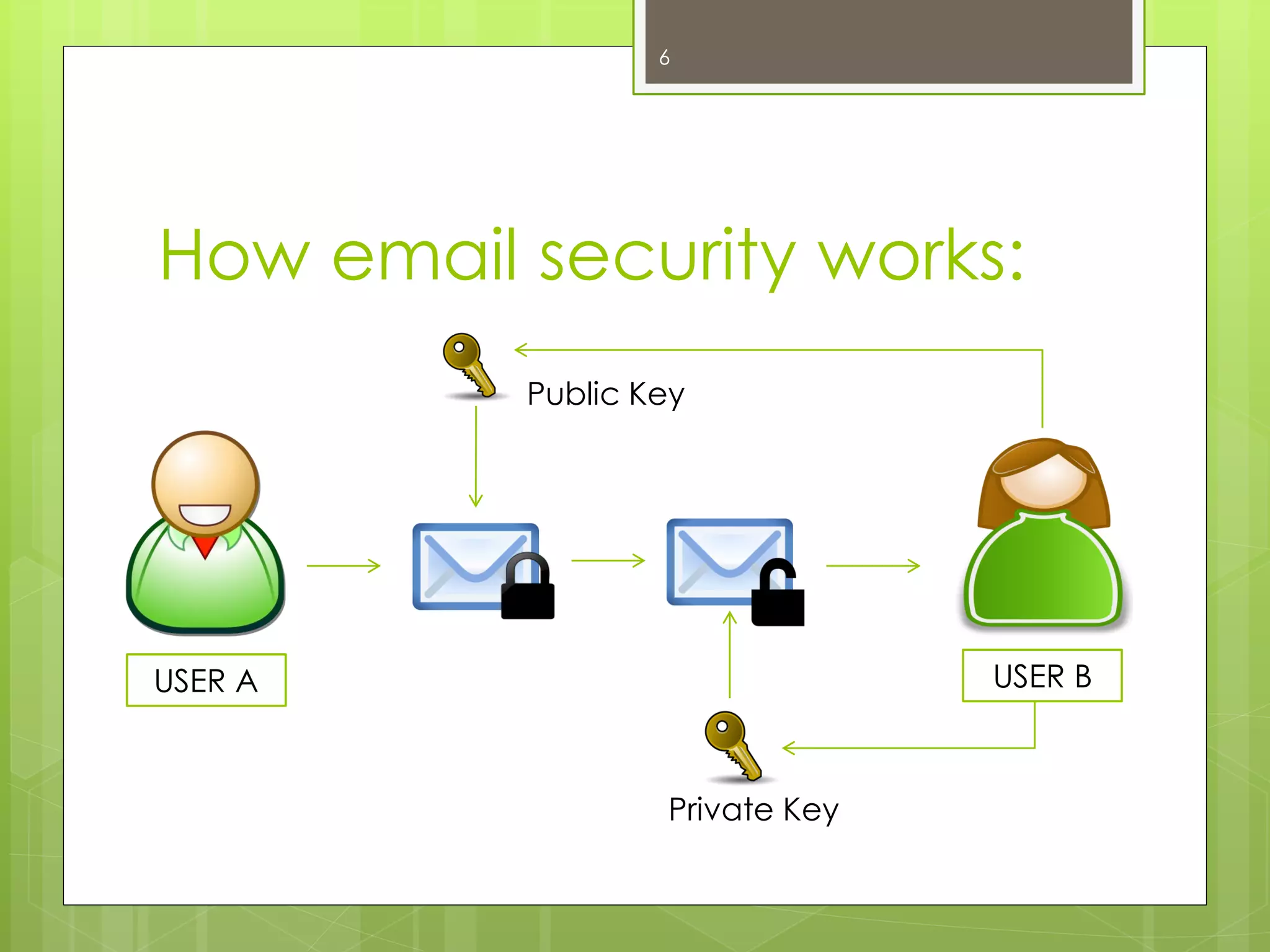
Email encryption is a critical measure for protecting sensitive data transmitted via email messages. When you encrypt email, you convert email content into an unreadable format, ensuring that only the intended recipient can decipher it, which is a key component of advanced email security. Employing email encryption adds a layer of security to your email communication, preventing unauthorized access to sensitive information even if intercepted. Many email service providers offer built-in email encryption features or support third-party email security solutions. By taking the step to encrypt email, you greatly enhance the security of your email and protect your data from potential email threats and email attacks in any type of email.
Understanding Email Server Security
Understanding the security of your email server is paramount in maintaining overall email security. Email servers should implement robust security measures, including firewalls, intrusion detection systems, and regular security audits. Your email service provider plays a crucial role in securing your email. Ensure your email provider employs encryption protocols to protect your data during transmission and storage. Furthermore, understanding the physical and logical security measures protecting the traditional email server infrastructure is essential for a comprehensive email security strategy. Keeping your email secure involves verifying the security practices of your email service and ensuring they align with best practices for email.
Maintaining Your Email Security Posture

Regular Security Audits
Performing regular email security audits is an essential email security practice for identifying vulnerabilities and ensuring compliance with security standards. These audits should assess various aspects of your email system, including password policies, access controls, and email encryption configurations. Regular email audits help detect weaknesses that could be exploited by hackers, allowing you to take proactive steps to mitigate risks and enhance the security of your email. By integrating regular security audits into your email security strategy, you can protect your data, protect your email, and maintain a strong security posture over time.
Keeping Email Software Updated
Keeping your email client and related software updated is a crucial email security best practice. Software updates often include patches for newly discovered security vulnerabilities. Neglecting to update your software can leave your email system exposed to email threats and email attacks. Enable automatic updates whenever possible to ensure you’re always running the latest, most secure versions of your email software. Regularly updating your email system and email client is essential for maintaining a secure email environment and protecting sensitive information. These measures enhance the security of your email and prevent data breaches.
Educating Yourself on Email Security Threats
Educating yourself and your team on current email security threats is a fundamental email security best practice. Regularly update your knowledge about phishing emails, malicious email attachments, business email compromise, and other email attacks. Conduct training sessions to help employees recognize and respond appropriately to potential email threats. A well-informed workforce is better equipped to identify and avoid email threats, strengthening your overall email security posture. Investing in continuous education is a proactive approach to keeping your email secure and protecting your data via email. Implementing email security solutions and promoting email security practices is essential to secure your email.

How do I secure email using email security best practices?
Apply email security best practices by enabling multi-factor authentication, using strong unique passwords, regularly updating security settings, and training users to recognize phishing. Implement email authentication protocols such as SPF, DKIM, and DMARC to ensure legitimate email, and enforce a security policy that covers acceptable use, incident reporting, and data security. Regular review your email logs and security of your email account to detect potential security risks and keep your email system robust.
What email protection measures prevent an email attack?
Protect email with layered defenses: inbound filtering for malware and spam, attachment sandboxing, URL rewriting to check links, and advanced threat protection to detect sophisticated email attack methods. Use transport layer security (TLS) for in-transit protection and enforce encryption at rest when storing email data. These measures reduce the chance that a hacker can exploit email vulnerabilities to access your account or infiltrate your organization.
How can I protect email addresses and avoid exposing them to hackers?
Minimize public exposure of email addresses by obfuscating them on websites, using contact forms instead of publishing addresses, and employing role-based or disposable addresses for marketing lists. Apply email marketing best practices to manage subscriptions and avoid sharing lists. Monitor for leaked email addresses and require users to change passwords and enable MFA if exposure is detected to keep accounts secure.
What security protocols should my email service support?
Ensure your email service supports essential security protocols: SPF, DKIM, DMARC for authentication; TLS for transport layer security; and modern encryption standards for email encryption ensures confidentiality. For cloud-based email, verify that the provider offers logging, audit trails, and options for additional security like SIEM integration and endpoint protection to protect your business and data security.
How do I secure your email for remote or mobile users?
Secure your email for remote access by enforcing device-level security (encryption, PIN/biometrics), using mobile device management, and requiring VPN or zero-trust access methods. Configure conditional access policies so only compliant devices can access the email service. Train staff on potential security risks when they access the email from public Wi‑Fi or personal devices to protect email and your organization’s resources.
What should our security policy include to keep email safe?
A strong email security policy should define acceptable email uses, procedures for verifying unknown senders, rules for handling sensitive email data, retention and archiving standards, and incident response steps for suspected breaches. Include best practices to protect account secure measures like MFA, required email settings, and periodic review your email and security settings to maintain robust email security across the organization.
How does email authentication protocols help stop spoofing and phishing?
Email authentication protocols (SPF, DKIM, DMARC) help recipients verify the email sender and reduce fraudulent messages that appear to come from legitimate email addresses. Correctly implemented, these protocols improve deliverability for legitimate email, block many phishing attempts, and give organizations reporting tools to identify and respond to abusive senders attempting to access your email or impersonate your domain.
What are the most important steps to protect your organization’s email data?
Protect your organization’s email data by classifying sensitive information, enforcing encryption for sensitive messages, limiting access via role-based controls, and regularly backing up email data. Combine email protection with endpoint security and phishing-resistant authentication to reduce potential security incidents. Conduct regular security awareness training so employees know how to handle suspicious messages and avoid clicking on links or opening attachments from anonymous email or unknown senders.
How do I respond if I receive a suspicious message via email?
If you receive a suspicious message via email, do not click links or download attachments. Verify the sender by checking authentication details and contacting them via an alternate channel if needed. Report the message according to your security policy, quarantine it through your email service, and scan affected systems for compromise using advanced email security means. Updating passwords and reviewing who can access the email and account secure settings are additional email practices to mitigate further risk.