Understanding MAC Address Tables in L2 Switches.
Cisco Switch: Understanding Layer 2 MAC Address Table & How Switches Learn MAC Addresses
In the realm of networking, understanding how a Cisco switch operates at Layer 2 is crucial for maintaining efficient and reliable communication within a local area network. This article delves into the intricacies of the MAC address table, also known as the CAM table, within a Cisco switch. We’ll explore how network switches learn MAC addresses, and how this learning process facilitates forwarding frames across the network. Furthermore, we will shed light on the types of MAC addresses and their significance in network operations.
Understanding MAC Addresses
What are MAC Addresses?
MAC addresses, or Media Access Control addresses, are unique identifiers assigned to network interfaces for communication within a network segment. Functioning at the data link layer of the OSI model, MAC addresses enable devices to be uniquely identified on a local area network. These physical addresses are essential for switches to forward Ethernet frames to the correct destination. Understanding MAC addresses is fundamental for anyone involved in configuring or troubleshooting network issues, as they are the cornerstone of Layer 2 communication.
Importance of MAC Addresses in Networking
The use of MAC addresses is paramount in networking for several reasons. Primarily, they facilitate efficient frame forwarding by network switches. When a switch receives a frame, it examines the destination MAC address and consults its MAC address table to determine which port should be used to forward the frame. This process, known as MAC learning, ensures that data reaches its intended recipient within the local network. Without MAC addresses, network communication would be chaotic and inefficient, hindering the performance of modern networks.
Types of MAC Addresses
Here are the primary types of MAC addresses, each designed for different communication patterns:
- Unicast: Used for one-to-one communication between two specific network interfaces. When a switch receives a frame with a unicast destination MAC address, it forwards the frame only to the specific port associated with that MAC address in its MAC address table.
- Multicast: Used for one-to-many communication, where a frame is sent to a specific group of devices.
- Broadcast: Used for one-to-all communication within the local area network.
The MAC Address Table
What is the MAC Address Table?
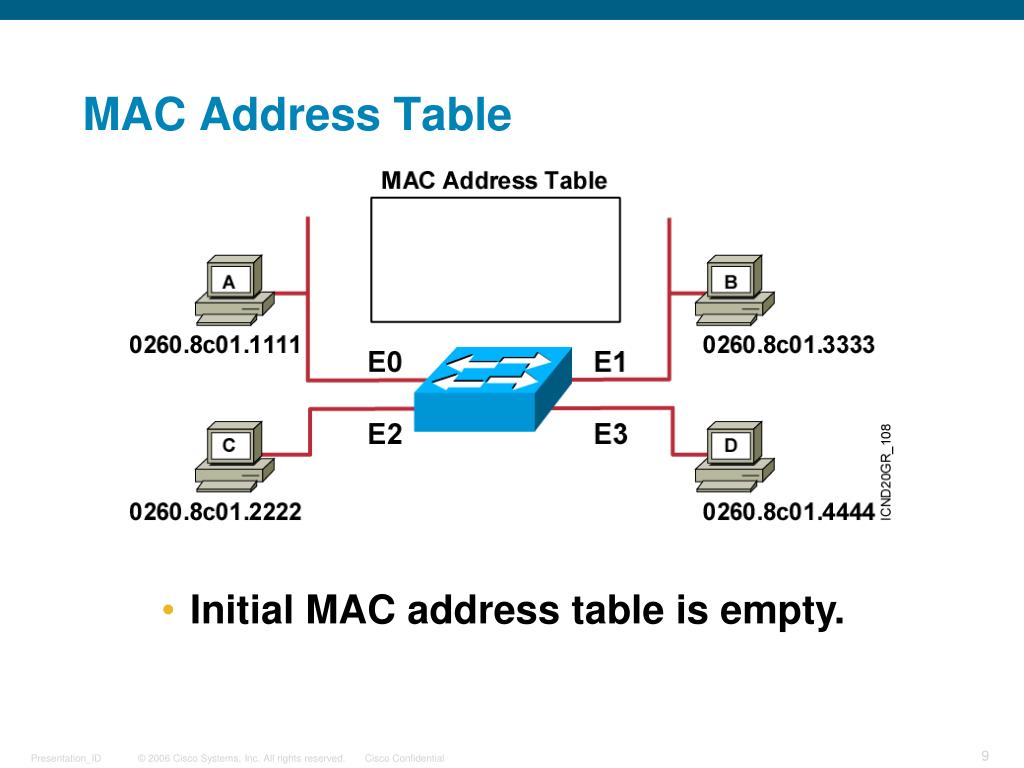
The MAC address table, sometimes referred to as the CAM table, is a crucial component within a Cisco switch that maintains a record of all the MAC addresses known to the switch. This table functions as a directory, associating MAC addresses with specific switch ports. When a switch receives a frame, it consults this MAC address table to determine the correct port to forward the frame to, based on the destination MAC address. Understanding the MAC address table is essential for network troubleshooting and optimizing network efficiency within a local area network.
How the MAC Address Table Functions
The switch’s MAC address table operates dynamically, learning MAC addresses as devices communicate across the network. When a switch receives an Ethernet frame, it examines the source MAC address and the interface on which the frame was received. The switch then records this information in its MAC table, associating the source MAC address with that particular port. This MAC learning process enables the switch to forward subsequent frames destined for that MAC address directly to the appropriate port, improving network efficiency and reducing unnecessary traffic on the local area network.
Table Entries and Aging Time
Each entry in the MAC address table includes the MAC address, the associated VLAN, and the interface through which the MAC address was learned. These table entries are not permanent; they are subject to an aging time, typically set to a few minutes. If a MAC address is not seen within this aging time, the switch removes the entry from its MAC address table. This ensures that the MAC table remains current and accurate, preventing the switch from forwarding frames to incorrect ports. It also aids in managing changes in the network, such as when devices move or are disconnected from the local area network.
How Switches Learn MAC Addresses
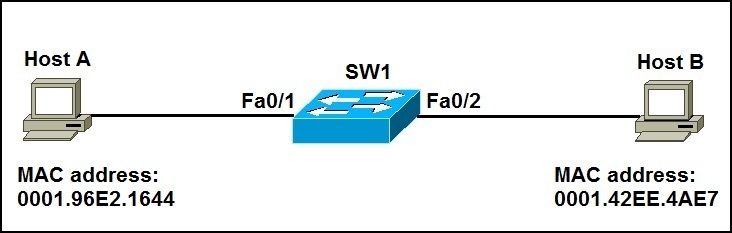
MAC Address Learning Process
The MAC address learning process is a fundamental operation that network switches use to efficiently forward Ethernet frames within a local area network. When a switch receives an Ethernet frame, it examines the source MAC address and the interface on which the frame arrived. This source MAC address is then recorded in the switch’s MAC address table, associating it with the specific switch port. This process allows the switch to dynamically build its MAC table, enabling efficient forwarding of future frames. Understanding how switches learn MAC addresses is crucial for troubleshooting network issues and optimizing network efficiency at Layer 2.
Switches Work: From Learning to Forwarding
Once a switch learns MAC addresses and populates its MAC address table, it can intelligently forward Ethernet frames. When the switch receives a frame, it inspects the destination MAC address. If the destination MAC address is present in the MAC address table, the switch forwards the frame only to the associated port, a process known as unicast forwarding. If the destination MAC address is not found, the switch floods the frame to all ports within the VLAN, except for the port on which the frame was received. This process ensures that the frame reaches its intended destination, with network switches using the MAC table to optimize the forwarding path.
Static vs Dynamic MAC Addresses
Here’s a breakdown of how MAC addresses behave within a MAC address table:
- Dynamic MAC addresses are learned automatically and are subject to aging.
- Static MAC addresses are manually configured and remain indefinitely, even without traffic.
Configuring static MAC addresses can be useful for devices that need guaranteed connectivity and is helpful for network troubleshooting and security.
Configuring the MAC Address Table on Cisco Switches

How to Configure MAC Address Tables
Configuring the MAC address table on Cisco switches is a fundamental task for network administrators to maintain network efficiency and security. Cisco provides a variety of commands via the Cisco CLI to manage the MAC address table, allowing administrators to add static MAC addresses, clear dynamic entries, and set aging times. By configuring the MAC table, network administrators can ensure that the switch forwards Ethernet frames correctly, optimizing network performance within the local area network. Also, configuring the MAC address table is essential for troubleshooting network issues.
Managing VLANs and MAC Addresses
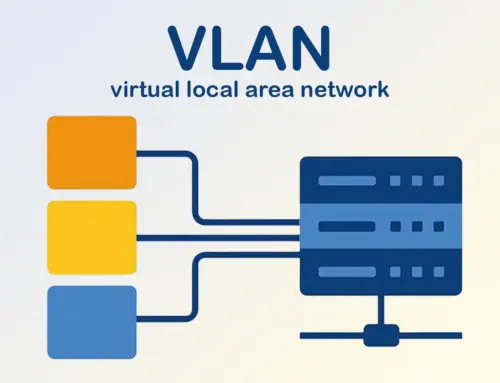
Managing VLANs and MAC addresses together is crucial for maintaining a well-organized and secure local area network. VLANs segment the network into logical broadcast domains, and the MAC address table ensures that traffic within each VLAN is forwarded efficiently. Network administrators can configure VLAN MAC address mappings to control which devices can communicate within a specific VLAN. This level of control enhances network security and helps to prevent unauthorized access. Correctly configuring VLANs and MAC addresses ensures optimal network efficiency and streamlined network troubleshooting.
Network Efficiency through Proper Configuration
Proper configuration of the MAC address table significantly contributes to network efficiency. When the MAC address table is accurately populated, the switch can quickly forward Ethernet frames to the correct destination port, minimizing unnecessary traffic on the local area network. Configuring static MAC addresses for critical devices ensures that their connectivity is consistent and reliable. Regularly reviewing and maintaining the MAC address table, including adjusting aging times and removing stale entries, optimizes switch performance and improves overall network efficiency and security. By using MAC addresses effectively, you also avoid bottlenecks.
Conclusion
Recap of Key Points
In summary, the MAC address table is a critical component of a Cisco switch’s Layer 2 forwarding mechanism. Understanding how network switches learn MAC addresses, the different types of MAC addresses (unicast, multicast, and broadcast), and how to manage the MAC address table is essential for any network administrator. The MAC learning process allows switches to dynamically build their MAC table, while static MAC addresses provide a way to manually configure permanent entries. Proper management of the MAC address table ensures network efficiency and security. By using MAC addresses in the right way, you can protect your local area network.
The Future of MAC Address Learning in Networking
The future of MAC address learning in networking is likely to evolve with advancements in network virtualization and software-defined networking (SDN). As networks become more dynamic and complex, the need for efficient and scalable MAC address management will increase. SDN controllers may play a more significant role in managing MAC address tables, providing centralized control and automation. Additionally, new protocols and technologies may emerge to enhance MAC address learning and forwarding, further improving network efficiency and security across both local area networks and wider network infrastructures.
Further Resources for CCNA and Networking Professionals
For CCNA candidates and networking professionals seeking to deepen their understanding of MAC addresses and Layer 2 switching, Cisco provides access to different resources. These resources include:
- Extensive documentation and training courses.
- Online resources such as the Cisco Learning Network, which offers valuable materials, including tutorials, practice exams, and community forums.
Additionally, books such as the “CCNA Routing and Switching Study Guide” and “Cisco Certified Network Associate Study Guide” provide in-depth coverage of these topics. Hands-on experience with Cisco switches and the Cisco CLI is invaluable for mastering MAC address table management and troubleshooting network issues. Consult the available resources to configure your devices correctly.

How does a layer 2 switch build its mac table on a LAN interface?
A layer 2 switch builds its mac table (switch mac address table) dynamically by inspecting the source and destination mac in each frame it receives on an interface. When a network device sends a frame, the switch reads the address of the sending device (source MAC) and records the association of that MAC address with the physical port (interface) and VLAN ID. The mac address-table entry includes the source mac, the port (for example port 1), the vlan id and an aging timer. This process updates the table so the switch knows where to forward future frames toward the destination device without flooding all ports.
What is the difference between static mac and dynamic mac entries in the mac table on network switches?
Static mac entries are manually configured specific mac addresses tied to a port and do not age out, whereas dynamic entries are learned automatically and removed after the aging timer expires (commonly 300 seconds unless changed). Static mac entries improve security by preventing unauthorized devices from using a port, while dynamic entries simplify management when multiple devices or NICs connect to the LAN and sends a frame. Using static mac addresses can mitigate security risks like MAC spoofing but requires administrative updates when topology changes.
How do I use show mac address-table and interpret mac entries and address entries?
On most switches the show mac address-table command displays the switch mac address table showing mac entries, their associated vlan id, ports and mac address type (static or dynamic). The output lists the number of mac addresses learned per VLAN and per port. Look for source and destination mac columns or fields to understand which address is the source of learned entries. If you see multiple devices appearing on one port, it may indicate a hub, a switch cascade, or multiple devices connected to a single NIC. Use this information to map topology and to locate a destination device for troubleshooting.
Why do mac addresses use hexadecimal and how does that affect troubleshooting in a virtual local area network?
MAC addresses are represented in hexadecimal because they are 48-bit hardware identifiers assigned to NICs. Understanding the hexadecimal format helps when matching mac addresses in logs or when filtering entries in a VLAN. In a virtual local area configuration, the switch maintains separate mac tables per vlan id so the same mac value on different VLANs is tracked independently. When troubleshooting, verify that the switch updates the table for the vlan and interface in question and confirm that the source and destination mac correspond to the expected devices on the correct LAN segment.
What happens when a switch receives frames with unknown destination MACs and how can ports except or security policies affect mac table behavior?
If a switch does not have a matching mac entry for the destination device, it floods the frame out all ports in the same VLAN except the originating interface, allowing the destination device to respond and thus letting the switch learn its address. Security policies such as port security can limit the number of mac addresses learned on a port to prevent unauthorized devices from connecting; excess addresses may be blocked. Administrators can also configure static mac entries to force a specific port binding, preventing unknown or unauthorized devices from taking bandwidth or causing security risks. Additionally, the aging timer and port configuration influence how quickly mac entries are removed and relearned as devices move or change connections.