Using SNMP for Switch Management.
Configure and Using SNMP for Switch Network Management Protocol
Simple Network Management Protocol (SNMP) is a standard protocol widely used for network management and interacts with the management information base (MIB). Configuring SNMP on network devices such as switches allows network administrators to monitor and manage network performance efficiently. This article provides a comprehensive guide on how to configure and use SNMP, focusing on various versions of SNMP and security considerations to ensure a robust network management strategy through the use of MIBs.
Introduction to SNMP

What is Simple Network Management Protocol?
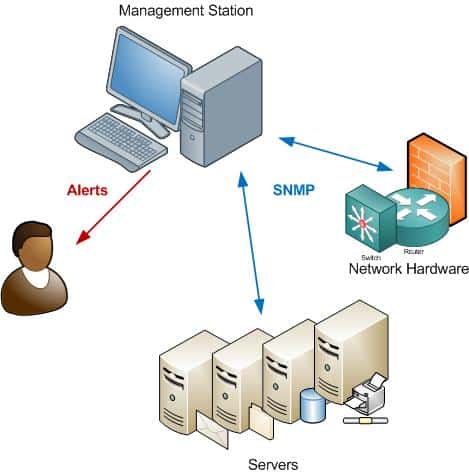
Simple Network Management Protocol, or SNMP, is a standard protocol designed to allow network devices, such as switches and routers, to communicate vital information to a central network management station (NMS). This standard protocol facilitates the monitoring and management of network devices by providing a standardized method for querying and configuring these devices. Via SNMP, administrators can retrieve data and manage network devices effectively.
Importance of SNMP in Network Management
The importance of SNMP in network management cannot be overstated. By using SNMP, network administrators can monitor network performance, detect network issues, and manage network devices remotely. The use of SNMP allows network administrators to efficiently manage network by proactively addressing potential problems. This proactive approach ensures optimal network performance and minimizes downtime, making network management more effective.
Overview of SNMP Versions
Here’s a breakdown of the primary SNMP versions, including SNMP version 3 which adds significant security features.
- SNMP version 1 (SNMPv1) is the initial version, which is community-based but lacks strong security features.
- SNMP version 2 (SNMPv2c) offers improvements in terms of error handling and data types but still uses a community string for authentication, unlike SNMP version 3 which enhances security.
- SNMPv3 enhances security by adding authentication and encryption, making it the most secure version for modern network management.
Configuring SNMP on Cisco Switches
Prerequisites for SNMP Configuration
Before you configure SNMP on Cisco switches, there are several prerequisites to consider. It’s important to ensure a few things are in place beforehand:
- The switch is accessible via the network and you have the necessary administrative privileges.
- Network devices, including the SNMP manager and agent, can communicate via the Internet Protocol (IP).
- Security policies allow SNMP traffic, usually UDP ports 161 and 162.
Proper planning will streamline the configuration process.
Step-by-Step Guide to Configure SNMP
To configure SNMP on Cisco devices, begin by accessing the switch’s CLI. Enter global configuration mode and use the `snmp-server community` command to set the community string for SNMPv1 and SNMPv2c. For SNMPv3, configure users with authentication and encryption using commands like `snmp-server user`. Define access control lists to restrict SNMP access to specific IP addresses. Enable SNMP traps to receive notifications for critical events. By configuring these parameters on the SNMP server, you can effectively use SNMP to monitor and manage your network devices.
Verifying SNMP Configuration
After you configure SNMP, verification is crucial. Use SNMP tools on your network management station (NMS) to query the switch. You can use the `snmp walk` command to retrieve a subtree of object identifiers (OIDs) from the switch’s MIB. Check if the SNMP agent responds to your queries, confirming that SNMP is properly configured and functioning. Verify that SNMP traps are being sent to the NMS. Successful verification ensures that the use of SNMP is providing accurate and timely network monitoring data.
Using SNMP for Network Management
Monitoring Network Devices via SNMP
Effective network management hinges on the ability to monitor network devices in real-time. Using SNMP allows network administrators to gather essential data about the health and performance of network devices. By querying the SNMP agent on managed devices like switches and routers, the SNMP manager can retrieve detailed information. This enables proactive monitoring and quick identification of potential issues, which is crucial for maintaining optimal network performance as outlined in the relevant RFCs.
Understanding SNMP Messages
Understanding SNMP messages is crucial for effective network management. SNMP messages are essentially packets of data exchanged between the SNMP manager and the SNMP agent. These messages include queries to retrieve data (using `getnext` operations) and trap messages sent by the agent to notify the manager of significant events. Analyzing these messages helps in diagnosing network issues and optimizing the performance of network devices via SNMP.
Utilizing SNMP for Performance Tuning
SNMP is invaluable for performance tuning within a network and is often used to gather data from the management information base (MIB). By monitoring metrics such as CPU utilization, interface traffic, and error rates via SNMP, network administrators can identify bottlenecks and areas for improvement. Configuring SNMP traps for specific thresholds allows for immediate notification when performance degrades. Armed with this information, administrators can make informed decisions to optimize network performance and ensure smooth operation of all managed devices.
Security Considerations for SNMP
Understanding SNMP Security Levels
Here’s how the different SNMP versions handle security:
- SNMPv1 and SNMPv2c rely on community strings, offering minimal security.
- SNMPv3 enhances security through authentication and encryption, safeguarding sensitive data exchanged between the SNMP manager and the SNMP agent.
Understanding these security variations is essential when selecting the appropriate SNMP version to secure your network management system.
Configuring SNMP v3 Security Features
Configuring SNMPv3’s security features is vital for protecting network devices. SNMPv3 enhances security through authentication and encryption. Authentication ensures that only authorized managers can query the SNMP agent, while encryption protects data from eavesdropping. Algorithms like MD5 or SHA are used for authentication, and AES is used for encryption. Proper configuration of these features is essential for ensuring that SNMP is secure and reliable for network management.
Common Security Best Practices
Several security best practices should be followed when using SNMP, especially when configuring the SNMP-server settings. Change default community strings immediately and restrict SNMP access to trusted IP addresses using access control lists on the SNMP server. Always use SNMPv3 with strong authentication and encryption. Regularly monitor SNMP traffic for suspicious activity. By implementing these measures, you can significantly reduce the risk of unauthorized access and protect your network devices effectively via SNMP.

What is the version of SNMP I should use and how does it affect device discovery?
Choosing the version of SNMP determines available security and features for device discovery: SNMPv1 and SNMPv2c provide basic community-string based, read-only access suitable for simple monitoring in IP networks, while SNMPv3 (the modern version of snmp) adds USM (User-based Security Model) to authenticate and encrypt traffic (priv) so network administrators to collect device data securely. For active device discovery and robust network management that provides secure telemetry, SNMPv3 is important in network environments; legacy devices may still require SNMPv1/v2c for compatibility.
How do OID, MIB view and getnext interact with different version of SNMP implementations?
Object Identifiers (OID) and MIB view define the standardized framework for requesting device data. A management software or SNMP client issues get or getnext requests to walk MIB trees; getnext is used to iterate through consecutive OIDs. rfc 1905 and rfc 1906 describe PDU semantics and bulk operations relevant to these operations for different versions of snmp. The command line SNMP tools rely on MIB view to interpret OIDs, while monitoring solution GUIs present the hierarchical OID structure from the MIB.
Does version of SNMP support security like authenticate and encrypt and what are the RFCs that define them?
SNMPv3 introduces USM which supports methods to authenticate and encrypt (priv) messages; these security functions allow network administrators to collect information safely across IP networks. Security models and associated protocols are described in multiple RFCs (including rfc 1901 for framework and rfc 1905/rfc 1906 for protocol operations). Implementations should follow these RFCs to ensure authentication, encryption, and integrity in management communications.
Can a management software provide read-only access and rules based monitoring when using which version of SNMP?
Yes — management software and monitoring solutions can be configured for read-only access across any version of SNMP, though enforcement is stronger with SNMPv3 where credentials and access control are tied to users and views. A rules based monitoring solution uses MIBs and OID thresholds to trigger alerts; it may rely on get next requests or bulk operations to efficiently poll device data. Proper configuration ensures minimal impact on devices while providing essential network management that provides timely insight.
How do SNMP clients and command line tools use get next, OID and RFC guidance to collect device data across IP networks?
SNMP clients and command line utilities use get, get next and bulk operations to traverse OID hierarchies defined in MIBs and produce a MIB view of device data. They follow RFC guidance (including rfc 1901, rfc 1905 and rfc 1906) to format requests and handle responses. For scalable monitoring across IP networks, a combination of device discovery, scheduled get or getnext requests, and adherence to the standard protocol used ensures network administrators to collect consistent, standardized device data for their monitoring solution.