New ClickLock macOS Stealer Kills Every App to Force Password Entry
ClickLock: The Aggressive macOS Stealer Forcibly Exiting Applications for Passwords
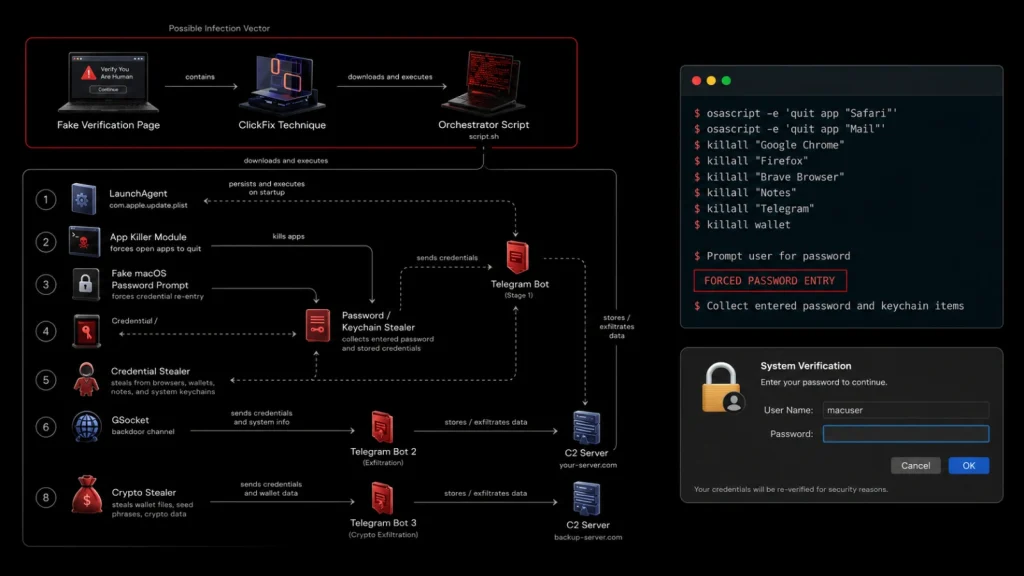
A new and particularly aggressive strain of macOS malware named has surfaced, demanding immediate attention from cybersecurity professionals and Apple users alike. This sophisticated threat, identified by researchers at Group-IB, doesn’t just quietly steal credentials; it employs a highly disruptive and deceptive tactic by forcibly terminating running applications, leaving users locked out of their systems until they provide their macOS password. This post delves into ClickLock’s mechanisms, its impact, and crucial defensive measures.
Understanding ClickLock’s Deceptive Modus Operandi
Unlike many stealth-focused stealers, ClickLock operates with a brazen disregard for user experience, turning a common security measure into a weapon. Its primary goal is to harvest macOS passwords by creating a scenario where the user believes providing the password is the only way to regain control of their device.
- Forced Application Termination: ClickLock’s signature move is its ability to “kill” every running application on a macOS system. This includes essential system processes and user applications, effectively rendering the system unusable from a user perspective.
- Coercion for Password Entry: By forcing a system state where no applications are functioning, ClickLock aims to trigger a natural user response: re-entering their password to unlock or log back into their macOS session. This is a classic social engineering tactic elevated by technical disruption.
- Credential Harvesting: Once the user enters their password, believing they are restoring system functionality, ClickLock intercepts and exfiltrates this critical credential. This gives attackers access to the user’s entire system and potentially other sensitive data.
The Impact of a ClickLock Infection
The implications of a successful ClickLock infection extend beyond just the immediate loss of a password:
- Complete System Compromise: A stolen macOS password grants attackers deep access to the victim’s device, enabling them to install further malware, access sensitive files, and monitor activities.
- Data Exfiltration Risk: With administrative access, attackers can exfiltrate documents, photos, financial information, and other personal or corporate data stored on the infected Mac.
- Supply Chain Weakness: If the compromised user is involved in a corporate environment, this could serve as an entry point for broader organizational breaches.
Remediation Actions and Prevention Strategies
Protecting against sophisticated threats like ClickLock requires a multi-layered approach encompassing proactive prevention and swift remediation. While no specific CVE has been assigned yet for ClickLock itself, its reliance on specific macOS functionalities or vulnerabilities might be detailed in future advisories.
Immediate Remediation if Suspected
- Disconnect from Network: Immediately disconnect the affected macOS device from all networks (Wi-Fi and Ethernet) to prevent further data exfiltration or attacker control.
- Change Passwords: On a secured, uninfected device, immediately change your macOS password and all other critical online account passwords (email, banking, social media) that might have been compromised.
- Backup and Reinstall: The safest course of action for a confirmed infection is to perform a clean reinstallation of macOS. Backup essential files to an external, secure drive, but be extremely cautious about restoring application data directly, as it might contain hidden malware.
- Malware Scan: Run a reputable anti-malware scan on the device, but remember that advanced malware like ClickLock might resist detection by standard tools.
Proactive Prevention Measures
- Software Updates: Keep your macOS operating system and all applications fully updated. Apple regularly releases security patches that address vulnerabilities that malware exploits.
- Strong, Unique Passwords: Use strong, unique passwords for all accounts, especially your macOS login. Consider a password manager.
- Multi-Factor Authentication (MFA): Enable MFA wherever possible, especially for critical accounts. While ClickLock aims for the macOS password, MFA reduces the risk for other services.
- Application Source Verification: Only download applications from trusted sources like the official App Store or directly from reputable developers. Avoid pirated software or downloads from suspicious websites.
- Be Wary of Social Engineering: Exercise extreme caution with unexpected emails, links, or attachments. Phishing attempts are a common delivery mechanism for malware.
- Regular Backups: Maintain regular, encrypted backups of your important data to external drives or secured cloud services.
- Endpoint Detection and Response (EDR): For businesses and power users, consider deploying EDR solutions that can detect and respond to advanced threats and suspicious activity on connected devices.
Tools for macOS Security
While no single tool is a silver bullet, combining various security utilities can significantly enhance your macOS defenses against threats like ClickLock.
| Tool Name | Purpose | Link |
|---|---|---|
| Malwarebytes for Mac | Anti-malware detection and removal | https://www.malwarebytes.com/mac |
| Objective-See Tools | Free macOS security tools (e.g., BlockBlock for persistent threats, LuLu for firewall) | https://objective-see.com/products.html |
| Little Snitch | Advanced outbound firewall, alerts on network connections | https://www.obdev.at/products/littlesnitch/index.html |
| MDM Solutions (e.g., Jamf Pro) | For enterprise-level macOS device management, patching, and security policy enforcement | https://www.jamf.com/products/jamf-pro/ |
Conclusion
The emergence of ClickLock underscores the continuous evolution of macOS malware and the increasing sophistication of credential-harvesting techniques. Its aggressive approach of forcing application termination to coerce password entry is a concerning development. Vigilance, coupled with robust security practices, including timely updates, strong authentication, and careful application management, remains paramount for protecting your macOS devices against such intrusive threats. Stay informed and prioritize your digital security.