
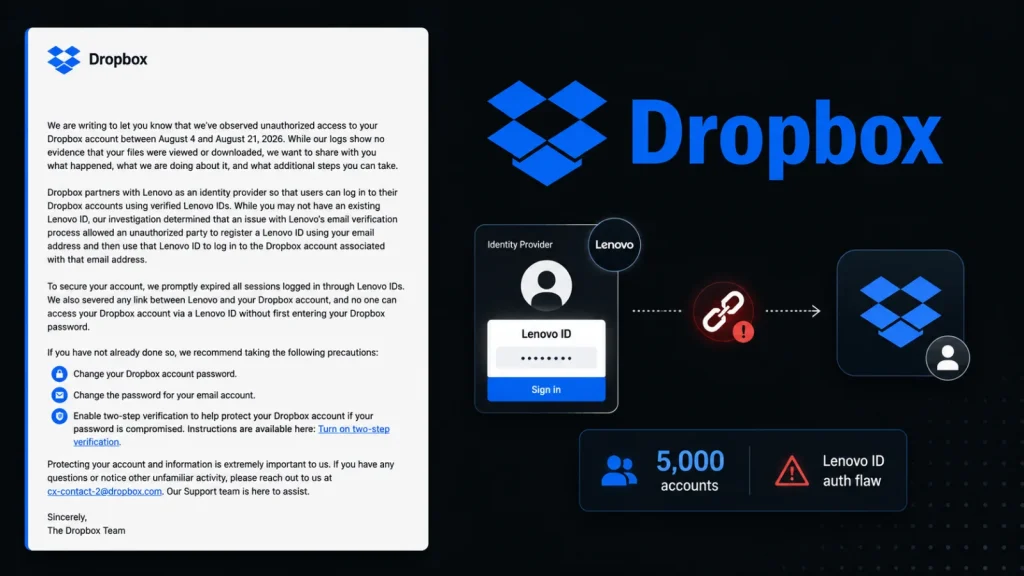
Dropbox Says 5,000 Accounts Were Compromised Through Lenovo ID Authentication Flaw
In an increasingly interconnected digital landscape, the security of our cloud storage often hinges on the integrity of third-party integrations. A recent disclosure from Dropbox serves as a stark reminder of this critical dependency. Approximately 5,000 Dropbox user accounts were compromised in August, not through a direct breach of Dropbox’s core infrastructure, but via an exploited vulnerability within its Lenovo ID sign-in integration.
This incident underscores a crucial lesson for both users and cloud service providers: the attack surface extends far beyond the primary platform when federated identity management is in play. Trusting external identity providers without robust, account-level verification can introduce significant security risks.
The Lenovo ID Authentication Flaw Explained
The core of the compromise lay in a weakness within the authentication process associated with Lenovo ID. While the specific technical details of the flaw haven’t been fully disclosed, the outcome was clear: attackers were able to leverage this vulnerability to gain unauthorized access to a substantial number of Dropbox accounts. The critical point is that Dropbox trusted the authentication provided by Lenovo ID, and this trust was exploited.
Such vulnerabilities often arise from insufficient validation mechanisms, weak session management, or flawed token handling during the authentication handshake between the service provider (Dropbox) and the identity provider (Lenovo ID). This allows an attacker to bypass legitimate login procedures, effectively impersonating a legitimate user.
Impact and Scope of the Breach
Dropbox has confirmed that approximately 5,000 user accounts were impacted by this incident. The unauthorized access occurred in August, and affected users have since received notifications detailing the compromise. While the exact nature of the data accessed within these accounts hasn’t been fully detailed, any unauthorized access to cloud storage is a serious concern, potentially exposing sensitive documents, personal files, and proprietary information.
This event serves as a potent example of how a vulnerability in one part of an integrated ecosystem can ripple outwards, affecting seemingly unrelated services. For users who might have linked their Dropbox account with their Lenovo ID for convenience, this convenience unfortunately became a vector for compromise.
The Perils of Third-Party Identity Providers
The reliance on third-party identity providers (IdPs) like Google, Facebook, or in this case, Lenovo ID, offers undeniable convenience for users, reducing password fatigue and streamlining the sign-in process. However, this convenience introduces a shared security responsibility. When a cloud platform delegates authentication to an external IdP, it inherently trusts the IdP’s security posture and the integrity of its authentication mechanisms.
This incident highlights the need for:
- Rigorous Vetting: Cloud providers must thoroughly vet the security practices of any third-party IdPs they integrate with.
- Layered Security: Even with trusted IdPs, implementing additional layers of security, such as mandatory multi-factor authentication (MFA) at the application level, can mitigate risks.
- Least Privilege: Ensuring that the integration only grants necessary permissions and no more.
Remediation Actions and User Recommendations
For affected users, immediate action is paramount. Dropbox has likely initiated password resets for compromised accounts, but proactive measures are always advisable.
For Affected Dropbox Users:
- Change Your Password: Immediately change your Dropbox password. Choose a strong, unique password that you don’t use for any other service.
- Enable Multi-Factor Authentication (MFA): If you haven’t already, enable MFA on your Dropbox account. This adds a crucial layer of security, requiring a second verification step even if your password is compromised.
- Review Account Activity: Scrutinize your Dropbox account activity logs for any suspicious or unauthorized actions.
- Unlink Suspect Third-Party Apps: Review any connected apps or services linked to your Dropbox account and remove those you don’t recognize or no longer use.
For All Users and Organizations:
- Strong, Unique Passwords: Practice good password hygiene across all online services.
- Universal MFA: Enable MFA wherever possible, especially for critical accounts.
- Stay Informed: Be vigilant about security notifications from your service providers.
- Regular Security Audits: Organizations should conduct regular security audits of all integrated third-party services and identity providers.
Tools for Enhancing Account Security
While no tool can completely prevent human error or all vulnerabilities, several solutions can significantly enhance account security and aid in detecting potential compromises.
| Tool Name | Purpose | Link |
|---|---|---|
| Password Managers (e.g., LastPass, 1Password, Bitwarden) | Generate strong, unique passwords and securely store credentials. | LastPass / 1Password / Bitwarden |
| Authenticator Apps (e.g., Google Authenticator, Authy) | Provide time-based one-time passwords (TOTP) for MFA. | Google Authenticator / Authy |
| Security Information and Event Management (SIEM) Systems | (For Organizations) Collect, analyze, and manage security logs and events. | (Various vendors, e.g., Splunk, IBM QRadar) |
| Endpoint Detection and Response (EDR) Solutions | (For Organizations) Monitor and respond to threats on endpoints. | (Various vendors, e.g., CrowdStrike, SentinelOne) |
Conclusion
The Dropbox compromise, facilitated by a Lenovo ID authentication flaw, serves as a critical reminder that cybersecurity is a chain, and its strength is determined by its weakest link. For cloud service providers, rigorous vetting of third-party integrations and implementing layered security measures are non-negotiable. For users, proactive security hygiene, including strong passwords and universal MFA, remains the most effective line of defense. As our digital lives become increasingly intertwined with cloud services and federated identities, understanding and mitigating these risks will be paramount for maintaining data integrity and privacy.




