Preventing Network Loops with STP.
Prevent Network Loops: Spanning Tree Protocol (STP) Solutions
At Teamwin Global Technologica, we understand the critical importance of maintaining a stable and efficient network. Network loops can severely disrupt your operations, leading to performance degradation and potential outages. That’s why we’re dedicated to providing comprehensive solutions, including the implementation and configuration of Spanning Tree Protocol (STP), to prevent network loops and ensure your network operates smoothly and securely. This guide will help you understand network loops and how STP can effectively prevent loops from compromising your network’s integrity.
Understanding Network Loops
What is a Network Loop?
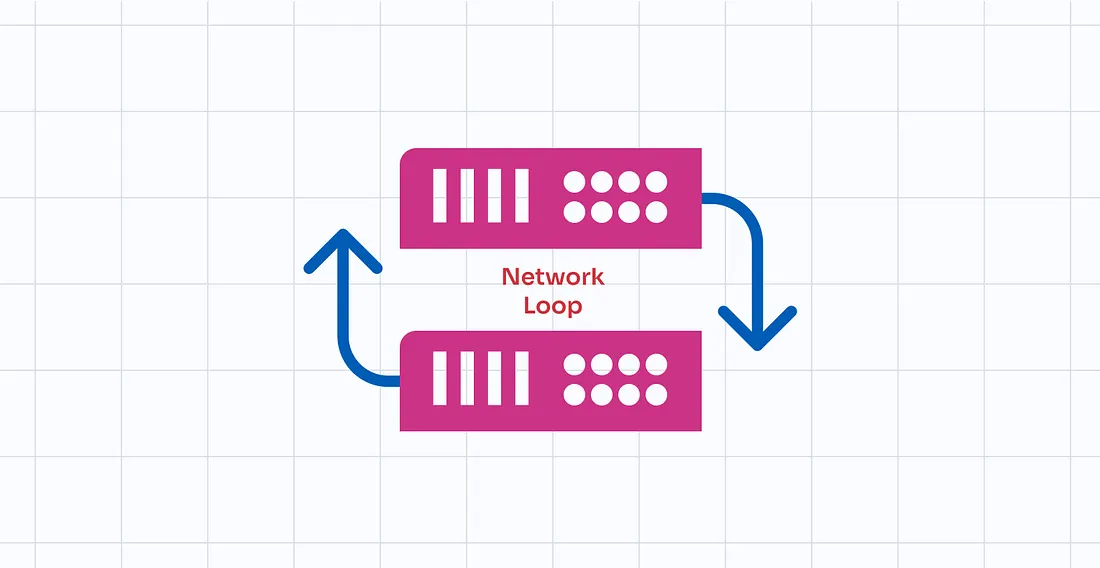
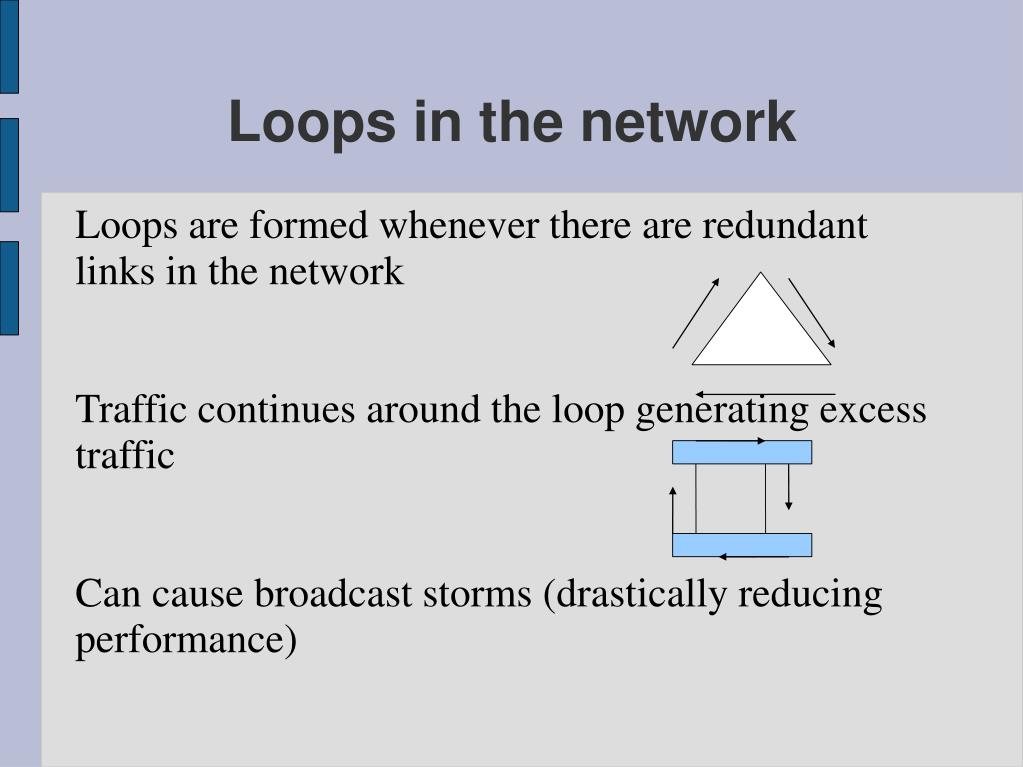
A network loop, often referred to as an STP loop or a layer 2 loop, occurs when there are redundant paths between network devices, typically network switches, in an Ethernet network. This creates a situation where data packets can circulate endlessly between switches. These loops occur because the data, such as broadcast or multicast frames, is continuously forwarded, consuming bandwidth and network resources. Without loop prevention mechanisms like spanning-tree protocol (STP), these redundant links can quickly lead to network instability and even a complete network outage. Understanding how loops form is the first step in effectively implementing strategies to prevent loops.
Impact of Loops in Ethernet Networks
The impact of loops in Ethernet networks can be devastating. One of the most common consequences is a broadcast storm, where an overwhelming amount of broadcast traffic floods the network, consuming all available bandwidth. This results in severely degraded network performance, making it difficult or impossible for legitimate network traffic to be transmitted, especially when network loops occur. Furthermore, the constant forwarding of frames in a loop can lead to increased CPU utilization on network devices, potentially causing them to crash. A network loop can effectively bring the entire network to a standstill, causing significant disruption and potential financial losses. Preventing network loops is therefore crucial for maintaining network stability.
Common Causes of Network Loops
Network loops often arise from unintended physical connections or misconfigurations in network topology, leading to issues within a network. Several factors can contribute to these issues, including:
- The accidental creation of redundant paths between network switches, often due to adding cables for redundancy without proper STP configuration.
- Incorrect configuration of STP, particularly if not all switches are participating or if conflicting configurations are applied, can lead to network loops occurring.
Another cause can be faulty network devices that incorrectly forward traffic. Properly designing the network topology, configuring STP, and regularly monitoring network devices are essential best practices for loop prevention and maintaining a loop-free network.
Spanning Tree Protocol (STP) Overview

How Spanning Tree Protocol Works
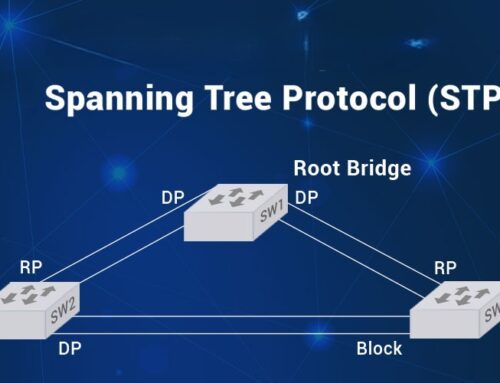
Spanning Tree Protocol (STP) is a network protocol designed to prevent network loops in a Layer 2 network, such as an Ethernet network. The primary goal of STP is to ensure a loop-free network topology by logically blocking redundant paths that could cause loops. STP operates by exchanging Bridge Protocol Data Units (BPDUs) between network switches to identify and select the best path throughout the network. This process involves electing a root bridge, which serves as the reference point for all path calculations. By strategically blocking certain ports, STP ensures that there is only one active path between any two network devices, thereby preventing network loops and maintaining network stability.
STP Components: Root Bridge and Ports
The root bridge is the central component in an STP network topology. The switch with the lowest bridge ID is elected as the root bridge. All other switches in the Ethernet network calculate their best path to this root bridge. To create a loop-free network, STP defines different port roles, including:
- Root ports, which are the ports on each switch that have the best path to the root bridge.
- Designated ports, which are the ports on each network segment that forward traffic toward the root bridge.
- Blocked ports, which prevent network loops by not forwarding traffic.
Understanding these components and roles is crucial to properly configure STP and prevent loops.
Types of STP: Rapid Spanning Tree Protocol
Rapid Spanning Tree Protocol (RSTP), defined in IEEE 802.1w, is an evolution of the original STP (802.1D) designed to offer faster convergence after a topology change. While standard spanning-tree protocol can take 30-50 seconds to converge, RSTP typically converges in a matter of seconds. RSTP achieves this by using a more efficient BPDU exchange mechanism and introducing new port states. RSTP maintains backward compatibility with legacy STP, allowing seamless integration in mixed environments. For modern Ethernet networks requiring high availability and quick recovery, deploying Rapid Spanning Tree Protocol is a best practice to prevent network outages and maintain optimal network performance.
Best Practices for Preventing Network Loops

Configuring STP on Switches
Configuring spanning tree protocol on network switches is a crucial step in preventing network loops and ensuring network stability. It involves setting parameters such as the bridge priority, which determines the likelihood of a switch becoming the root bridge. Lower values increase the chance of the switch being elected as root bridge. Proper configuration of switch port costs and priorities is essential for directing traffic along the best path. Incorrect settings can lead to suboptimal path selection and potentially introduce loops in Ethernet. It is also important to enable spanning-tree protocol globally on all switches within the Layer 2 network to ensure comprehensive loop protection. Regularly review and update the STP configuration to align with changes in the network topology and maintain a loop-free network.
Implementing Loop Prevention Techniques
Implementing loop prevention techniques involves a multifaceted approach to safeguard against network loops in Ethernet networks. Several practices can be employed to achieve this, including:
- Carefully design the network topology to minimize redundant paths.
- Use redundant links thoughtfully, ensuring that spanning tree protocol is properly configured to manage them.
- Employ loop detection tools to identify and address network loops within a network.
- Regularly monitor the network for unusual traffic patterns or broadcast storms that may indicate a potential loop within a network.
- Train network administrators on the importance of proper cabling and configuration procedures.
Combining proactive network design with vigilant monitoring helps prevent loops effectively.
Utilizing Loop Guard and BPDU Guard
Loop Guard and BPDU Guard are vital features to configure STP to prevent loops and enhance network stability. Loop Guard prevents loops that could form due to unidirectional links, by placing switch ports in a loop-inconsistent blocked port state if BPDUs are not received. BPDU Guard protects the network from rogue switches by disabling switch ports that receive BPDUs. Configure STP with BPDU Guard on ports where switches are not expected to connect, preventing unauthorized devices from affecting the spanning-tree topology. Both Loop Guard and BPDU Guard provide added layers of loop protection, safeguarding against misconfigurations. These features help prevent loops in Ethernet and contribute to a more robust, loop-free network.
Configuring STP for Optimal Network Performance

Setting Up Root Ports and Designated Ports
Properly configuring spanning tree protocol involves strategically setting up root ports and designated ports to achieve optimal network performance and prevent loops. Root ports are the switch ports on each non-root switch that have the best path to the root bridge, providing the most efficient route for network traffic. Designated ports are the switch ports on each network segment that are responsible for forwarding traffic toward the root bridge. Ensuring the correct assignment of these roles is crucial for creating a loop-free network topology and optimizing network performance. Misconfigured root ports or designated ports can lead to suboptimal traffic flow, potentially causing network congestion or even a network outage. By carefully planning and configuring these ports, you can enhance network stability and prevent network loops.
Adjusting STP Timers for Efficiency
Adjusting spanning-tree protocol timers is essential for fine-tuning STP behavior and improving network efficiency, particularly after a topology change. STP uses timers, such as the hello time, max age, and forward delay, to control the process of detecting and responding to changes in the network topology. The hello time determines how frequently switches send BPDUs to communicate their presence and network status. The max age timer specifies how long a switch waits before considering a BPDU to be invalid. The forward delay timer dictates how long a switch port remains in the listening and learning states before transitioning to the forwarding state. Optimizing these timers allows for faster convergence, minimizing the impact of topology change and ensuring network stability. However, incorrect timer settings can lead to network instability or increased convergence times, making it essential to carefully adjust these parameters based on the specific network environment.
Monitoring STP and Loop Detection Strategies
Monitoring spanning tree protocol and implementing loop detection strategies are critical for maintaining a healthy and stable network and to prevent loops. Regular monitoring of STP status provides insights into the health and performance of the spanning-tree topology, allowing administrators to identify and address potential issues before they impact the network. Loop detection mechanisms, such as loop guard, can automatically detect and mitigate loops that occur due to misconfigurations or hardware failures. By continuously monitoring STP parameters, such as root bridge election, port states, and BPDU activity, administrators can quickly identify and resolve loop-related problems, ensuring that the entire network remains loop-free. Implementing robust monitoring and loop detection strategies is a best practice for maintaining a reliable network, preventing network outages and optimizing network performance.

How does spanning-tree protocol (stp works) to prevent creating a loop in a layer 2 network?
Spanning Tree Protocol (STP) prevents network loops by electing a root switch and placing redundant paths into a blocked state so traffic is forwarded only along a loop-free topology. When multiple paths exist, STP uses Bridge Protocol Data Units (BPDUs) — sometimes referred to as receiving bridge protocol data — to detect network changes, determine the root switch, and calculate best paths. This behavior keeps the network stable, preventing broadcast storms and helping overall network performance and network connectivity across the whole network.
Can I configure loop protection and stp port settings on a cisco switch to keep the network safe?
Yes. On Cisco devices you can configure loop protection and adjust STP port roles and priorities to control which ports forward or block traffic. Features such as root guard and portfast help maintain a predictable root switch and prevent unintended switches from becoming the root, while STP port cost and priority changes let you influence which links forward. Implementing Cisco best practices for network monitoring and network management ensures that one switch misconfiguration does not cause a spanning tree loop or cause STP to fail to keep the network loop free.
What happens when a layer 2 loop is detected and how does stp prevent broadcast storms?
When a layer 2 loop is detected, switches receive BPDUs and alter port states so that at least one path becomes blocked, stopping frames from circulating indefinitely. STP prevents broadcast storms by ensuring only designated forwarding ports carry broadcast traffic; blocked ports do not forward, which prevents multiple copies of frames from flooding the network. Because STP prevents redundant paths from simultaneously forwarding, it protects the overall network against the effects that occur when a loop is created, maintaining overall network reliability.
How do advanced options like multiple spanning tree protocol and root guard improve production networks?
Multiple Spanning Tree Protocol (MSTP) allows VLAN-aware topologies by mapping VLANs to different spanning-tree instances, improving load balancing and overall network performance across core switch and access layers. Root guard enforces a stable root switch by blocking ports that advertise superior BPDU information, so a rogue device cannot change the root. Together these STP features reduce the chance that network changes or a misbehaving device creates a loop, support STP in complex designs, and help with ongoing network monitoring and maintenance.
What practical steps should I take to configure loop prevention and diagnose if a loop is occurring?
Start by enabling STP on all layer 2 devices and verify STP is enabled on trunk and access ports. Configure portfast on edge ports to speed up host connectivity, set root bridge priorities to control the root switch placement, and enable root guard on uplinks where you expect the root to be fixed. Monitor for signs that a loop is detected — high CPU, excessive MAC address table churn, or repeated BPDU messages — and use show spanning-tree and MAC address tables to locate the problem port. These steps help with preventing network loops with STP and keep the network loop free while maintaining network connectivity.