What Is BPDU Guard and Why Use It?
What is BPDU Guard and Why Use it for Filter, Portfast, Root Guard and STP
BPDU Guard is a critical feature in network administration, designed to protect the integrity and stability of your spanning tree protocol (STP) topology. It acts as a security feature that prevents unauthorized switches from influencing the STP process. In this article, we will explore what BPDU Guard is, a feature that plays an important role in safeguarding your network, and how it functions.
Understanding BPDU Guard

BPDU Guard is essential for maintaining the stability and security of a network by preventing unauthorized devices from disrupting the STP topology. When properly implemented, it can significantly reduce the risk of loops and other network issues, ensuring a more reliable and secure environment.
Definition of BPDU Guard
BPDU Guard is a spanning tree protocol (STP) enhancement designed to protect the network from rogue switches. The primary function of BPDU Guard is to disable a switch port if it receives a BPDU. Bridge Protocol Data Units (BPDUs) are data messages exchanged by switches to prevent data loops in a network, particularly when a port receives a BPDU. BPDU Guard ensures that access ports do not participate in STP, thus preventing them from becoming part of the STP topology.
Importance of BPDU Guard in Network Security
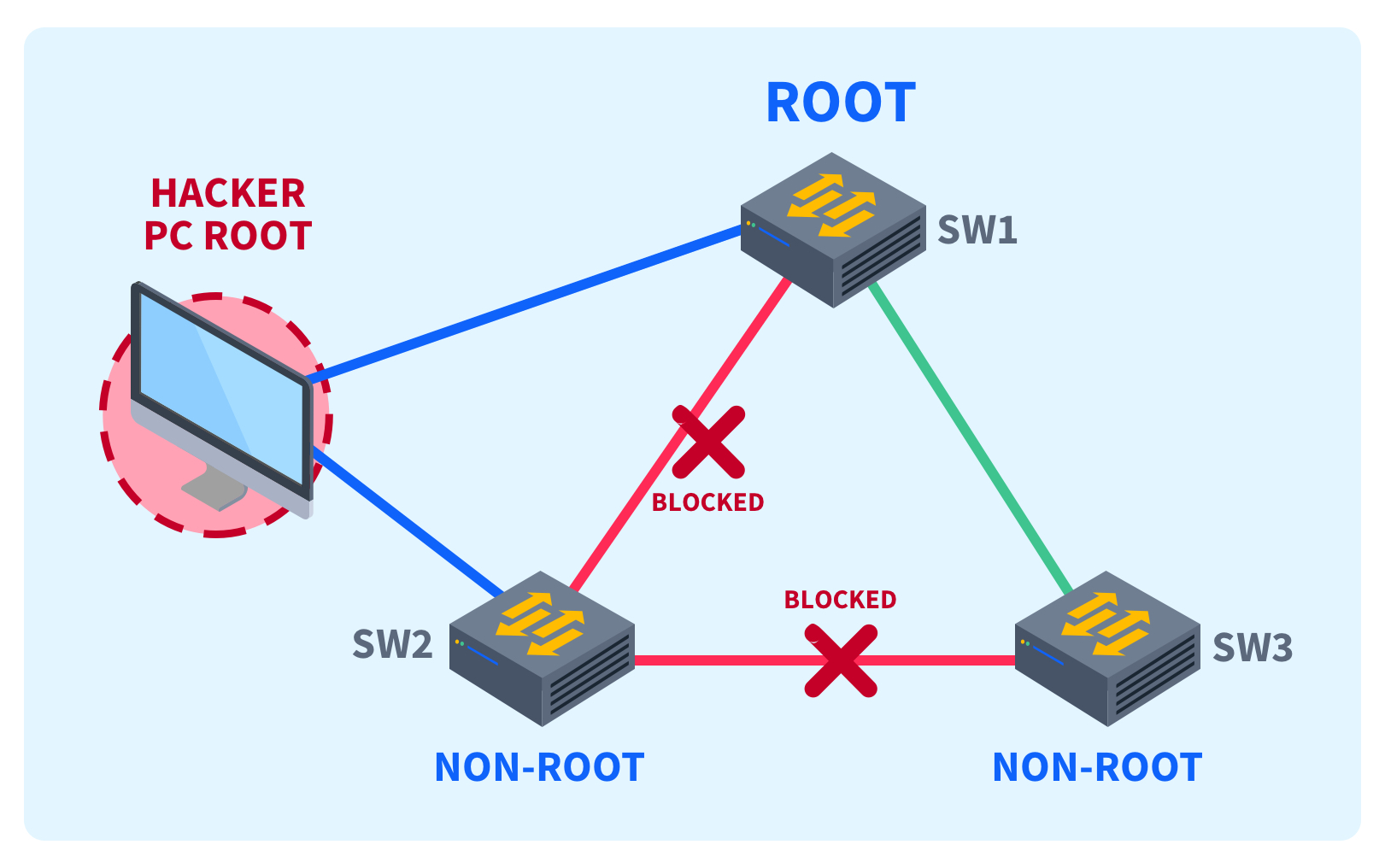
BPDU Guard is crucial for network security as it prevents unauthorized switches or devices from injecting BPDUs into the network. This protection is vital because rogue switches can manipulate the STP topology, potentially causing loops and network instability. By using BPDU Guard, you can protect the network from devices trying to become the root bridge, ensuring the established STP structure remains intact.
How BPDU Guard Works
When BPDU Guard is enabled on a switch port, that port is monitored for incoming BPDUs. If a BPDU is received, the port immediately goes into an error-disabled state, effectively shutting down the port and preventing any further participation in STP. This action ensures that any unauthorized or rogue devices cannot influence the STP topology, thus protecting the network from potential loops and disruptions.
Connection Between BPDU Guard and STP

Role of STP in Network Topology
The spanning tree protocol (STP) plays a pivotal role in maintaining a loop-free network topology. STP ensures that there is only one logical path between any two switches, preventing broadcast storms and ensuring network stability. Switches communicate using Bridge Protocol Data Units (BPDUs) to determine the best path, and STP dynamically adjusts to changes in the network to maintain this loop-free environment. Understanding STP is crucial before configuring BPDU Guard.
BPDU Guard in the Context of STP
BPDU Guard enhances STP by providing a security feature that protects the STP topology from unauthorized switches. When BPDU Guard is enabled on a switch port, it monitors for incoming BPDUs. If a BPDU is received, the switch port is immediately disabled, preventing rogue switches from participating in STP. This ensures that the established STP topology remains intact and secure. BPDU Guard protects the network from potential disruptions.
Benefits of Using BPDU Guard with STP
The primary benefit of using BPDU Guard with STP is enhanced network stability and security. BPDU Guard prevents unauthorized or malicious devices from manipulating the STP topology, which can cause loops and disrupt network operations. By implementing BPDU Guard, network administrators can ensure that the STP environment remains secure, reliable, and free from disruptions caused by unauthorized switches trying to become the root bridge. Furthermore, BPDU Guard helps maintain the integrity of the network.
Configuring BPDU Guard
Steps to Enable BPDU Guard
To enable BPDU Guard, you can configure it either globally or on specific interfaces. To enable BPDU Guard globally, use the command “spanning-tree Portfast bpdu guard default” on Cisco switches. For specific interfaces, enter interface configuration mode and use the “spanning-tree bpdu guard enable” command. Ensure that Port fast is enabled on the interfaces where you want to enable BPDU Guard, as BPDU Guard is typically used on access ports.
Common Configuration Scenarios
A common scenario for configuring BPDU Guard is on access ports connected to end-user devices. These ports should not be sending or receiving BPDUs. Enable Portfast on these ports to expedite the convergence process, and then apply BPDU Guard to protect against rogue switches. Another scenario is in environments where unauthorized devices might be connected, such as public areas or untrusted networks. In this case, configure BPDU Guard for added security.
Best Practices for Cisco Devices
For Cisco devices, it’s best practice to enable BPDU Guard globally using the “spanning-tree portfast bpdu guard default” command. This ensures that all ports configured with Portfast automatically have BPDU Guard enabled. Regularly monitor the network for error-disabled ports to identify and address any potential issues caused by BPDU Guard disabling a port. Also, consider using loop guard in conjunction with BPDU Guard for comprehensive STP protection. Cisco BPDU Guard offers robust features.
Using BPDU Guard with Port fast and Root Guard
Integrating BPDU Guard with Portfast
Integrating BPDU Guard with Port fast is a common and effective practice to protect the network from potential STP-related issues on access ports. When you enable Port fast on a switch port, you’re essentially designating it as an edge port that connects to an end-user device, and should not participate in STP. Combining Port fast and BPDU Guard ensures that if a rogue switch is connected to such a port, BPDU Guard disables the port immediately upon receiving a Bridge Protocol Data Unit (BPDU), preventing STP topology disruptions.
Understanding Root Guard and its Relationship with BPDU Guard
While BPDU Guard protects the network from rogue switches influencing the STP topology via access ports, root guard provides protection against unauthorized switches attempting to become the root bridge. Root guard ensures that a designated port never becomes a root port, thus maintaining the stability of the STP environment. Although they address different aspects of STP security, BPDU Guard and Root Guard together offer a more comprehensive defense. BPDU Guard is enabled to specifically deal with edge ports, while root guard deals with root bridge election, highlighting the differences between root guard vs BPDU guard.
Use Cases for BPDU Guard and Root Guard
Use BPDU Guard on access ports connected to workstations and servers, where no switch is expected. If a device sends BPDUs, the port is shut down, preventing unauthorized STP participation. Implement root guard on ports connecting to switches that should never become root bridges, such as distribution or core switches. Root guard maintains control over the STP root placement, ensuring network stability. BPDU Guard helps prevent accidental loops and unauthorized devices from affecting the STP process.
BPDU Guard vs. BPDU Filter and Loop Guard

Differences Between BPDU Guard and BPDU Filter
BPDU Guard and BPDU Filter are both used to manage BPDUs, but they function differently. BPDU Guard proactively disables a port upon receiving a BPDU, effectively shutting down the port to prevent STP disruptions. In contrast, BPDU Filter simply prevents a port from sending or receiving BPDUs, without automatically disabling the port. BPDU Filter can be configured globally or per interface, offering flexibility in controlling BPDU transmission, whereas BPDU Guard is enabled to act as a security feature.
How Loop Guard Complements BPDU Guard
Loop guard complements BPDU Guard by providing additional protection against unidirectional links, which can cause STP to fail and create loops. Loop guard prevents a port from transitioning to a forwarding state if it stops receiving BPDUs from its neighbour, indicating a potential link failure. By using loop guard in conjunction with BPDU Guard, you can create a more robust and resilient STP environment, safeguarding against both unauthorized devices and link failures. The best practice for Cisco devices is to use both to protect the network.
When to Use Each Feature
Use BPDU Guard on access ports to prevent rogue switches from influencing the STP topology. Apply BPDU Guard to Portfast enabled ports to quickly shut down any port receiving unexpected BPDUs. Employ BPDU Filter on ports where you want to suppress BPDU transmission, such as on edge ports connected to devices that do not support STP. Implement loop guard on ports where unidirectional link failures are a concern, providing an additional layer of protection against STP failures. If a BPDU is received the best option is to use BPDU Guard.

What is spanning tree protocol and how does BPDU Guard relate?
Spanning Tree Protocol (STP) prevents switching loops by electing a current root bridge and creating a loop-free topology. STP uses Bridge Protocol Data Units (BPDUs) to exchange topology information and determine the root switch. BPDU Guard is a security feature that protects the topology by disabling ports that unexpectedly receive a BPDU on ports configured as edge ports with stp portfast. By avoiding receiving BPDU on those edge ports, the network reduces the risk that another switch or a misconfigured device will become a superior BPDU source and change the topology.
How do portfast and bpdu work together and why use “spanning-tree portfast bpdu guard default”?
PortFast accelerates port transitions to forwarding for end-hosts, and portfast and bpdu are often used together to keep edge ports quickly active while still protecting the network. Using “spanning-tree portfast bpdu guard default” or the command use “spanning-tree portfast bpduguard default” globally makes bpdu guard active on all ports configured with portfast. If a port configured with bpdu guard receives a BPDU from a device such as another switch, bpdu guard works by disabling the port (errdisable) to prevent topology changes and avoid receiving BPDU from a device that could become the root switch.
How does BPDU Guard Cisco implementation function and how to turn BPDU Guard on a port?
BPDU Guard Cisco behaviour: when bpdu guard is active and a port configured with portfast receives a BPDU, the guard acts by disabling the interface to protect the topology. You can enable bpdu guard on a port with the interface-level command (bpdu guard on a port) or globally with “spanning-tree portfast bpdu guard default”. To disable bpdu guard, remove the configuration or use commands to turn bpdu guard off; note that bpdu guard is disabled by default unless configured. BPDU guard settings and the bridge protocol data unit guard feature are commonly used to prevent another switch from accidentally being connected to an edge port and to keep the better root bridge selection intact.
Why is bpdu guard is essential and when should you avoid or disable BPDU Guard?
BPDU Guard is a security and network stability feature: guard is used to protect edge ports from accidental topology changes by detecting a BPDU and then err disabling the port. BPDU guard is essential when you connect hosts, printers, or servers to edge ports to avoid receiving BPDU and undesired superior BPDU that could alter the root bridge or allow a malicious device to claim root. However, do not enable bpdu guard on ports where you expect to connect another switch or trunk—bpdu guard is a network tool that will block legitimate links if you enable it incorrectly. If you need to connect a switch, turn bpdu guard off on that port or use explicit port configuration rather than global portfast bpduguard. In all cases, use bpdu guard and portfast and bpdu settings thoughtfully to balance fast convergence and topology protection.