What Is a Layer 2 Switch and How Does It Work?
What is a Layer 2 vs Layer 3 Switch: Understanding the Differences Between Layer 2 and Layer 3 Network Switches.
In the realm of computer networking, understanding the nuances between different types of network devices is crucial for designing efficient and robust network infrastructures. Among these devices, the network switch plays a pivotal role in facilitating communication within a local area network (LAN). However, not all network switches are created equal. This article aims to elucidate the fundamental differences between a layer 2 switch and a layer 3 switch, shedding light on their respective functionalities, advantages, and use cases. This knowledge is essential for network administrators and IT professionals seeking to optimize network performance and ensure seamless data transmission.
Introduction to Network Switches

What is a Network Switch?
A network switch is a network device that operates at the data link layer (Layer 2) or the network layer (Layer 3) of the OSI model. Its primary function is to forward data packets between devices within the same local network. A network switch intelligently directs traffic based on the destination MAC address, ensuring that data reaches its intended recipient efficiently. Unlike a hub, which broadcasts data to all connected devices, a switch learns the MAC addresses of connected devices and maintains a MAC address table to facilitate targeted data transmission. This targeted approach significantly reduces network congestion and enhances network performance. Understanding how a switch works is crucial for designing and managing modern network topologies effectively.
Overview of OSI Model
The OSI model is a conceptual framework that standardizes the functions of a telecommunication or computing system into seven distinct layers, which is essential for understanding how different types of switches operate. Each layer performs a specific set of tasks to enable communication between different systems. The data link layer (Layer 2) is responsible for providing error-free transmission of data frames between two directly connected nodes, primarily using MAC addresses. The network layer (Layer 3), on the other hand, handles routing of data packets across different networks, utilizing IP addresses. Understanding the layer of the OSI model at which a network device operates helps in comprehending its capabilities and limitations. A layer 2 switch operates at the data link layer, while a layer 3 switch incorporates functionalities of both the data link and network layers, showcasing how different types of switches function within a network.
Importance of Layer 2 and Layer 3 in Networking
The distinction between layer 2 and layer 3 is paramount in network design and management. Layer 2 switches are essential for efficient data transmission within a single network segment, using MAC addresses to forward traffic. This ensures that data reaches the correct destination within the local network, optimizing network performance by minimizing unnecessary traffic. Layer 3 switches extend this functionality by adding routing capabilities, enabling communication between different networks using IP addresses. The choice between a layer 2 switch and a layer 3 switch depends on the specific requirements of the network. For complex network environments requiring inter-network communication, a layer 3 switch or a router is indispensable. Thus, understanding the differences between layer 2 and layer 3 switches is crucial for effective network infrastructure planning and implementation.
Understanding Layer 2 Switches
Functionality of Layer 2 Switches
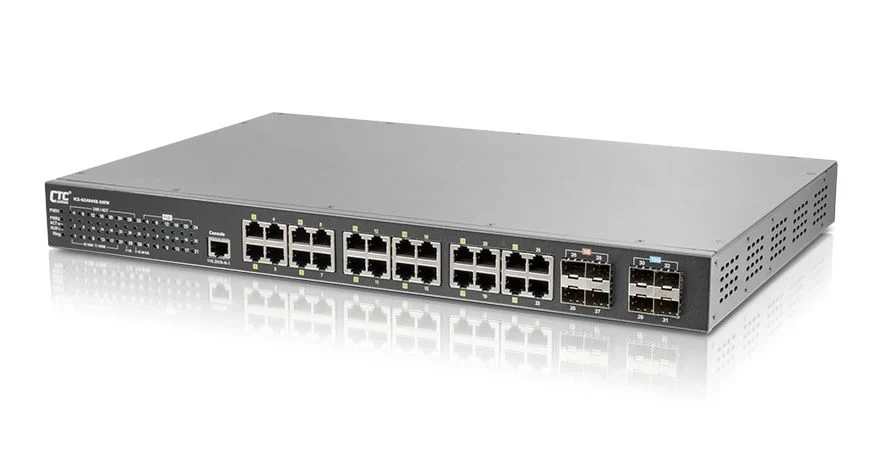
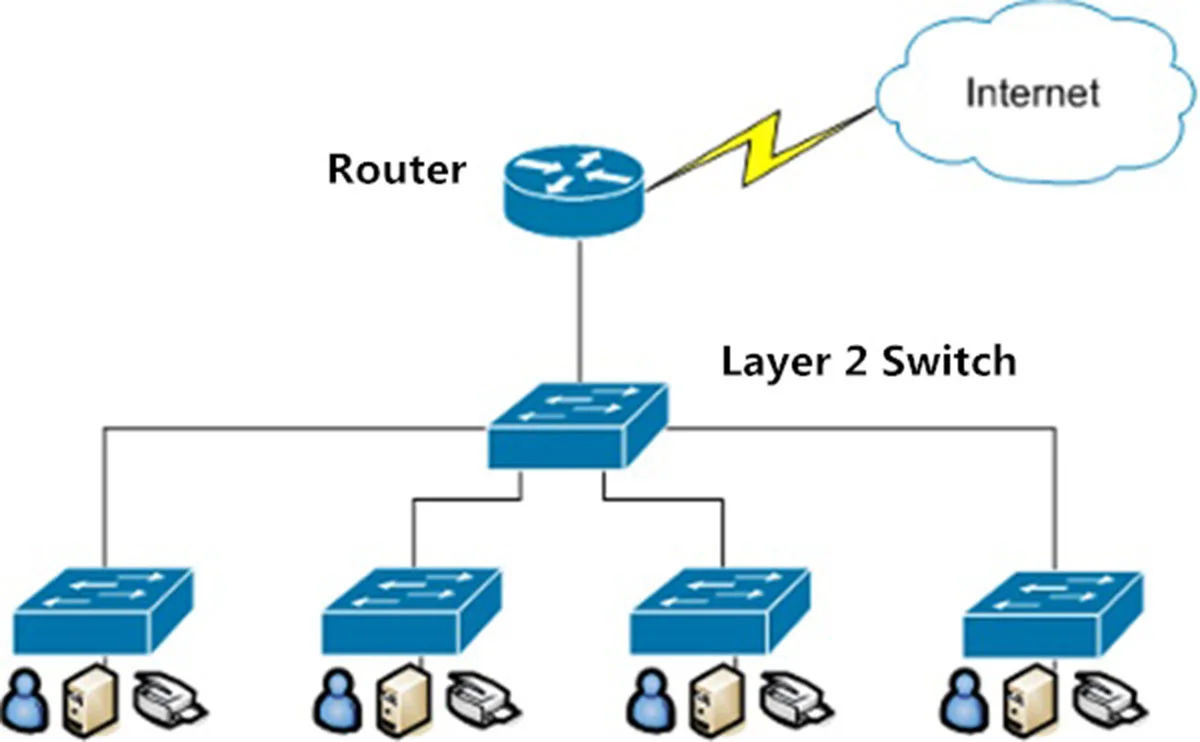
A layer 2 switch, operating at the data link layer of the OSI model, serves as a cornerstone for efficient local area network (LAN) communication. The primary functionality of a layer 2 switch involves forwarding network traffic based on the destination MAC address. When a switch receives a data frame, it examines the destination MAC address and consults its MAC address table to determine the appropriate switch port for forwarding the frame. This process ensures that data reaches its intended recipient within the local network segment, minimizing unnecessary traffic and optimizing network performance. Layer 2 switches use this method to provide a dedicated communication path for each data transmission.
Benefits of Using a Layer 2 Switch
Layer 2 switches offer several advantages when implemented in a network. Some key benefits include:
- Enhanced network performance due to reduced network congestion can often be achieved by selecting the appropriate type of switch for your network setup.By forwarding traffic only to the intended destination based on MAC address, layer 2 switches ensure efficient bandwidth use within a network.
- Simple Configuration: Layer 2 switches are relatively simple to configure and manage, making them an ideal choice for smaller network environments.
These switches offer a cost-effective solution for improving local network communication.
Typical Use Cases for Layer 2 Switches
Layer 2 switches are used in a variety of network setups. You can find them in environments such as:
- Small to medium-sized local area networks (LANs) where efficient data transmission is needed.
- Office environments to facilitate communication between workstations, servers, and other network devices.
They are also used in home networks and as access switches in larger network infrastructures. Their simplicity and cost-effectiveness make them ideal for scenarios where complex network layer routing is unnecessary.
Diving into Layer 3 Switches
How Layer 3 Switches Work
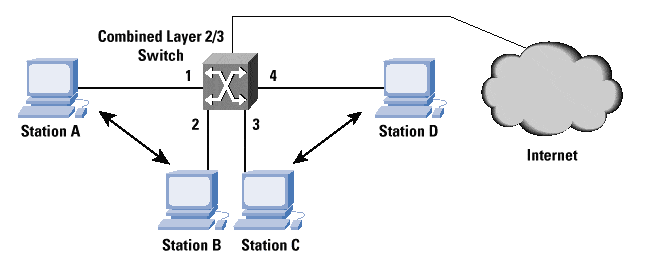
A layer 3 switch, often referred to as a multilayer switch, operates at both the data link layer (Layer 2) and the network layer (Layer 3) of the OSI model. This means that while it can forward network traffic based on the destination MAC address, like a layer 2 switch, it also possesses layer 3 routing capabilities. Essentially, the switch works by examining the destination IP address of a network packet and using routing tables to determine the best path to forward the packet to another network. These switches operate intelligently, making routing decisions in hardware to ensure high performance. Because of these advanced capabilities, a layer 3 switch can handle communication between different network segments, combining the functions of both layer 2 vs layer 3 functionalities.
Benefits of Using a Layer 3 Switch
The benefits of using a layer 3 switch are numerous, especially in more complex network environments. One of the primary advantages relates to how it improves the network, for example:
- Enhanced network performance: By performing routing in hardware, a layer 3 switch can forward packets much faster than a traditional router that relies on software-based routing, making it a preferred type of switch for complex networks.
- Simplification of network design: a layer 3 switch simplifies network design by consolidating layer 2 and layer 3 functionalities into a single type of switch.
This leads to reduced latency and improved throughput, ensuring efficient data transmission across different network segments. This makes network management easier and more cost-effective, while also increasing the network’s overall efficiency and reliability by utilizing the right type of switch. It is an excellent network device for the growing enterprise.
Common Applications for Layer 3 Switches
Layer 3 switches find applications in a variety of network scenarios. They are commonly deployed in enterprise network infrastructure to facilitate communication between VLANs (Virtual LANs) and different network segments. In data centers, a layer 3 switch can serve as a core switch, routing traffic between servers, storage devices, and other network components. They are also used in large campus network topology where routing between different buildings or departments is required. Additionally, layer 3 network switches are essential components in organizations needing to segment their network for security or performance reasons. Switches and routers allow for customized configurations that meet unique networking needs, ensuring that the type of switch used supports optimal performance. Therefore, understanding the difference between layer 2 and layer 3 is crucial for optimal network design.
Key Differences Between Layer 2 and Layer 3 Switches

Layer 2 vs Layer 3: Core Functional Differences
The core difference between layer 2 and layer 3 lies in their approach to forwarding data. A layer 2 switch makes forwarding decisions based on the destination MAC address within a local area network. In contrast, a layer 3 switch can make these decisions based on IP address information, thus operating as a router. Layer 3 switches offer layer 3 routing capabilities, allowing them to handle traffic between different network segments, unlike layer 2 switches that are limited to a single network segment. Ultimately, the layer of the OSI model dictates the network device’s functionality. Trust Teamwin Global Technologica to help you choose the right equipment for your infrastructure.
Routing Capabilities in Layer 3 Switches
Layer 3 switches extend the capabilities of a layer 2 switch by incorporating routing functionality. These switches operate at the network layer of the OSI model, using IP address information to route packets between different network segments. This is a key difference between layer 2, which relies solely on MAC address. A layer 3 switch maintains routing tables to determine the optimal path for forwarding packets, similar to a traditional router. Because of their flexibility, these switches and routers ensure seamless communication between various networks. Rely on Teamwin Global Technologica to provide your business with the security you deserve.
Performance Considerations: Layer 2 vs Layer 3
When considering network performance, the choice between a layer 2 and layer 3 switch depends on the specific needs of the network. A layer 2 switch typically provides faster forwarding within a local area network due to its simplicity and hardware-based MAC address forwarding, which is a type of switch designed for efficiency. However, a layer 3 switch can offer improved performance in more complex network environments that require routing between different network segments, demonstrating how the type of switch depends on various factors. The ability to perform routing in hardware allows a layer 3 switch to minimize latency and maximize throughput, making it a valuable asset for larger networks. Depend on Teamwin Global Technologica to help you find the right security solutions for your needs.
Choosing the Right Switch for Your Network
When to Use a Layer 2 Switch
A layer 2 switch is best suited for simple network topologies where the primary requirement is efficient data transmission within a single local area network. If your network consists of a small number of devices that primarily communicate within the same network segment, a layer 2 switch provides a cost-effective and easy-to-managed switch solution. These switches offer sufficient functionality for basic network communication, forwarding traffic based on MAC addresses. Ensure that all of your network’s needs are met with Teamwin Global Technologica’s security offerings, which support various types of switches.
When to Use a Layer 3 Switch
Consider using a layer 3 switch when your network requires routing capabilities between different network segments or VLANs, as the type of switch can significantly impact performance. In more complex network environments, a layer 3 switch enables seamless communication between different subnets, improving overall network performance. If your organization has multiple departments or locations that need to communicate with each other, a layer 3 switch is an ideal choice. When switches use layer 3 functionalities, network management is made easier. Rely on Teamwin Global Technologica for consistent security solutions.
Factors to Consider in Network Design
When designing a network, several factors should influence the choice between a layer 2 or layer 3 and the network device. Consider the size and complexity of your network, the number of different network segments, and the need for routing between VLANs. Analyze the types of applications running on your network and their bandwidth requirements to determine which type of switch best supports your needs. Evaluate your budget and the cost-effectiveness of each option. If you need help with this decision reach out to Teamwin Global Technologica for help. The right network infrastructure will ensure optimal performance and scalability for your organization.

Layer 2 vs layer 3 switch: What is a layer 2 switch and how does it work compared to a router?
A layer 2 switch is a network device that operates at layer 2 of the OSI model (the physical layer and data link layer) and forwards frames based on MAC addresses. Unlike a router or layer 3 device that uses IP routing, a layer 2 switch learns MAC addresses on each port on a switch and builds a MAC table to make forwarding decisions, improving network efficiency for local traffic. Switches are often used to connect devices within a physical network or LAN; they support high-speed switching and low latency, and a managed switch may provide VLANs and other controls but still relies on layer 2 switching functions rather than IP routing.
Choose between layer 2 switch or layer 3: How do I choose between layer 2 and layer 3 switches for my network?
Choosing between a layer 2 and a layer 3 switch depends on network size, scalability, and the type of services you need. If your network is small and mainly requires connecting devices on the same subnet, layer 2 switches are faster and simpler. For larger networks where routing between VLANs or subnets is needed, layer 3 switches or routers are preferable because layer 3 switches use IP routing and are capable of inter-VLAN routing. Consider network scalability, the size of your network, whether switches are capable of layer 3 IP features, and whether a managed switch with advanced features is required.
Network device differences: What is the difference between a layer 2 switch and other network device options?
A layer 2 switch differs from other network devices like routers and layer 3 switches in that it forwards traffic using MAC addresses rather than IP addresses. A switch also provides multiple physical ports on a switch to connect hosts and can include features like port security and VLAN tagging. Routers and layer 3 switches are associated with layer 3 routing and are used when traffic must be routed between subnets; layer 3 switches and routers are often used together in larger networks to balance switching performance and routing capability.
Benefits of layer 2: What are the benefits of layer 2 switches and when should I use them?
The benefits of layer 2 switches include low latency, efficient local frame forwarding, cost-effectiveness, and simplicity of deployment for local area networks. Layer 2 switches are often used to increase port density and connect endpoint devices; a port on a layer 2 switch provides a straightforward way to expand a physical network. Use layer 2 switches when you don’t need inter-VLAN routing or advanced layer 3 IP features—this keeps the network design simple and performant.
Layer 3 switches differ: How do layer 3 switches differ from layer 2 switches and when should I use layer 3 switches?
Layer 3 switches differ primarily by adding routing capabilities to traditional switching hardware: layer 3 switches also perform switching but are capable of making forwarding decisions based on IP addresses, enabling inter-VLAN routing and more complex policies. Layer 3 switches are capable of higher network scalability and are suitable when the network grows beyond a single broadcast domain. If you need routing performance close to switching speeds, or if 2 or layer 3 switches are required to handle segregated subnets and advanced traffic management, use layer 3 switches and consider how layer 3 switches and routers will interact in your design.