
Comodo Internet Security 0-Day Vulnerability Lets Attacker Crash the User’s Windows System
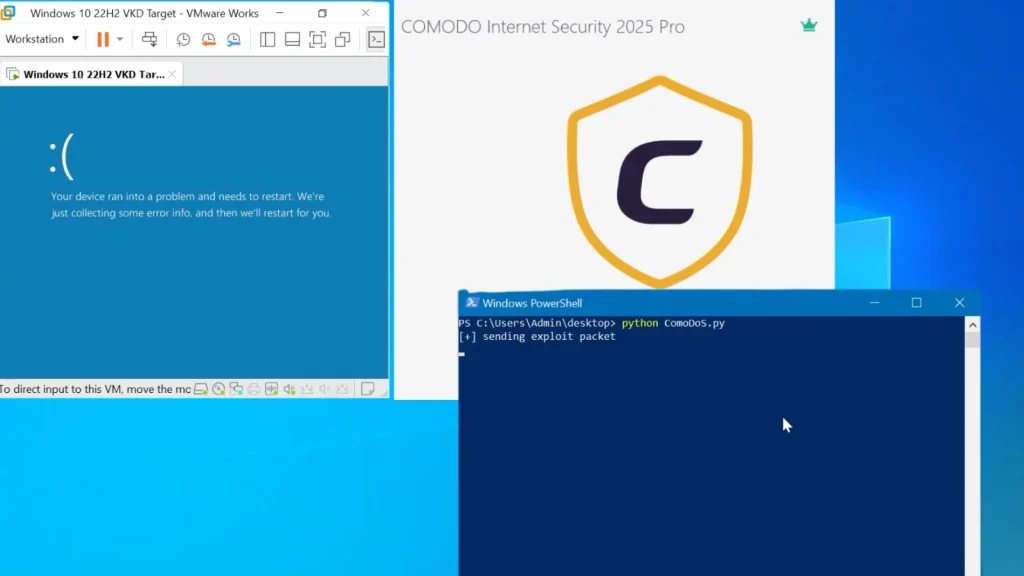
A critical zero-day vulnerability in Comodo Internet Security’s firewall driver, Inspect.sys, has been disclosed, allowing remote attackers to crash Windows systems with a single malformed IPv6 packet. This alarming flaw, dubbed “ComoDoS,” poses a significant threat to users relying on Comodo’s security suite. The vulnerability’s public disclosure by security researcher Marcus Hutchins follows multiple unsuccessful attempts to engage the vendor.
Understanding the ComoDoS Vulnerability
The ComoDoS vulnerability resides within the Inspect.sys firewall driver, a core component of Comodo Internet Security. This driver is responsible for filtering network traffic and enforcing security policies. The flaw specifically exploits how the driver processes IPv6 packets. By crafting a specially malformed IPv6 packet, a remote attacker can trigger a denial-of-service (DoS) condition, leading to an immediate crash of the target Windows system.
What makes this vulnerability particularly insidious is its ability to bypass all configured firewall rules. This means that even with a fully configured and ostensibly secure Comodo firewall, a malicious actor can still compromise system stability. The impact of such a crash can range from temporary disruption to data loss, depending on the system’s state when it occurs.
This 0-day status means that no official patch from Comodo is currently available, leaving users exposed to potential attacks. The vulnerability’s discovery and subsequent disclosure by Marcus Hutchins highlight the responsible disclosure process breaking down, forcing researchers to go public to ensure user awareness.
Technical Details and Impact
While specific exploit details are not fully public to prevent widespread abuse, the core mechanism involves sending a crafted IPv6 packet to the target system running Comodo Internet Security. The malformation within this packet is not properly handled by the Inspect.sys driver, leading to an unhandled exception or critical error that forces the Windows operating system to blue screen (BSOD).
The implications of a remote DoS vulnerability are substantial:
- System Instability: Frequent system crashes disrupt productivity and can lead to loss of unsaved work.
- Reduced Availability: For critical systems, repeated crashes can render them unusable, impacting business operations.
- Data Corruption Risk: Abrupt system shutdowns carry an inherent risk of data corruption, especially to open files or databases.
- Gateway to Further Exploitation: While primarily a DoS, such vulnerabilities can sometimes be chained with other flaws to achieve more advanced attacks, although this is not explicitly stated for ComoDoS.
It is important to note that the vulnerability is triggered remotely, meaning an attacker does not need local access to the target machine to initiate the attack.
Remediation Actions
Given the 0-day nature of ComoDoS and the lack of an official patch from Comodo, immediate remediation options are limited but crucial for minimizing risk:
- Disable Comodo Internet Security (Temporary): As a last resort, if robust alternative security is in place, temporarily disabling or uninstalling Comodo Internet Security would remove the vulnerable driver. This should only be done if an equally strong or stronger alternative is immediately implemented.
- Firewall Configuration Review: While ComoDoS bypasses configured firewall rules, reviewing and tightening overall network security policies, especially at the network perimeter (e.g., router/gateway firewall), can help filter out suspicious IPv6 traffic.
- Monitor for Vendor Updates: Vigilantly monitor Comodo’s official channels for any announcements regarding a patch or workaround. Apply updates immediately once they become available.
- Consider Alternative Security Solutions: For critical systems or environments where this vulnerability poses an unacceptable risk, evaluate and transition to alternative, actively maintained security solutions.
- Network Traffic Monitoring: Implement or enhance network intrusion detection systems (NIDS) to monitor for unusual IPv6 traffic patterns originating from unknown sources.
At present, there is no official CVE number assigned to this specific vulnerability. Users should refer to public advisories from cybersecurity researchers like Marcus Hutchins for the latest information.
Tools for Detection and Mitigation
While direct exploits for ComoDoS are nascent, certain general network security tools can assist in monitoring and mitigating broad network threats, including those potentially related to malformed packets.
| Tool Name | Purpose | Link |
|---|---|---|
| Wireshark | Packet analysis and network traffic inspection to identify malformed IPv6 packets. | https://www.wireshark.org/ |
| Snort / Suricata | Network Intrusion Detection/Prevention Systems (NIDS/NIPS) for detecting suspicious network activity and potentially malformed packet signatures. | https://www.snort.org/ https://suricata-ids.org/ |
| Firewall/Router Logs | Regularly review logs from network firewalls and routers for unusual connection attempts, especially those involving IPv6. | (Vendor Specific) |
Conclusion
The ComoDoS 0-day vulnerability in Comodo Internet Security’s Inspect.sys driver presents a serious threat, allowing remote attackers to crash Windows systems with a single malformed IPv6 packet. The inability to reach the vendor for a coordinated disclosure has forced this public announcement, leaving users in a precarious position without an official patch. Users of Comodo Internet Security should remain highly vigilant, monitor for official updates, and consider implementing temporary mitigation strategies to protect their systems from this unpatched flaw.




