Hackers Turn Fake Games Into Multi-Stage Infostealers That Steal Passwords and Crypto Wallets
In the evolving landscape of cyber threats, attackers are constantly refining their tactics to exploit user trust and system vulnerabilities. A concerning trend has emerged where seemingly innocuous game downloads, mods, and crack files are being weaponized into sophisticated, multi-stage infostealers. These malicious payloads are designed to surreptitiously infiltrate Windows systems, harvesting sensitive information like passwords and cryptocurrency wallet data from unsuspecting users.
This article delves into the intricacies of this deceptive campaign, providing cybersecurity analysts and IT professionals with a comprehensive understanding of the threat, its operational mechanics, and, critically, the preventative and remedial actions necessary to safeguard digital assets.
The Deceptive Lure: Fake Games and Software
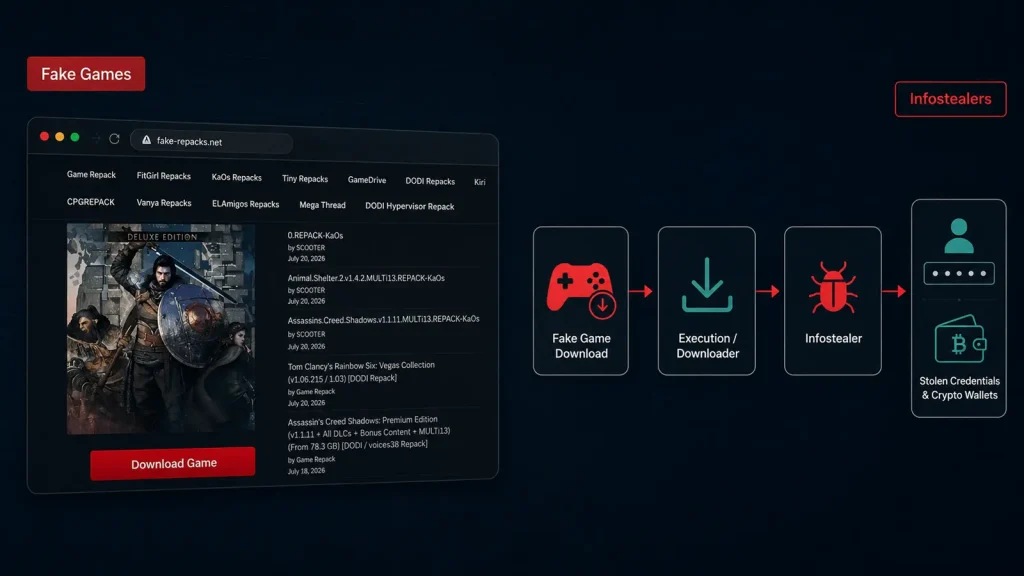
The attackers exploit a common user behavior: the search for free or hard-to-find software, particularly games, modifications, and cracking tools. They distribute malicious archives disguised as legitimate software downloads. These archives often appear harmless upon initial inspection, and may even present a convincing loading or installation screen, mimicking a genuine setup process. This deceptive front serves as a critical first stage in lulling users into a false sense of security, allowing the multi-stage infostealer to begin its clandestine operation.
Multi-Stage Infostealers: A Deep Dive into Their Operation
The sophistication of these infostealers lies in their multi-stage delivery and execution. Once a user downloads and initiates the seemingly benign archive, a complex chain of events is triggered, designed to evade detection and maximize data exfiltration. While the exact technical details of each variant may differ, the core principles remain consistent:
- Initial Dropper: The downloaded archive typically contains an initial dropper component. This small, often obfuscated executable is responsible for unpacking and launching subsequent malicious payloads.
- Stealthy Installation: The infostealer prioritizes stealth. It often installs itself in obscure directories, modifies system registry entries, and establishes persistence mechanisms to ensure it restarts with the system.
- Information Gathering: The primary objective is data exfiltration. These infostealers are engineered to scavenge for a wide array of sensitive information, including:
- Browser Credentials: Stored passwords, cookies, and autofill data from web browsers (e.g., Chrome, Firefox, Edge).
- Cryptocurrency Wallet Data: Private keys, seed phrases, and wallet files from various cryptocurrency applications and browser extensions.
- System Information: Machine details, installed software, and network configurations, which can aid in further exploitation.
- Documents and Files: Specific types of documents or files deemed valuable by the attackers.
- Command and Control (C2) Communication: Exfiltrated data is transmitted to attacker-controlled command and control servers. This communication is often obfuscated or encrypted to avoid network detection.
Remediation Actions
Given the multi-faceted nature of this threat, a layered security approach is crucial for both prevention and remediation. Organizations and individual users must adopt robust cybersecurity practices to mitigate the risks associated with these infostealers.
- Software Source Verification: Always download software, especially games, mods, and utilities, from official and reputable sources. Avoid unofficial forums, torrent sites, or suspicious third-party download portals.
- Endpoint Detection and Response (EDR): Implement and maintain robust EDR solutions. These tools can detect anomalous behavior, identify suspicious file executions, and block malicious processes before they can fully compromise a system.
- Antivirus/Anti-Malware: Ensure up-to-date antivirus and anti-malware software is installed and actively scanning your systems. Regularly review scan logs for any detected threats.
- Strong, Unique Passwords: Utilize strong, unique passwords for all online accounts. Implement a password manager to securely store and generate complex passwords.
- Multi-Factor Authentication (MFA): Enable MFA wherever possible, especially for email, financial accounts, and cryptocurrency exchanges. This adds an essential layer of security even if credentials are compromised.
- Regular Backups: Perform regular backups of critical data to an offline or air-gapped storage solution. This can aid in recovery in the event of a successful data exfiltration or ransomware attack.
- User Education: Educate users about the dangers of unofficial software downloads, phishing attempts, and suspicious links. Reinforce the importance of scrutinizing file sources and exercising caution.
- Network Segmentation: For organizational networks, segmenting networks can help contain the spread of malware and limit the scope of potential data breaches.
- Patch Management: Keep operating systems, applications, and web browsers updated with the latest security patches. Vulnerabilities in unpatched software are often exploited by malware.
Relevant Security Tools
To aid in the detection, analysis, and mitigation of such threats, several security tools are invaluable:
| Tool Name | Purpose | Link |
|---|---|---|
| VirusTotal | Online service for analyzing suspicious files and URLs. Aggregates results from multiple antivirus engines. | https://www.virustotal.com/ |
| Malwarebytes Endpoint Detection and Response (EDR) | Provides proactive threat detection and incident response capabilities for endpoints. | https://www.malwarebytes.com/business/endpoint-detection-response |
| Procmon (Process Monitor) | Advanced monitoring tool for Windows that shows real-time file system, Registry, and process/thread activity. | https://learn.microsoft.com/en-us/sysinternals/downloads/procmon |
| Wireshark | Network protocol analyzer that lets you see what’s happening on your network at a microscopic level. Useful for detecting C2 communication. | https://www.wireshark.org/ |
| YARA | Tool aimed at helping malware researchers identify and classify malware samples. Can be used to create detection rules. | https://virustotal.github.io/yara/ |
Conclusion
The proliferation of multi-stage infostealers hidden within fake game downloads represents a significant and evolving threat to digital security. These sophisticated campaigns leverage social engineering and technical obfuscation to bypass traditional defenses, specifically targeting valuable credentials and cryptocurrency assets. By understanding the methodology behind these attacks, implementing robust preventative measures, and utilizing appropriate security tools, individuals and organizations can significantly enhance their resilience against such pervasive threats. Vigilance and proactive security practices remain paramount in safeguarding sensitive digital information.