Controlling Super‑Admin Roles in SaaS Platforms (Google Workspace, M365, Salesforce)
Controlling Super Admin Roles in SaaS Platforms: Google Workspace, M365, and Salesforce
In the intricate landscape of modern SaaS platforms, the control and management of administrative roles are paramount to maintaining robust security and operational integrity. This article will delve into the critical aspects of defining, assigning, and safeguarding super admin roles within Google Workspace, M365, and Salesforce, providing a comprehensive guide to best practices for organizations.
Understanding the Admin Role

Definition of Admin Roles
An admin role, within any SaaS ecosystem, denotes a set of predefined permissions and privileges that allow an individual to perform specific administrative tasks. These roles are essential for managing users, configuring services, and maintaining the overall health and security of the platform. Properly defining and assigning roles is a fundamental best practice for effective user management and governance.
Types of Admin Roles in Google Workspace
Google Workspace offers a granular approach to administrative access through a variety of predefined and custom roles. These roles enable organizations to assign privileges based on specific responsibilities, ranging from managing user accounts and resetting passwords to configuring security settings and service applications. Understanding these distinct Google Workspace admin roles is crucial for effective Google Workspace administration and ensuring that each administrator possesses only the necessary permissions. The Google Admin Console provides a centralized interface for managing these roles.
Within Google Workspace, there are numerous administrator roles designed to cater to diverse organizational needs and responsibilities. Beyond the super admin, several other roles allow for specific operational control and grant particular permissions, ensuring that different admins can manage users, oversee organizational units, or handle specific service configurations without possessing full system access, thereby adhering to the principle of least privilege. These roles include various google workspace roles tailored to specific administrative functions.
- Google Workspace admin
- User management admin
- Help desk admin
- Groups admin
Importance of Super Admins
The super admin role holds the highest level of privilege within a SaaS platform, granting unrestricted access to all features and data. In Google Workspace, for example, a super administrator possesses comprehensive control over all Google Workspace accounts, able to manage users, security settings, and every service without limitation. Due to the extensive power associated with this super admin account, its protection and judicious assignment are critical for preventing unauthorized access and mitigating potential security risks.
Managing Google Workspace Admin Roles
Overview of Google Workspace Administration
Effective Google Workspace administration is crucial for maintaining a secure and efficient digital environment. This encompasses a broad spectrum of responsibilities, from managing user accounts and configuring service settings to upholding stringent security policies. A well-structured approach to Google Workspace administration ensures that all organizational units operate seamlessly and securely, aligning with the principle of least privilege by carefully assigning administrator roles. The Google Admin Console serves as the central hub for these critical operations, including the admin roles page for managing user access.
Assigning Administrator Roles
The process of assigning administrator roles within Google Workspace requires meticulous attention to detail to ensure that each admin possesses only the necessary permissions. Organizations must strategically assign roles to individuals based on their specific job functions, preventing the over-provisioning of privileges. This best practice minimizes potential security risks and enhances operational efficiency, as admins are empowered to manage users and services without unnecessary access to sensitive data or configurations.
Best Practices for Role Management
Adhering to best practices for role management, including the use of pre-built roles, is fundamental to safeguarding your Google Workspace environment. By proactively managing roles, organizations can mitigate the risk of unauthorized access, ensuring the integrity and security of all Google Workspace accounts. Key practices include:
- Regularly reviewing and auditing assigned administrator roles
- Ensuring that super admins are limited to a select few
- Implementing robust password policies for all administrator accounts
Custom Roles and Access Control
Creating Custom Administrator Roles
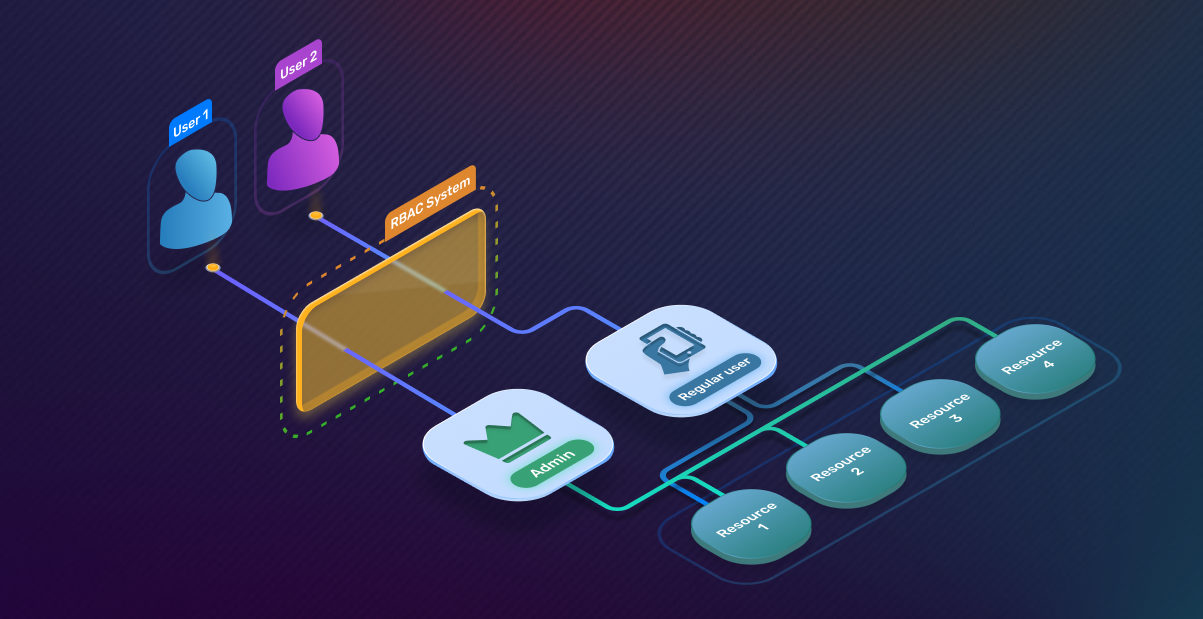
Google Workspace offers the flexibility to create custom roles, providing organizations with granular control over administrative privileges. This capability allows for the precise definition of permissions, ensuring that each admin role aligns perfectly with specific departmental or project-based responsibilities. By utilizing custom roles, organizations can further refine their access control mechanisms, moving beyond predefined roles to meet unique operational requirements and bolster their security posture.
Access Control Mechanisms
Robust access control mechanisms are vital for protecting sensitive data and preventing unauthorized actions within Google Workspace. These mechanisms involve not only the careful assignment of admin roles but also the implementation of multi-factor authentication, regular security audits, and adherence to the principle of least privilege across all user accounts. Effective access control ensures that only authorized personnel can manage Google Workspace settings and user accounts.
Simplifying Role Management
Simplifying role management within Google Workspace is a continuous effort aimed at optimizing security and operational efficiency. This involves leveraging the Google Admin Console to its full potential, documenting all assigned roles and their associated privileges, and providing comprehensive training to admins. By streamlining these processes, organizations can effectively manage roles, ensure compliance, and maintain a secure and productive Google Workspace environment without unnecessary complexity, leveraging pre-built roles where applicable.
Effective Role Assignment Strategies
How to Assign Super Admin Roles
Assigning super admin roles within any SaaS platform, be it Google Workspace, M365, or Salesforce, demands a meticulously planned approach. Due to the extensive privileges associated with the super admin account, it is a critical best practice to limit the number of individuals holding this role to the absolute minimum necessary. This reduction in the attack surface significantly enhances security. Organizations must establish clear criteria and a robust approval process before any individual is assigned this powerful administrator role.
Managing Roles Effectively
Effective role management extends beyond the initial assignment of super admins; it encompasses the continuous oversight and refinement of all administrator roles within the Google Workspace environment. This proactive strategy involves regular audits of assigned permissions, ensuring that each admin’s privileges remain aligned with their current responsibilities. Leveraging the Google Admin Console to manage roles effectively allows organizations to adjust permissions as job functions evolve, preventing privilege creep and maintaining a secure operational posture across all user accounts.
Monitoring Admin Activities
Vigilant monitoring of admin activities is an indispensable component of a comprehensive security strategy. Within Google Workspace, the Google Admin Console provides tools to track actions performed by all admins, including super admins, ensuring that administrator privileges are monitored effectively. This monitoring capability helps identify unusual or unauthorized activities, enabling a swift response to potential security incidents, particularly concerning google workspace roles. Regularly reviewing these logs is a best practice that ensures accountability and strengthens the overall security of the Google Workspace environment, protecting sensitive data and user accounts through diligent oversight of administrator privileges.
Comparative Analysis: Google Workspace, M365, and Salesforce
Admin Role Structures Across Platforms
Examining the admin role structures across Google Workspace, M365, and Salesforce reveals distinct approaches to privilege management, yet all aim to provide granular control. Understanding these foundational differences is crucial for effective multi-platform administration and consistent security policies.
| Platform | Admin Role Management |
|---|---|
| Google Workspace | Tiered system with predefined and custom roles (via Google Admin Console) |
| M365 | Various administrator roles (within Microsoft 365 admin center) |
| Salesforce | Profiles and permission sets |
Similarities and Differences in Role Management
While Google Workspace, M365, and Salesforce each present unique interfaces and terminologies, core similarities in role management exist, centered on the principle of least privilege and the effective use of google cloud services. All platforms allow organizations to assign roles, define permissions, and manage user accounts, aiming to prevent unauthorized access. Key differences lie in their extensibility for custom roles, the depth of audit trails, and how super admin privileges are partitioned or managed, requiring tailored best practices for each platform to ensure robust security.
Best Practices Across SaaS Platforms
Adopting universal best practices across all SaaS platforms, including Google Workspace, M365, and Salesforce, is paramount for maintaining a strong security posture, especially when managing roles and permissions. This includes assigning an administrator role to ensure proper oversight of Google services. limiting super admin access, implementing multi-factor authentication for all administrator accounts, and regularly reviewing and auditing assigned permissions. Organizations should also prioritize continuous training for admins, ensure clear documentation of all roles and privileges, and leverage automated tools for user management and security monitoring to manage roles effectively and safeguard all workspace accounts.

How does a google admin or super administrator limit risk from privileged role accounts?
A google admin or super administrator should enforce the principle of least privilege by assigning a set of privileges that match common business functions rather than full super admin rights; use cloud identity account controls and identity management tools to require MFA, session limits, and conditional access; rotate credentials and log privileged activity to detect insider threats and prevent security breaches; and use a management tool to audit role grants so you can prove compliance with regulatory requirements.
What steps should a super admin account owner follow as a step-by-step guide to onboard new users and grant administrator roles to other users?
Start with a step-by-step guide: create cloud identity or google workspace accounts for new users, assign custom roles tailored to the job (avoid permissive super admin grants), document onboarding tasks in the admin console, set up role grants for administrator users with only necessary permissions, configure billing and management tool access separately, and schedule periodic reviews so that when employees change roles or leave you can remove or adjust privileges promptly.
When and why should I create custom roles in google workspace roles instead of giving someone a super admin account?
Create custom roles when you need to map permissions to common business functions—such as managing billing, user lifecycle, or security settings—because custom roles offer finer control and reduce the blast radius of a compromised account; this helps enforce the principle of least privilege, supports identity management policies, and reduces exposure to cloud security and insider threats compared with broad super administrator privileges.
How can administrators use google workspace or cloud identity and salesforce help together to maintain cross-platform security and compliance?
Use google workspace or cloud identity as the central identity provider and integrate it with Salesforce using SSO and SCIM for provisioning; apply administrator roles to other users in each platform that reflect the same least-privilege model; combine logs and SIEM outputs from Google and Salesforce to detect anomalies, prove compliance, and streamline audits; consult salesforce help for product-specific role mapping and API options for automated role grants.
What operational controls prevent orphaned super admin accounts when employees change roles or leave?
Implement a lifecycle process tied to your organizational structure: require HR-triggered deprovisioning, use automated workflows in the admin console to revoke privileged role access, keep an inventory of administrator users, conduct regular access reviews, and use management tools to revoke or transfer ownership of resources and billing so that permissive super admin accounts are eliminated and you reduce the risk of cybersecurity incidents or regulatory noncompliance.