
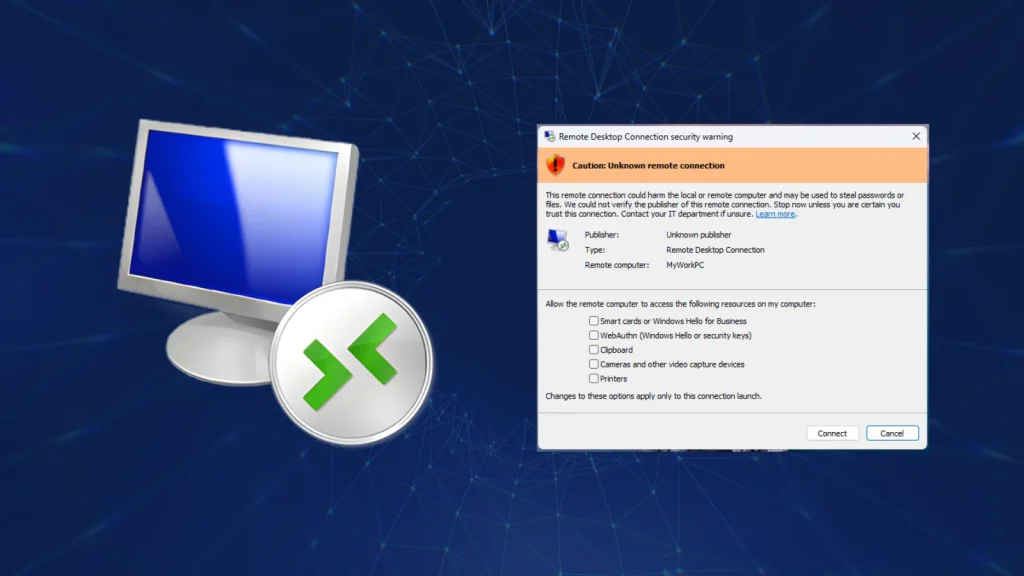
Microsoft Confirms Remote Desktop Warnings May Display Incorrectly After April 2026 Security Update
Imagine logging into a remote system, expecting crucial security warnings to pop up clearly, only to be met with garbled text or misplaced elements. For IT professionals and security analysts relying on Remote Desktop Protocol (RDP), this isn’t just an inconvenience; it’s a potential blind spot to active phishing threats. Microsoft has recently acknowledged a significant issue stemming from its April 2026 Windows 11 cumulative update: RDP security warning dialogs may display incorrectly on specific configurations. This malfunction undermines a critical user protection mechanism, making it imperative for organizations to understand the implications and ensure their defenses remain robust.
Microsoft Confirms RDP Warning Display Anomaly
The core of the issue, officially recognized by Microsoft, is that security warnings designed to alert users about potential risks during RDP sessions may not render as intended. Specifically, the dialogs could appear with incorrect formatting, overlapping text, or misplaced components. This isn’t merely a cosmetic glitch; these warnings are strategically placed to inform users before they proceed with an RDP connection, especially when connecting to unfamiliar or untrusted endpoints. When these visual cues are compromised, users are deprived of clear information, increasing their susceptibility to social engineering tactics and phishing attacks.
The Genesis of the Bug: April 2026 Security Update
Microsoft states that this bug was introduced alongside the April 14, 2026, cumulative update for Windows 11. While security updates are fundamental to patching vulnerabilities and enhancing system integrity, occasionally they can introduce unforeseen regressions. In this instance, the alteration of how RDP security warnings are handled or rendered appears to have been an unintended consequence of the update. Organizations that strictly adhere to patch management cycles and promptly deploy cumulative updates are the most likely to encounter this specific display anomaly.
Impact on User Security and Phishing Defense
The primary concern with incorrectly displayed RDP warnings is the direct impact on user security. These warnings are often the last line of defense against users inadvertently connecting to malicious servers disguised as legitimate ones. If a user cannot clearly read or understand a warning about an untrusted certificate, a mismatched hostname, or other security advisories, they are more likely to dismiss it or proceed without due caution. This situation creates a fertile ground for phishing campaigns, where attackers leverage deceptive RDP connection prompts to trick users into divulging credentials or granting access to compromised systems.
Remediation Actions and Proactive Measures
While Microsoft works on a definitive fix for this RDP display bug, organizations and individual users should implement several proactive measures to mitigate the risk:
- Educate Users: Reinforce cybersecurity awareness training specifically on RDP best practices. Emphasize the importance of scrutinizing connection details, even if warning dialogs appear unusual. Train users to recognize legitimate RDP warning signs versus potentially malformed or deceptive ones.
- Verify Connection Details Independently: Before connecting via RDP, users should independently verify the authenticity and integrity of the remote host. This can include checking the IP address, hostname, and certificate details through out-of-band channels or trusted internal systems.
- Implement Strong Authentication: Ensure multifactor authentication (MFA) is mandated for all RDP connections where possible. MFA adds a crucial layer of security, even if a user is tricked into attempting a connection to a malicious server.
- Limit RDP Exposure: Restrict RDP access to only necessary personnel and IP ranges. Utilize VPNs for RDP connections from outside the corporate network. Regularly audit RDP access logs for unusual activity.
- Monitor Microsoft Announcements: Stay vigilant for official communications from Microsoft regarding a patch or workaround for this specific display issue. Subscribe to Microsoft’s security advisories and update channels.
- Consider Alternative Remote Access Solutions: For highly sensitive environments or during the interim period, evaluate using alternative secure remote access solutions that may not be affected by this Windows 11 RDP bug.
Tools for Enhancing RDP Security and Monitoring
While this issue is a display bug, robust RDP security tools remain critical for overall protection. Here are some relevant tools:
| Tool Name | Purpose | Link |
|---|---|---|
| DUO Security | Multi-factor authentication (MFA) for RDP and other services | https://duo.com/ |
| Microsoft Defender for Endpoint | Endpoint detection and response (EDR), including RDP anomaly detection | https://www.microsoft.com/en-us/security/business/threat-protection/microsoft-defender-for-endpoint |
| Nessus | Vulnerability scanning to identify unsecured RDP ports and configurations | https://www.tenable.com/products/nessus |
| Splunk/Elastic Stack | Security Information and Event Management (SIEM) for RDP log analysis and threat hunting | https://www.splunk.com/ / https://www.elastic.co/ |
Conclusion
The acknowledgment by Microsoft that Remote Desktop security warnings may display incorrectly after the April 2026 Windows 11 cumulative update highlights a critical usability and security concern. While not a direct vulnerability in RDP itself, this display bug weakens a crucial line of defense against phishing and social engineering by hindering clear communication with users. Organizations must prioritize user education, enforce strong authentication, limit RDP exposure, and proactively monitor for Microsoft’s resolution to ensure that even with visual anomalies, their remote access remains secure and resilient against evolving threats.




