
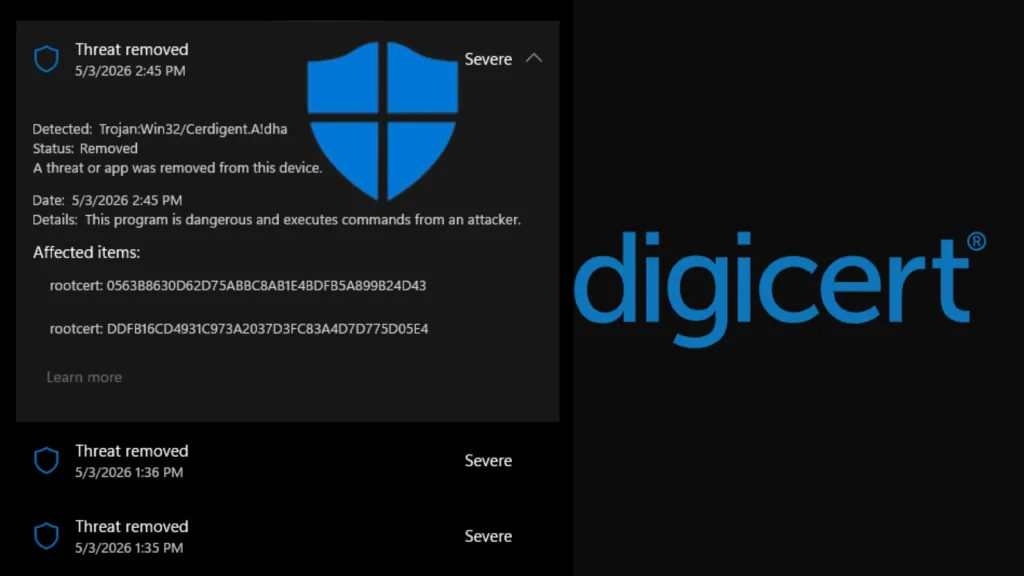
Microsoft Defender Mistakenly Flags DigiCert Root Certificates as Malware
The Digital Certificate Conundrum: Microsoft Defender Flags Legitimate DigiCert Roots as Malware
Imagine a digital world where the very foundations of trust – your digital certificates – are inexplicably flagged as malicious. This isn’t a hypothetical scare scenario; it recently became a reality for countless organizations globally when Microsoft Defender, a cornerstone of enterprise security, mistakenly identified legitimate DigiCert root certificates as dangerous malware. This widespread false positive had the potential to cripple critical SSL/TLS validation and code-signing operations, sending a ripple of concern through the cybersecurity community.
On or around April 30, 2026, a routine Microsoft Defender antimalware signature update introduced a detection labeled Trojan:Win32/Cerdigent.A!dha. This new signature, intended to protect systems from genuine threats, unfortunately developed a critical flaw: it began incorrectly identifying specific registry entries associated with two widely used DigiCert root certificates. The implications of such an error are profound, impacting the very mechanisms that ensure secure communication and software authenticity.
Understanding the Impact: Why Root Certificate False Positives Matter
Root certificates are the bedrock of the Public Key Infrastructure (PKI). They are trusted by operating systems, browsers, and applications to verify the authenticity of other certificates, establishing a chain of trust for SSL/TLS connections (think secure websites) and code signing (ensuring software hasn’t been tampered with). When a root certificate is mistakenly flagged as malware, the consequences can be severe:
- Disrupted SSL/TLS Connections: Applications and systems relying on these certificates for secure communication might fail to establish connections, leading to outages for websites, VPNs, and other encrypted services.
- Software Execution Issues: Code signed with certificates chained to the flagged DigiCert roots could be blocked from executing, preventing legitimate software – including operating system components or critical business applications – from running.
- Operational Downtime: IT teams would face significant challenges diagnosing and remediating these issues, leading to widespread operational disruption and potential financial losses.
- Erosion of Trust: Such incidents can erode confidence in security solutions, prompting users to question the accuracy of their protective measures.
The Technical Details: Trojan:Win32/Cerdigent.A!dha and DigiCert
The core of the issue lay in the Trojan:Win32/Cerdigent.A!dha detection within Microsoft Defender. This signature, designed to identify a generic trojan, inadvertently targeted registry entries associated with legitimate DigiCert root certificates. While specific details of the exact registry entries are not fully disclosed, it’s common for security software to scan for unusual or malicious patterns in the registry, which can sometimes lead to collisions with legitimate system components, especially after a flawed update.
DigiCert is one of the world’s leading providers of digital trust services, issuing a significant portion of the SSL/TLS certificates used globally. Their root certificates are embedded in virtually all operating systems and browsers, making them incredibly impactful when a false positive occurs.
Remediation Actions: Addressing the False Positive
While Microsoft quickly moved to address the issue with subsequent signature updates, immediate actions were often required by affected organizations. Here’s how cybersecurity professionals responded and what ongoing measures are prudent:
- Update Microsoft Defender Signatures: The primary and most crucial step was to ensure all Microsoft Defender instances received the latest antimalware signature updates. Microsoft rapidly deployed a fix to resolve the erroneous detection.
- Monitor System Logs: Proactively monitor security event logs for instances of Trojan:Win32/Cerdigent.A!dha detections, particularly in conjunction with certificate-related errors.
- Verify Certificate Trust: If SSL/TLS or code-signing issues persist, verify the trust chain of affected certificates using native operating system tools (e.g., CertMgr.msc on Windows) or third-party certificate viewers.
- Isolate and Analyze: For any persistent detections, isolate affected systems and conduct thorough analysis to confirm if the detection is a false positive or indicates a genuine compromise unrelated to the Defender issue.
- Review and Reconfigure: In some highly sensitive environments, a temporary review of antivirus exclusions for critical system paths might have been considered, though this should always be approached with extreme caution and reversed once the issue is resolved.
Lessons Learned: The Importance of Robust Testing
This incident underscores several critical lessons for both security vendors and enterprises:
- Thorough Signature Testing: Security vendors must implement even more rigorous testing protocols for signature updates to prevent false positives that can have catastrophic consequences.
- Layered Security Approach: Relying on a single security solution, no matter how robust, can be risky. A layered defense strategy helps mitigate the impact of failures in any single component.
- Rapid Response and Communication: Microsoft’s swift response in deploying a fix was crucial. Clear and timely communication from vendors during such incidents is paramount for helping organizations recover.
- Proactive Monitoring: Enterprises need robust monitoring systems in place to detect anomalies and potential security tool misconfigurations quickly.
Cybersecurity Tools for Certificate Management and Endpoint Protection
Managing the health and validity of certificates is crucial. Here are some relevant tools:
| Tool Name | Purpose | Link |
|---|---|---|
| Microsoft Defender for Endpoint | Comprehensive endpoint detection and response (EDR) solution, including antivirus capabilities. | https://www.microsoft.com/en-us/security/business/microsoft-365-defender |
| DigiCert Certificate Inspector | Tool for inspecting and validating various types of digital certificates. | https://www.digicert.com/dc/tools/certificate-inspector |
| OpenSSL | A versatile command-line tool for managing certificates, keys, and cryptographic operations. | https://www.openssl.org/ |
| Certutil (Windows) | Built-in Windows command-line utility for managing Certificate Services. | https://docs.microsoft.com/en-us/windows-server/administration/windows-commands/certutil |
Conclusion: Maintaining Vigilance in a Complex Landscape
The Microsoft Defender incident, mistakenly flagging legitimate DigiCert root certificates, serves as a powerful reminder of the intricate and often delicate balance in modern cybersecurity. Even sophisticated security solutions can falter, and when they do, the impact can be widespread and disruptive. For organizations, it reinforces the need for continuous vigilance, robust incident response plans, and a proactive approach to monitoring and verifying the integrity of their digital infrastructure, especially critical components like digital certificates. Staying informed and agile in the face of evolving threats and occasional misconfigurations is paramount to maintaining a secure operational environment.




