
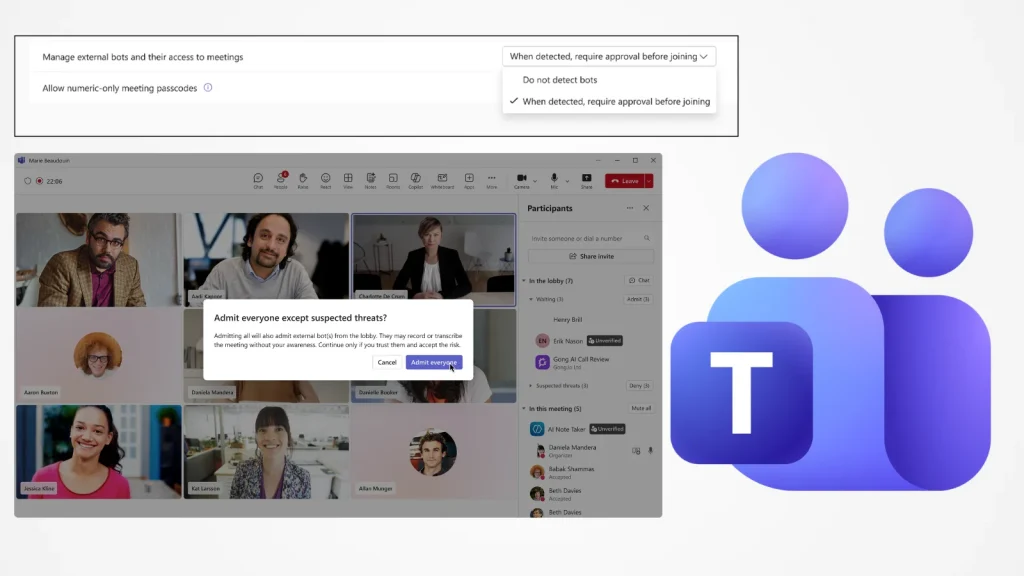
Microsoft Teams’ New Feature Blocks Bots from Joining Meetings
In a significant move to bolster meeting privacy and security, Microsoft has rolled out a crucial new capability for Teams. This feature grants IT administrators and meeting organizers unprecedented control over external bots attempting to join meetings, directly addressing the escalating concerns surrounding AI-powered meeting tools that have become increasingly prevalent in the modern workplace.
The Rise of AI Meeting Bots and Associated Risks
The proliferation of AI-powered note-taking bots and other automated tools in virtual meetings has offered undeniable benefits, such as automated transcriptions, summaries, and action item generation. However, this convenience has come with a growing shadow of privacy and security concerns. Unauthorized bots, or even legitimate ones used improperly, can inadvertently expose sensitive company information, intellectual property, or confidential discussions, creating potential legal and compliance liabilities.
The core issue lies in the unhindered access these bots often have to meeting content. Without proper controls, a bot could potentially record, store, and analyze conversations without explicit consent from all participants, raising questions about data governance and the ethical use of AI in professional environments. This new Microsoft Teams feature directly tackles these challenges by introducing a robust gatekeeping mechanism.
Microsoft Teams’ New Bot Protection: How It Works
The new bot protection in Microsoft Teams empowers both IT administrators and individual meeting organizers. This multi-layered approach ensures that unauthorized or unapproved bots cannot automatically join sensitive conversations. While the exact implementation details are often refined, the general mechanism involves:
- Administrator Control: IT departments can establish organization-wide policies, whitelisting approved bots and blocking others. This central control point is crucial for maintaining a consistent security posture across the enterprise.
- Organizer Overrides: Meeting organizers have granular control to manage bot access for specific meetings. This allows for flexibility, enabling the use of necessary tools while preventing uninvited intrusions.
- Explicit Permissions: Rather than passive entry, bots are now subject to explicit permission requirements, ensuring transparency and accountability. Attendees will likely have visibility into which bots are attempting to join and can potentially challenge their presence.
This capability adds a vital layer of defense against potential data breaches and ensures that meeting discussions remain within the intended audience, mitigating risks associated with the unintended sharing of confidential information.
The Importance of Granular Control in Enterprise Environments
For organizations operating in regulated industries or handling sensitive data, granular control over external applications accessing communication platforms is not merely a convenience but a necessity. The ability to dictate which AI tools can participate in meetings directly impacts an organization’s compliance with regulations like GDPR, HIPAA, or CCPA.
Beyond compliance, robust control fosters trust among employees and external partners. Knowing that sensitive conversations are protected from unauthorized listening devices, whether human or AI, enhances psychological safety and encourages open communication.
Remediation Actions and Best Practices for IT Administrators
With this new feature, IT administrators have powerful tools at their disposal. Here are key remediation actions and best practices:
- Review and Define Bot Policies: Establish clear policies regarding which AI meeting bots are approved for use within the organization. This should be a collaborative effort with legal and compliance teams.
- Leverage Centralized Management: Utilize the Microsoft Teams admin center to configure organization-wide bot access settings. Implement a whitelist approach where only explicitly approved bots can join.
- Educate End-Users: Inform meeting organizers and participants about the new bot protection features and their role in maintaining meeting security. Provide guidelines on when and how to invite approved bots.
- Regularly Audit Bot Activity: Monitor audit logs for any unauthorized bot attempts or unusual activity related to meeting attendance.
- Stay Updated: Keep abreast of Microsoft Teams updates and new security features to continuously strengthen your organization’s defense posture.
Conclusion
Microsoft Teams’ new bot protection capability is a timely and essential enhancement, addressing the evolving landscape of workplace collaboration and the inherent risks introduced by AI automation. By providing both IT administrators and meeting organizers with greater control, Microsoft is empowering organizations to maintain privacy, enforce security policies, and ensure the integrity of their communications. This move underscores the critical need for robust security measures as AI tools become increasingly integrated into our daily professional lives, ultimately fostering a more secure and trustworthy meeting environment.




