
New RDP Alert After April 2026 Security Update Warns of Unknown Connections
New RDP Alert: Microsoft’s April 2026 Update Enhances Phishing Protection
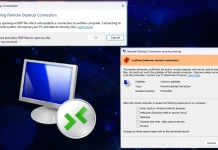
The landscape of cyber threats is in constant flux, with sophisticated phishing attacks continually probing for weak points. One enduring vector for compromise has been the Remote Desktop Protocol (RDP), a cornerstone for remote access. Microsoft, recognizing the increasing weaponization of RDP files, has rolled out a significant behavioral change to its Windows Remote Desktop Connection application (MSTSC) as part of its April 2026 Patch Tuesday security update. This update introduces critical new warning dialogs, specifically designed to protect users from malicious Remote Desktop Protocol (.rdp) file exploits originating from unknown or untrusted sources.
Understanding the Threat: Weaponized RDP Files
Remote Desktop Protocol (RDP) enables users to connect to and control a remote computer over a network. While incredibly useful for IT administrators and remote workers, the .rdp file format itself has become a potent tool for threat actors. These files, when crafted maliciously, can be used in various attack scenarios:
- Phishing Campaigns: Attackers embed a malicious .rdp file within a deceptive email or link, convincing users it’s a legitimate connection file. Once opened, it can initiate connections to attacker-controlled servers, facilitate credential harvesting, or lead to further compromise.
- Malware Delivery: A weaponized .rdp file can be configured to execute commands or download malware upon connection, often leveraging vulnerabilities in the RDP client or server.
- Lateral Movement: Within a compromised network, attackers can use custom .rdp files to move between systems, silently establishing persistence or expanding their access.
The ease with which these files can be modified and distributed has made them a favored tool for various threat groups, necessitating a more robust defense mechanism from Microsoft.
Microsoft’s Response: What’s New in MSTSC
The April 2026 Patch Tuesday update introduces a crucial behavioral change within the MSTSC client. Previously, users might have opened an .rdp file with little explicit warning if it pointed to a new or unconventional connection. The new dialogs aim to interject a clear prompt when a user attempts to connect to an RDP endpoint defined by an .rdp file from an “unknown” or “untrusted” source.
This “unknown” designation likely applies to .rdp files downloaded from the internet, received via email, or originating from paths not designated as trusted. The specific wording and behavior of these warning dialogs will be critical in educating users about the potential risks before they proceed with an untrusted connection.
Impact on Cybersecurity Professionals and Enterprises
For IT professionals and cybersecurity teams, this update presents both a positive step forward and a potential communication challenge:
- Increased User Awareness: The new dialogs will inherently make users more cautious, prompting them to question the legitimacy of unfamiliar RDP connections. This serves as an invaluable layer of defense against phishing.
- Reduced Phishing Success: By explicitly warning users, the update aims to reduce the success rate of phishing campaigns that rely on tricking users into opening malicious .rdp files.
- User Education Critical: While the warnings are helpful, effective user education will still be paramount. Users need to understand why these warnings appear and the severe consequences of ignoring them.
- Policy Adjustments: Organizations may need to review and adjust their Group Policies related to RDP connections, ensuring that legitimate .rdp files are properly signed or sourced from trusted locations to avoid undue friction for end-users.
Remediation Actions and Best Practices
To effectively leverage Microsoft’s new RDP alert system and bolster your organization’s defenses against .rdp file
-based attacks, consider the following actions:
- Educate Users: Conduct regular training on identifying phishing attempts, especially those involving attachments or links that initiate RDP connections. Emphasize never opening .rdp files from unknown sources.
- Implement Least Privilege: Ensure users only have RDP access to the systems absolutely necessary for their roles.
- Strong Authentication: Enforce Multi-Factor Authentication (MFA) for all RDP access, both internal and external.
- Network Segmentation: Isolate critical servers and RDP endpoints within segmented network zones to limit lateral movement in the event of a compromise.
- Regular Patching: Maintain a rigorous patching schedule for all Windows systems, ensuring the MSTSC client and underlying RDP components are always up-to-date. This includes ensuring the April 2026 update is deployed across your estate.
- Employ Endpoint Detection and Response (EDR): Utilize EDR solutions to monitor RDP activity, detect anomalous connections, and identify potential compromises in real-time.
- Review RDP Gateway Usage: For external RDP access, leverage RDP Gateways to centralize and secure connections, applying granular access controls and logging.
- Digital Signatures for .rdp Files: For environments that distribute .rdp files, explore options for digitally signing these files to establish trust and potentially bypass some warnings for legitimate connections.
Tools for RDP Security and Monitoring
Enhancing RDP security goes beyond just client-side warnings. Various tools can assist in monitoring, securing, and managing RDP environments.
| Tool Name | Purpose | Link |
|---|---|---|
| Microsoft Defender for Endpoint | Endpoint detection & response, RDP activity monitoring | https://www.microsoft.com/en-us/security/business/microsoft-365-defender |
| Sysmon | Detailed logging of system activity, including RDP connections | https://docs.microsoft.com/en-us/sysinternals/downloads/sysmon |
| RDP Brute-Force Defenders | Software designed to block RDP brute-force attacks | (Varies by vendor; search for “RDP brute force protection”) |
| Network Access Control (NAC) Solutions | Control who can access RDP ports and resources based on device health/identity | (Varies by vendor; Cisco ISE, Aruba ClearPass, etc.) |
Conclusion: A Proactive Step Towards Enhanced RDP Security
Microsoft’s April 2026 security update marks a crucial evolution in defending against RDP-based phishing and exploitation. By introducing clear warning dialogs for unknown .rdp connections, Microsoft is empowering users with more information and injecting a critical pause before potentially dangerous actions. This change underscores the ongoing battle against social engineering and the need for continuous vigilance. For IT and security professionals, it’s a timely reminder to reinforce user education, review RDP policies, and implement multi-layered security controls to protect this essential but often targeted protocol.




