
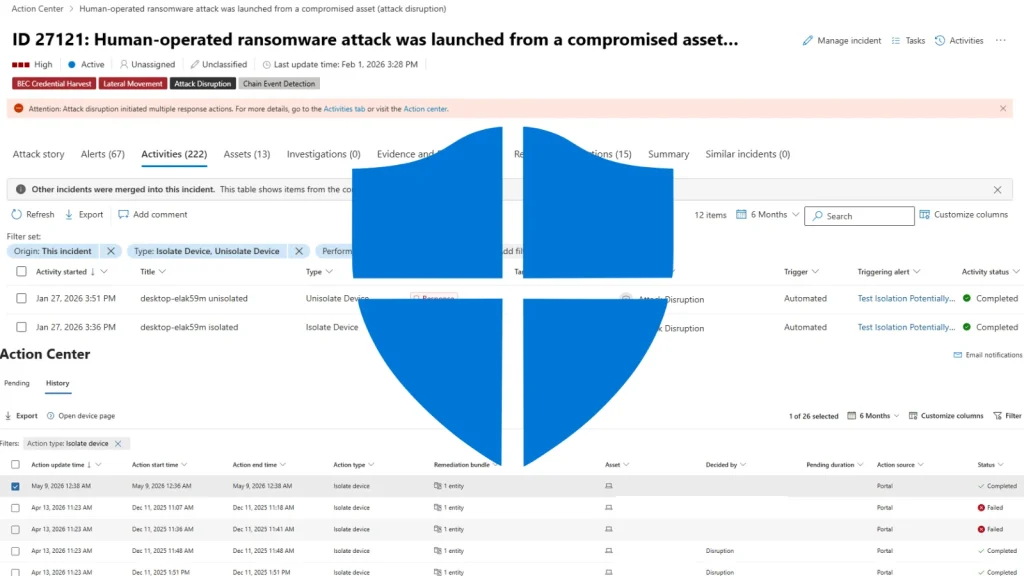
Microsoft Defender Now Automatically Isolates Compromised Devices to Stop Ransomware
Ransomware attacks continue to pose a significant threat to organizations worldwide, capable of crippling operations and extorting millions. The speed at which these attacks propagate within a compromised network often determines the extent of the damage. For security teams, the race against time to contain a breach is paramount. Microsoft has now significantly upped the ante in this ongoing battle, introducing a critical enhancement to Microsoft Defender for Endpoint: automatic device isolation.
The Urgency of Containment: Why Speed Matters
The moment a threat actor gains a foothold within an organization’s network, every second counts. Traditional incident response often relies on human intervention to analyze alerts, confirm compromises, and manually initiate containment actions. This delay, however brief, can be exploited by sophisticated ransomware strains to encrypt critical systems and exfiltrate sensitive data before detection. The ability to automatically and instantaneously isolate a compromised device is a game-changer, acting as a crucial circuit breaker against lateral movement and widespread infection.
Microsoft Defender’s New Automatic Device Isolation Capability
Microsoft Defender for Endpoint has integrated an automatic device isolation feature into its broader Automatic Attack Disruption framework. This proactive containment capability is designed to immediately disconnect a compromised workstation from the network when a high-confidence attack is detected. The key here is automation – there’s no waiting for a security analyst to review an alert or approve an action. The system identifies a threat, confirms its severity, and acts unilaterally to prevent further damage.
This automated response is particularly vital in the context of file-encrypting malware, where rapid containment can mean the difference between a minor incident and a catastrophic data loss event. By severing network communication for the infected device, Defender for Endpoint effectively quarantines the threat, preventing it from reaching other devices or critical servers.
How Automatic Attack Disruption Works
The automatic device isolation is not a standalone feature but an integral part of Microsoft’s comprehensive Automatic Attack Disruption framework. This framework leverages the extensive telemetry and threat intelligence gathered by Microsoft Defender to:
- Identify malicious activity patterns indicative of a developing attack.
- Correlate various security signals to build a high-confidence determination of a compromise.
- Execute predefined containment actions, such as isolating the affected device, without human oversight.
This approach significantly reduces the dwell time of attackers within the network, thereby minimizing the potential impact of ransomware and other advanced persistent threats (APTs).
Impact on Ransomware Prevention and Response
For organizations battling the continuous onslaught of ransomware, this new feature offers a substantial advantage. It transforms incident response from a reactive, human-centric process into a proactive, automated defense mechanism. Here’s how it impacts ransomware prevention and response:
- Reduced Ransomware Spread: By isolating infected machines, the feature directly curbs the lateral movement of ransomware, preventing it from spreading across the network and encrypting more systems.
- Faster Containment: Automation eliminates the delay associated with manual response, drastically shortening the window of opportunity for attackers.
- Mitigated Business Disruption: Preventing a widespread infection means less downtime and a quicker return to normal operations post-incident.
- Enhanced Security Posture: It adds another crucial layer of defense, making it harder for ransomware to achieve its objectives even if an initial endpoint is breached.
Remediation Actions and Best Practices
While automatic isolation is a powerful tool, it’s part of a multi-faceted security strategy. Organizations should implement the following best practices alongside this new capability:
- Enable and Configure Defender for Endpoint: Ensure Microsoft Defender for Endpoint is fully deployed and correctly configured across all eligible devices. Regularly review and update its policies.
- Regular Patching and Updates: Keep operating systems, applications, and security software up to date. Many ransomware attacks exploit known vulnerabilities, such as those listed on CVE-2021-34527 (PrintNightmare) or CVE-2017-0199 (DDE vulnerabilities).
- Strong Authentication Practices: Implement multi-factor authentication (MFA) for all critical accounts, especially those with administrative privileges.
- Employee Training: Educate employees about phishing, social engineering, and safe browsing habits to reduce the risk of initial compromise.
- Robust Backup Strategy: Maintain frequent, air-gapped, and immutable backups of critical data to ensure recovery in the event of a successful attack.
- Network Segmentation: Implement network segmentation to limit the blast radius if an attack does occur, making it harder for threats to move between different parts of the network.
- Monitor and Alert Review: While automation is key, human oversight remains vital. Regularly review Defender for Endpoint alerts and perform threat hunting to identify and address potential blind spots.
Conclusion
Microsoft Defender for Endpoint’s new automatic device isolation capability represents a significant leap forward in defending against ransomware. By providing immediate, automated containment of compromised devices, it offers organizations a vital advantage in the fight against rapidly evolving cyber threats. This feature underscores the industry’s shift towards proactive, AI-driven security responses, significantly reducing the impact and spread of devastating attacks. Integrating this capability with other robust security practices is critical for maintaining a strong and resilient cybersecurity posture.




