Microsoft SCCM Vulnerability Chained to Execute Malicious Code Remotely
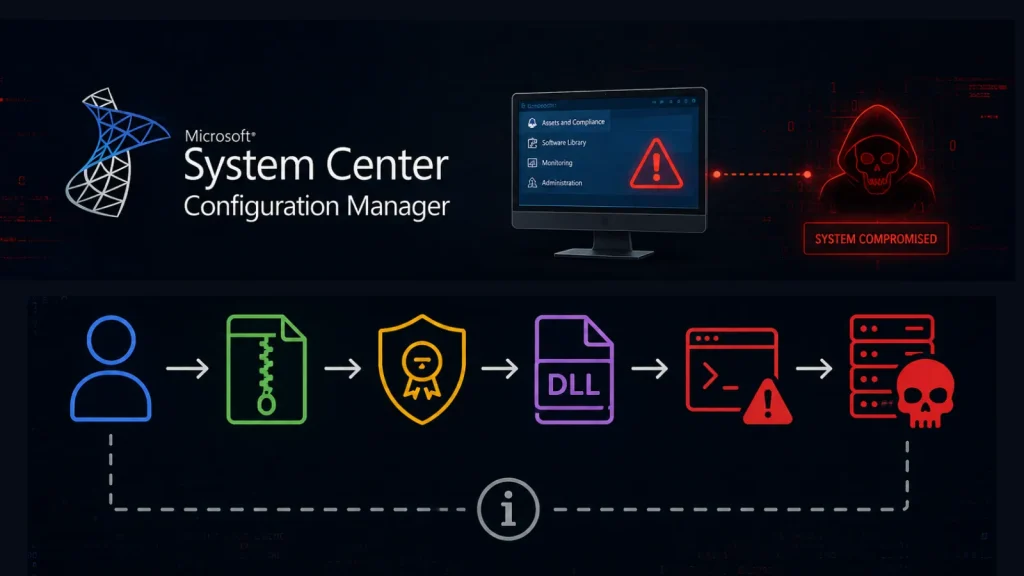
Organizations worldwide rely heavily on Microsoft System Center Configuration Manager (SCCM), also known as Configuration Manager, to manage and maintain their Windows environments. Its broad functionality, from deploying operating systems to managing software updates, makes it an indispensable tool. However, recent disclosures by security researchers have unveiled a critical attack chain targeting SCCM primary site servers, capable of enabling remote code execution and potentially compromising an organization’s entire managed infrastructure.
Understanding the SCCM Vulnerability Chain
The core of this significant security concern lies in a series of vulnerabilities that, when chained together, allow an attacker to achieve remote code execution (RCE) on an SCCM primary site server. This isn’t a singular flaw but rather a sophisticated combination of weaknesses that exploit how SCCM processes certain inputs and manages communication within its architecture.
The details, though still emerging, point to an attack vector that could bypass standard security controls, granting an unauthorized actor the ability to execute malicious code with elevated privileges. Such an exploit could lead to complete control over the SCCM server, subsequently providing a foothold into all managed endpoints within the network. This situation is particularly alarming because the SCCM server often holds extensive privileges, making it a high-value target for adversaries.
Impact of Remote Code Execution on SCCM Servers
A successful RCE on an SCCM primary site server presents a catastrophic scenario for any organization. The immediate impact includes:
- Full System Compromise: An attacker gains complete control over the SCCM server, including access to sensitive configuration data, deployment packages, and administrative credentials.
- Widespread Malware Distribution: The compromised SCCM server can be weaponized to push malware, ransomware, or other malicious payloads to all connected client machines, affecting the entire Windows environment.
- Data Exfiltration: With elevated privileges, attackers can access and exfiltrate sensitive corporate data stored on or accessible through the SCCM server.
- Persistent Foothold: Attackers can establish persistent backdoors and mechanisms to maintain access even after initial detection, making remediation significantly more challenging.
- Operational Disruption: Tampering with SCCM operations can disrupt software deployments, patch management, and system configurations, leading to widespread operational paralysis.
Remediation Actions for SCCM Administrators
Given the severity of this attack chain, immediate and comprehensive action is required from all organizations utilizing Microsoft SCCM. Proactive defense and prompt patching are paramount.
- Apply All Available Patches: Monitor Microsoft’s security advisories closely for patches related to SCCM. While specific CVEs were not detailed in the initial source, it’s critical to apply all relevant security updates as soon as they become available. Keep your SCCM environment, including the primary site server, secondary site servers, and management points, fully updated.
- Implement Least Privilege: Ensure that the SCCM service accounts and administrative accounts operate with the absolute minimum necessary privileges. Avoid using domain administrator accounts for SCCM services.
- Network Segmentation: Isolate your SCCM infrastructure within a dedicated network segment. This limits an attacker’s ability to reach the SCCM server from other parts of the network and contains any potential breach.
- Enhanced Monitoring: Implement robust logging and monitoring for all SCCM activities. Look for unusual access patterns, unauthorized configuration changes, or unexpected deployments. Pay particular attention to activity on the primary site server.
- Endpoint Detection and Response (EDR): Deploy EDR solutions across your endpoints and servers, including the SCCM server, to detect and respond to suspicious activity that might indicate an ongoing attack or post-exploitation.
- Regular Security Audits: Conduct frequent security audits of your SCCM configuration and environment to identify and rectify misconfigurations or potential vulnerabilities.
- Review Public-Facing Components: Ensure that no SCCM components are inadvertently exposed to the internet. Restrict access to SCCM management points and client communication points to trusted networks.
Detection and Mitigation Tools
Implementing a robust security posture for your SCCM environment requires a combination of vigilance and effective tooling. The following tools can aid in detection, scanning, and mitigation efforts:
| Tool Name | Purpose | Link |
|---|---|---|
| Microsoft Defender for Endpoint | Advanced EDR for threat detection and response on Windows servers and endpoints. | Microsoft Defender for Endpoint |
| Nessus (Tenable) | Vulnerability scanning for identifying known vulnerabilities on SCCM servers and related infrastructure. | Nessus Vulnerability Scanner |
| Qualys VMDR | Comprehensive vulnerability management, detection, and response platform. | Qualys VMDR |
| Wireshark | Network protocol analyzer for deep inspection of network traffic to detect anomalous SCCM communications. | Wireshark |
| Sysinternals Suite (Process Monitor, Autoruns) | Advanced utilities for monitoring and troubleshooting Windows systems, useful for investigating suspicious processes on SCCM servers. | Sysinternals Suite |
Protecting Your Managed Windows Environment
The discovery of this attack chain serves as a stark reminder of the critical importance of securing core infrastructure components like Microsoft SCCM. A breach here can have ripple effects across an entire organization, impacting operational continuity, data integrity, and regulatory compliance.
Organizations must prioritize the security of their SCCM deployments. This includes a commitment to continuous patching, adherence to least privilege principles, robust network segmentation, and proactive threat monitoring. By taking these measures, administrators can significantly reduce the attack surface and protect their managed Windows environments from sophisticated threats.