
New Windows LegacyHive 0-Day Vulnerability Allows Hackers to Gain Admin Access
Unmasking LegacyHive: A Critical Windows Zero-Day Puts Admin Accounts at Risk
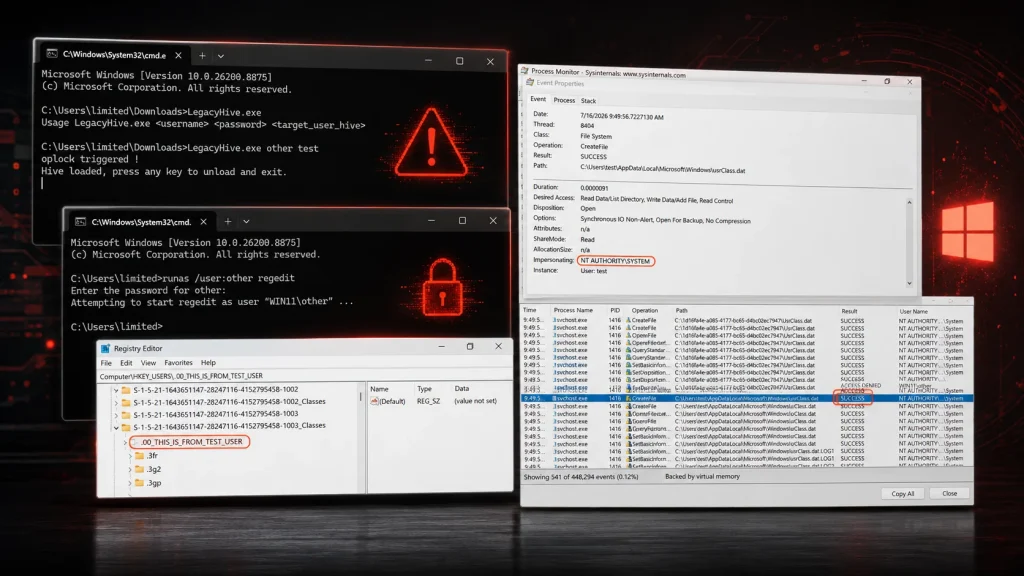
A new and alarming Windows zero-day vulnerability, dubbed LegacyHive (also known as MSNightmare), has emerged, posing a significant threat to system integrity. This critical flaw allows attackers to achieve local privilege escalation, effectively hijacking administrator accounts and executing arbitrary code with elevated privileges. For IT professionals, security analysts, and developers, understanding the mechanics and implications of LegacyHive is paramount to safeguarding Windows environments.
What is LegacyHive (MSNightmare)?
LegacyHive is a local privilege escalation (LPE) vulnerability that exploits a weakness within the Windows User Profile Service (ProfSvc). This service is fundamental to the operating system, responsible for managing user profiles and their associated registry hives during user logons and logoffs. The vulnerability derives its power from its ability to tamper with these core components, granting an attacker administrative control over a compromised system.
The existence of a public proof-of-concept (PoC) for LegacyHive exacerbates the immediate threat. This readily available exploit code empowers even less sophisticated attackers to leverage the vulnerability, making rapid remediation and proactive defense essential.
How Does LegacyHive Abuse the User Profile Service?
The User Profile Service (ProfSvc) plays a crucial role in providing a personalized computing experience for each user. When a user logs in, ProfSvc loads their unique user profile and registry hive. Conversely, upon logoff, it unloads these resources. LegacyHive exploits a flaw in this process, allowing an attacker to manipulate the way ProfSvc handles these operations. By interfering with the loading or unloading of registry hives, an attacker can elevate their privileges to an administrative level.
Specifically, the vulnerability enables an attacker to perform actions typically reserved for administrators, such as:
- Tampering with administrator accounts: This could involve changing passwords, creating new administrative users, or altering existing administrative privileges.
- Admin-level code execution: Once administrative privileges are achieved, an attacker can execute malicious code with the highest level of authority, leading to full system compromise.
Identifying and Mitigating the Threat: Remediation Actions
Given the severity of a zero-day vulnerability that grants administrative access, immediate action is required. While official patches are awaited, several steps can be taken to mitigate the risk posed by LegacyHive.
- Monitor for Official Patches: Continuously monitor Microsoft’s security advisories and promptly apply any patches released to address this vulnerability. This is the most effective long-term solution.
- Implement Principle of Least Privilege: Ensure all users operate with the minimum necessary privileges. This limits the impact even if an attacker successfully exploits a user-level account.
- Employ Advanced Endpoint Detection and Response (EDR) Solutions: EDR tools can help detect anomalous behavior indicative of privilege escalation attempts, even if the specific exploit is unknown.
- Regular Security Audits: Conduct frequent audits of user accounts, administrative groups, and system configurations to identify any unauthorized changes.
- Educate Users on Phishing and Social Engineering: While LegacyHive is a technical vulnerability, initial access often comes through social engineering. User awareness can prevent the initial foothold.
- Consider Temporary Workarounds (with caution): Depending on advisories from Microsoft or trusted security vendors, there might be temporary configuration changes that can reduce exposure. Always test these thoroughly in a non-production environment before deployment.
Tools for Detection and Mitigation
While direct exploits for zero-days are often proprietary, several security tools can aid in detecting suspicious activity and strengthening overall security posture against such threats.
| Tool Name | Purpose | Link |
|---|---|---|
| Windows Event Viewer | Review Security, System, and Application logs for unusual activity, especially around User Profile Service events and privilege changes. | https://learn.microsoft.com/en-us/windows/win32/eventlog/event-logging |
| Sysmon | A powerful system monitor that logs high-fidelity activity, providing detailed information about process creations, network connections, and file system modifications. Essential for detecting advanced threats. | https://learn.microsoft.com/en-us/sysinternals/downloads/sysmon |
| PowerShell cmdlets (Get-WinEvent, Get-Acl) | Scripting capabilities to query event logs, audit file/registry permissions, and identify unusual system configurations. | https://learn.microsoft.com/en-us/powershell/module/microsoft.powershell.management/get-winevent |
| Endpoint Detection and Response (EDR) Solutions | Real-time threat detection, investigation, and response capabilities. EDRs can identify privilege escalation attempts and anomalous process behavior. (Vendor-specific links vary) | (Requires specific vendor tool, e.g., CrowdStrike, SentinelOne) |
Looking Ahead: The Evolving Threat Landscape
The emergence of LegacyHive underscores the continuous and sophisticated nature of cyber threats. Zero-day vulnerabilities, by their very definition, are difficult to defend against as they exploit previously unknown weaknesses. Proactive security measures, continuous monitoring, and a robust incident response plan are not merely best practices but critical necessities in this dynamic environment. Organizations must remain vigilant, apply patches expeditiously, and strengthen their overall security posture to mitigate the risks posed by vulnerabilities like LegacyHive.




