
Adobe Acrobat Extension Flaw Lets Attackers Steal WhatsApp Chats From 329 Million Users
A Stealthy Threat: Adobe Acrobat Extension Flaw Exposes 329 Million WhatsApp Users
In an increasingly interconnected digital landscape, even seemingly innocuous browser extensions can harbor significant security risks. A recently unearthed vulnerability in the Adobe Acrobat Chrome extension served as a stark reminder of this reality, allowing attackers to discreetly collect sensitive WhatsApp Web data from millions of users. This incident, dubbed “HermeticReader” by security researchers, highlights the critical need for vigilance in managing browser extensions and understanding their potential impact on personal privacy.
The HermeticReader Flaw: How WhatsApp Chats Were Snatched
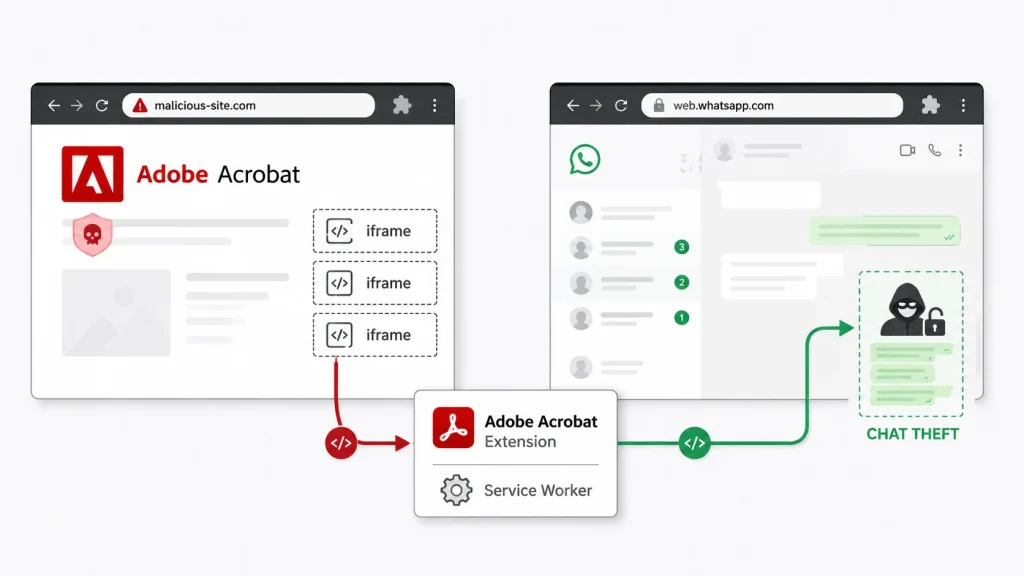
Security experts at Guardio Labs uncovered this profound flaw, officially tracked as CVE-2026-48294. The vulnerability exploited a critical oversight in the Adobe Acrobat Chrome extension, enabling malicious actors to bypass standard browser security mechanisms. What made HermeticReader particularly insidious was its silent execution: users did not need to click on suspicious links, download questionable files, or even enter credentials. Simply visiting a specially crafted malicious webpage was sufficient for the attacker to initiate the data exfiltration process.
The core of the attack leveraged the extension’s broad permissions and its ability to interact with web content across different origins. This cross-origin communication, when coupled with specific vulnerabilities in how the extension processed and rendered web content, allowed an attacker to inject malicious scripts. These scripts could then silently extract sensitive information from the WhatsApp Web interface, which many users access through their browsers.
Data at Risk: WhatsApp Chats, Contacts, and Profile Information
The scope of data compromised by this flaw was considerable. Attackers could harvest a wide array of personal and confidential information, including:
- WhatsApp Web Chats: The entire conversation history accessible through WhatsApp Web.
- Contact Lists: The names and associated phone numbers of a user’s contacts.
- Profile Data: Information from the user’s WhatsApp profile, which could include names, profile pictures, and “About” statuses.
The potential implications of such a data breach are extensive, ranging from targeted phishing attacks and identity theft to blackmail and reputational damage. With an estimated 329 million users potentially affected, the incident underscores the far-reaching consequences of extension vulnerabilities.
Remediation Actions and Best Practices
Addressing vulnerabilities like HermeticReader requires a multi-faceted approach, combining immediate remediation with proactive security practices.
- Update Adobe Acrobat Extension: Ensure your Adobe Acrobat Chrome extension is updated to the latest version. Adobe has patched CVE-2026-48294, and updating is the most critical immediate step.
- Audit Browser Extensions: Regularly review all installed browser extensions. Remove any extensions that are no longer used or those from untrustworthy developers. Be critical of the permissions requested by extensions during installation.
- Principle of Least Privilege: Grant extensions only the minimum necessary permissions required for their functionality. If an extension requests overly broad permissions (e.g., “read and change all your data on all websites”), reconsider its necessity.
- Browser Security Features: Utilize built-in browser security features, such as enhanced protection modes or site isolation.
- Regular Software Updates: Keep your operating system, web browser, and all installed applications updated. These updates often include critical security patches.
- Ad Blocker/Script Blocker: Consider using privacy-focused browser extensions that block known malicious sites and scripts, adding an extra layer of defense against web-based attacks.
Tools for Detection and Mitigation
Implementing effective cybersecurity hygiene involves leveraging appropriate tools for scanning, detection, and mitigation. While no single tool provides a complete solution, a combination can significantly enhance protection:
| Tool Name | Purpose | Link |
|---|---|---|
| Browser’s Extension Manager | Review and manage installed extensions and their permissions. | chrome://extensions (for Chrome) |
| Privacy Badger | Blocks trackers and unwanted scripts, helping to prevent cross-site data collection. | https://privacybadger.org/ |
| uBlock Origin | An efficient broad-spectrum blocker that can also block malicious domains and scripts. | https://ublockorigin.com/ |
| Web Application Firewalls (WAFs) | Protects web applications (used by organizations) from various web attacks, including script injection. | (Varies by vendor, e.g., Cloudflare WAF) |
Lessons from HermeticReader
The HermeticReader vulnerability serves as a critical reminder that the attack surface extends beyond traditional applications to browser extensions, which often operate with elevated privileges. For both individuals and organizations, understanding the potential risks associated with third-party software and maintaining rigorous security practices are non-negotiable. Proactive management of browser extensions, coupled with regular security updates and user education, forms the bedrock of a robust cybersecurity posture in an era where data privacy is paramount.




