
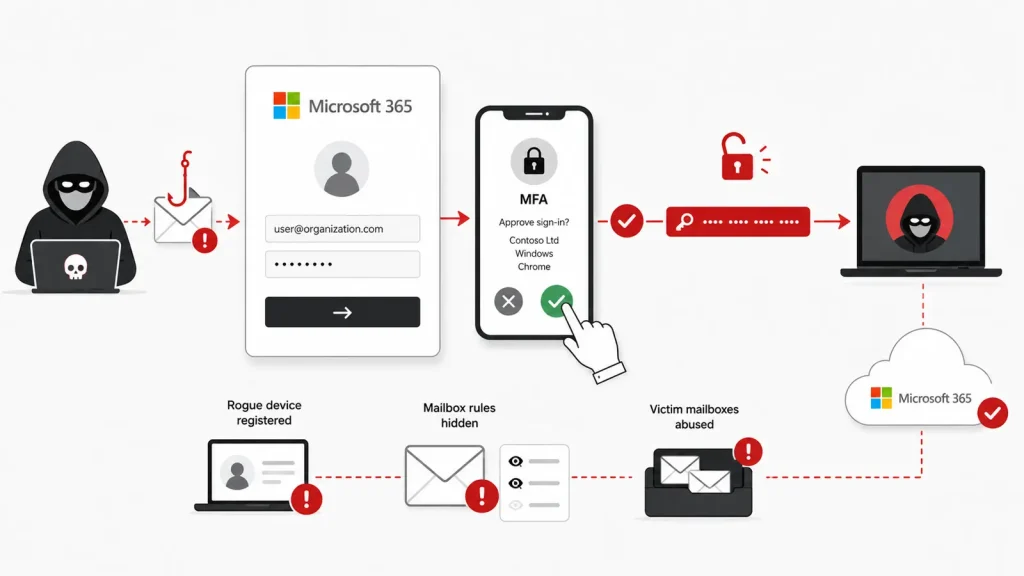
Hackers Let Victims Complete MFA Then Steal the Entire Microsoft 365 Session
Multi-factor authentication (MFA) stands as a critical defense against credential theft, yet sophisticated attackers continuously adapt. A new and concerning phishing technique has emerged, circumventing MFA by manipulating users into approving legitimate Microsoft sign-ins, subsequently hijacking their entire Microsoft 365 session. This isn’t about stealing your password; it’s about weaponizing your trust after you’ve already completed your security check.
The Evolving Threat: Bypassing MFA for Session Hijacking
Traditional stolen-password attacks are increasingly thwarted by MFA. However, this novel approach sidesteps that barrier entirely. Instead of attempting to guess or steal credentials directly, attackers employ a cunning social engineering tactic. They persuade a user to initiate and complete a legitimate Microsoft sign-in process, including the MFA challenge. Once the user approves the MFA prompt, the attackers, already in control of the underlying session, seamlessly take over their Microsoft 365 environment.
How the OAuth Device-Code Flow is Abused
At the core of this technique lies the abuse of the OAuth device-code flow. This feature was designed for legitimate purposes, enabling sign-ins on devices that lack a web browser for direct interaction, such as smart TVs or specialized meeting room systems. In a normal scenario, a user visits a URL (e.g., microsoft.com/devicelogin), enters a code displayed on the device, and then authenticates on a separate, browser-enabled device. The malicious campaign subverts this trusted process. Attackers present a fake interface that tricks the user into entering a code, initiating the legitimate device-code flow. Once the user authenticates and completes MFA, the attacker, who initiated the flow with their own controlled session, then gains access to the fully authenticated Microsoft 365 session.
Understanding the Attack Vector and Impact
The danger here is profound. With a hijacked Microsoft 365 session, attackers gain unauthorized access to a wealth of sensitive information and capabilities. This can include email, documents in SharePoint and OneDrive, Teams communications, and potentially administrative controls depending on the compromised user’s privileges. The victim has, in essence, unknowingly authorized the attacker’s access by completing what they believed was a legitimate sign-in for themselves. This attack vector highlights the continued need for vigilance beyond merely implementing strong authentication. While this specific campaign doesn’t have a CVE assigned to it as it exploits a feature rather than a vulnerability in Microsoft’s code, the potential for harm is significant.
Remediation Actions and Proactive Defense
Defending against such sophisticated session hijacking requires a multi-layered approach focusing on user education, rigorous monitoring, and advanced security configurations.
- Enhanced User Awareness Training: Educate users about the nuances of phishing beyond password requests. Emphasize scrutinizing login prompts and the origin of requests for MFA approval. Users should be highly suspicious of any unsolicited requests to “link” devices or enter codes into unfamiliar interfaces.
- Implement Conditional Access Policies: Leverage Microsoft 365 Conditional Access to restrict access based on device compliance, location, IP address, and other attributes. This can help detect and block anomalous login attempts even if MFA is bypassed.
- Monitor Sign-in Logs and Audit Trails: Regularly review Microsoft 365 sign-in logs for unusual activities, such as concurrent sessions from disparate geographical locations immediately following an MFA approval. Pay close attention to logs related to OAuth device-code flow usage.
- Session Timeout Configuration: Enforce strict session timeouts within Microsoft 365 to limit the window of opportunity for an attacker even if a session is hijacked.
- Zero Trust Architecture: Continue to move towards a Zero Trust model, where every access request is verified regardless of whether it originates inside or outside the network.
- Threat Emulation and Pen Testing: Conduct regular penetration testing and threat emulation exercises to identify potential weaknesses in your existing defenses against advanced phishing and session hijacking techniques.
Tools for Detection and Mitigation
While not a direct vulnerability in software, addressing this attack vector benefits from robust security tools.
| Tool Name | Purpose | Link |
|---|---|---|
| Microsoft 365 Defender | Advanced threat protection, email & identity protection, behavioral analytics. | https://www.microsoft.com/en-us/security/business/threat-protection/microsoft-365-defender |
| Azure Active Directory Conditional Access | Policy-based access control for enforcing security requirements. | https://docs.microsoft.com/en-us/azure/active-directory/conditional-access/ |
| SIEM Solutions (e.g., Splunk, Microsoft Sentinel) | Security Information and Event Management for centralized log analysis and anomaly detection. | https://www.splunk.com/ https://azure.microsoft.com/en-us/products/microsoft-sentinel |
| Phishing Simulation Platforms | Training users to recognize and report sophisticated phishing attempts. | https://knowbe4.com/ https://cofense.com/ |
Key Takeaways
The effectiveness of MFA as a primary defense against credential theft remains undisputed. However, this recent campaign demonstrates that attackers are finding creative ways to bypass even robust authentication mechanisms by exploiting trust and manipulating legitimate functionalities. Remaining secure means moving beyond simply implementing MFA to fostering a security-conscious culture, continuously monitoring for anomalies, and enforcing granular access controls. The threat landscape is always evolving, and our defenses must evolve with it.




