
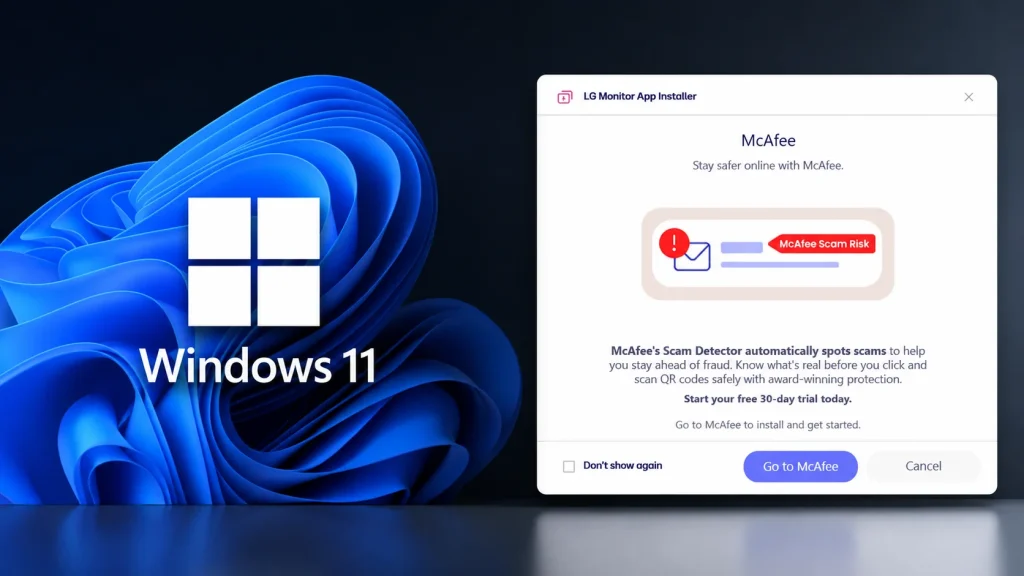
Microsoft Confirms No Bloatware Ads in Windows 11; LG Disables McAfee Pop-ups
Unpacking the LG Monitor Saga: Microsoft Confirms No Windows 11 Bloatware Ads, LG Disables McAfee Pop-ups
The digital landscape is fraught with unexpected challenges, and sometimes, even the most commonplace hardware can introduce unforeseen security and user experience headaches. Recently, Windows 11 users encountered a puzzling situation when connecting new LG monitors: unsolicited McAfee trial pop-ups began appearing. This incident sparked immediate concern about potential bloatware being nefariously embedded within the Windows ecosystem. However, a rapid response from both Microsoft and LG has clarified the situation, assuring users that these were not intentional ad placements by Microsoft.
The Unexpected McAfee Pop-up: A Closer Look
The issue first came to light through reports from owners of premium LG displays. Upon connecting their new monitors to Windows 11 systems, users observed that Windows Update silently delivered companion software for the LG Monitor. Immediately following this update, McAfee trial pop-ups began to appear, creating the impression that Microsoft was allowing or even facilitating third-party advertising in its operating system, akin to bloatware. This generated significant user dissatisfaction, as the expectation for a premium operating system and hardware experience is one free of intrusive advertising.
The key concern here wasn’t just the pop-ups themselves, but the mechanism through which they appeared. The fact that the LG Monitor software was delivered via Windows Update, a trusted channel for system and driver updates, raised red flags. It suggested a potential backdoor for unwanted software installations, undermining user trust in the update mechanism. This type of incident underscores the critical need for rigorous vetting of all software delivered through official channels.
Microsoft’s Swift Clarification: No Bloatware Ads in Windows 11
Responding to the growing user concern and media attention, Microsoft moved quickly to address the issue. The company issued a definitive statement confirming that these McAfee pop-ups were not a result of Microsoft intentionally integrating advertising or bloatware into Windows 11. Instead, the investigation revealed that the LG Monitor companion software, delivered via Windows Update, was the source of the McAfee trial installations and subsequent pop-ups. This clarification was crucial in debunking the perception that Microsoft had altered its policy on in-OS advertising.
Microsoft’s prompt communication helped to clarify the origin of the unwanted software, shifting the focus from an imagined Windows 11 bloatware problem to a third-party software integration issue. This move reinforced confidence in Microsoft’s commitment to a clean user experience within Windows 11, at least concerning direct advertising in the OS itself.
LG’s Remediation: Disabling McAfee Pop-ups
In parallel with Microsoft’s clarification, LG also took proactive steps to resolve the problem. The company confirmed that the McAfee trial offer was indeed bundled with its monitor companion software. Recognizing the negative user experience and the unintended controversy, LG implemented a fix to disable the McAfee pop-ups from appearing in future installations of its monitor software. This collaborative effort between a hardware manufacturer and an operating system vendor highlights the importance of accountability and quick action in maintaining user satisfaction and trust.
The exact technical details of how LG disabled these pop-ups are not publicly available, but it likely involved either removing the McAfee installer from future software packages or modifying the installation routine to prevent the automatic deployment of the trial offer. This quick turnaround from LG helped to mitigate further negative impact on its brand and on the Windows ecosystem.
Remediation Actions for Affected Users
For users who have already experienced the McAfee pop-ups due to the LG monitor software, here are some actionable steps:
- Check Installed Programs: Navigate to
Settings > Apps > Apps & features. Look for “McAfee” or “LG” related software that you did not intentionally install. - Uninstall Unwanted Software: If you find McAfee or other unwanted software, select it and choose “Uninstall.” Follow the prompts to completely remove the application.
- Run a Malware Scan: Even after uninstalling, it’s a good practice to run a full scan with a reputable antivirus solution (if you have one other than McAfee) to ensure no remnants or other unwanted programs remain.
- Review Startup Programs: Check your Task Manager (
Ctrl+Shift+Esc) under the “Startup” tab to ensure no unwanted programs are launching with Windows. Disable any suspicious entries. - Monitor for Future Updates: Keep an eye on LG’s official support channels for further advisories or updated software versions that explicitly address this bundling issue.
- Consider Driver-Only Installations: When installing new hardware, if possible, opt for “driver-only” installations rather than full software suites which often include additional bundleware.
Key Takeaways and Future Implications
This incident serves as a crucial reminder for both manufacturers and users. For manufacturers, it underscores the need for rigorous scrutiny of bundled software and a clear understanding of the user experience. Unwanted installations, even if seemingly harmless from a security vulnerability perspective, can significantly erode user trust. For consumers, it reinforces the importance of vigilance when installing new software, even if it comes via seemingly official channels like Windows Update. Always be prepared to identify and remove unwanted programs.
While no specific CVE number was associated with this event, as it primarily involved bundled software rather than a direct vulnerability in Windows itself, it highlights a common industry challenge. The transparency and swift actions from both Microsoft and LG in addressing this concern are commendable and set a positive precedent for how such issues should be handled in the future.




