
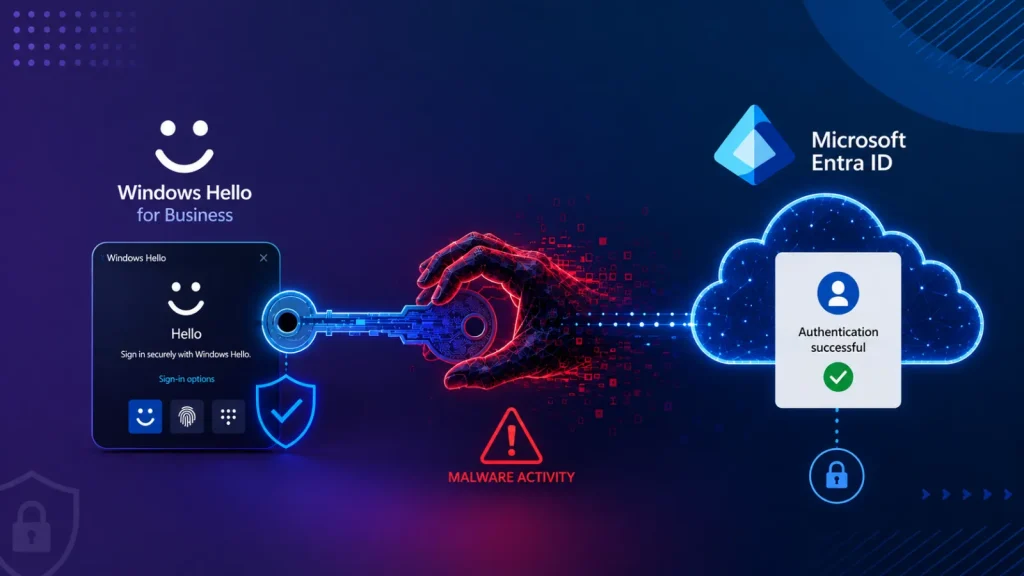
Malware Abuses Windows Hello for Business Key to Authenticate Microsoft Entra ID
In the evolving landscape of enterprise security, the promise of passwordless authentication has been a beacon of efficiency and enhanced protection. Windows Hello for Business (WHFB) stands at the forefront of this initiative, offering robust, biometric, and PIN-based login experiences. However, a recently highlighted technique demonstrates a critical vulnerability: malware operating within a compromised Windows user session can exploit WHFB cryptographic keys to gain unauthorized access to Microsoft Entra ID (formerly Azure Active Directory).
This alarming discovery means that even without knowledge of a user’s password, PIN, or biometric data, attackers can bypass conventional security measures, establishing a foothold in cloud environments. This blog post delves into the specifics of this sophisticated attack, its implications, and the essential remediation strategies organizations must adopt to safeguard their digital assets.
Understanding Windows Hello for Business Authentication
Windows Hello for Business is a pivotal component of Microsoft’s zero-trust security architecture, designed to provide strong, two-factor authentication without relying on traditional passwords. Instead, it leverages cryptographic keys bound to a user’s device. When a user authenticates with their PIN or biometric data, WHFB uses these keys to issue a primary refresh token (PRT) to Microsoft Entra ID, granting access to cloud resources.
The core principle is that the private key is protected by a Trusted Platform Module (TPM) or software-based security, making it difficult for attackers to extract. The user’s PIN or biometric data merely unlocks access to this protected key, not the key itself.
The Malware Exploitation Technique
The recently identified attack vector, detailed by cybersecurity researchers, capitalizes on an inherent trust relationship within a compromised user session. Specifically, the technique involves malware running with the privileges of a logged-in Windows user. This malware can:
- Access the WHFB Cryptographic Key: While the private key is designed to be protected, malware operating within the user’s security context can interact with the Windows Hello for Business components. This interaction allows the malware to request the use of the cryptographic key for authentication purposes.
- Forge Authentication Requests: With access to the WHFB key’s capabilities, the malware can construct and send legitimate-looking authentication requests to Microsoft Entra ID. This bypasses the need for the user’s PIN or biometric input, as the system perceives the request as originating from the legitimate user’s device.
- Obtain Primary Refresh Tokens (PRTs): Upon successful authentication, Microsoft Entra ID issues a PRT to the compromised session. This PRT is a highly valuable asset, granting the attacker persistent access to various cloud services and applications integrated with Microsoft Entra ID.
Crucially, this attack does not involve cracking the PIN or stealing biometric data. Instead, it abuses the legitimate mechanism by which WHFB authenticates, turning a security feature into an entry point for cloud compromise. For a detailed technical breakdown, refer to the original report referenced by Cybersecurity News.
Impact and Risks of WHFB Key Compromise
The implications of such a compromise are significant, extending beyond simple credential theft:
- Cloud Account Takeover: With a valid PRT, attackers gain access to the victim’s Microsoft Entra ID account, including associated cloud applications, data, and services like Microsoft 365, SharePoint, and OneDrive.
- Persistence: PRTs have a lifespan, and attackers can often renew them, establishing long-term persistence within the organization’s cloud infrastructure without further authentication challenges.
- Lateral Movement: Access to cloud resources can facilitate lateral movement within the enterprise, allowing attackers to discover and exploit other vulnerabilities or sensitive data.
- Data Exfiltration: Attackers can exfiltrate sensitive data stored in cloud storage, email, or other applications accessible via the compromised Entra ID account.
- Espionage and Sabotage: In advanced persistent threat (APT) scenarios, this type of access can be used for corporate espionage, intellectual property theft, or disruptive actions.
Remediation Actions and Mitigations
Addressing this vulnerability requires a multi-layered approach, focusing on endpoint security, identity management, and proactive threat detection:
- Enhanced Endpoint Protection: Deploy and maintain robust Endpoint Detection and Response (EDR) solutions. These tools are crucial for detecting and preventing malware execution, especially those attempting to interact with sensitive system components like WHFB.
- Principle of Least Privilege (PoLP): Ensure users operate with the minimum necessary privileges. Reducing administrative rights on endpoints limits the potential damage malware can inflict if a session is compromised.
- Regular Security Audits and Vulnerability Assessments: Continuously audit endpoint configurations and user access patterns to identify and rectify potential weaknesses.
- Security Information and Event Management (SIEM): Integrate security logs from Windows endpoints and Microsoft Entra ID into a SIEM solution. Monitor for unusual authentication patterns, rapid access to multiple cloud services from a new location, or suspicious activity related to PRT issuance.
- Conditional Access Policies: Implement stringent Microsoft Entra ID Conditional Access policies. These policies can enforce additional authentication requirements (e.g., multi-factor authentication) based on factors like device compliance, location, IP address, or application being accessed. For instance, restrict access to sensitive applications unless the device meets strict compliance requirements.
- Device Health Attestation: Leverage Windows Device Health Attestation, which uses the TPM to verify the integrity of the boot process and system configuration. This can help prevent malware from establishing a foothold on compromised devices.
- User Education and Awareness: Train users to identify and report phishing attempts, suspicious emails, and unfamiliar software. A compromised user session often begins with social engineering or drive-by downloads.
- Regular Patching and Updates: Keep operating systems, applications, and security software up to date. While this specific issue may not be a traditional software bug, timely patching reduces the attack surface for other vulnerabilities that malware might exploit to gain initial access.
Tools for Detection and Mitigation
| Tool Name | Purpose | Link |
|---|---|---|
| Microsoft Defender for Endpoint | Advanced EDR for threat detection and response. | Microsoft Defender for Endpoint |
| Microsoft Entra ID Conditional Access | Policy-based access control to enforce security requirements. | Microsoft Entra ID Conditional Access |
| Azure Monitor / Azure Sentinel | SIEM and security orchestration for cloud and on-premises logs. | Azure Monitor / Azure Sentinel |
| Sysinternals Process Monitor | Real-time file system, Registry, and process/thread activity monitoring (for incident response). | Process Monitor |
Conclusion
The technique demonstrating malware’s ability to abuse Windows Hello for Business keys to authenticate to Microsoft Entra ID underscores the persistent challenge of securing modern enterprise environments. While passwordless authentication offers significant advantages, its underlying mechanisms can become targets if not adequately protected. Organizations must prioritize robust endpoint security, implement stringent identity and access management policies, and maintain continuous vigilance through monitoring and auditing. By adopting a proactive and multi-layered security posture, enterprises can significantly reduce their exposure to this sophisticated attack vector and protect their critical cloud resources.




