
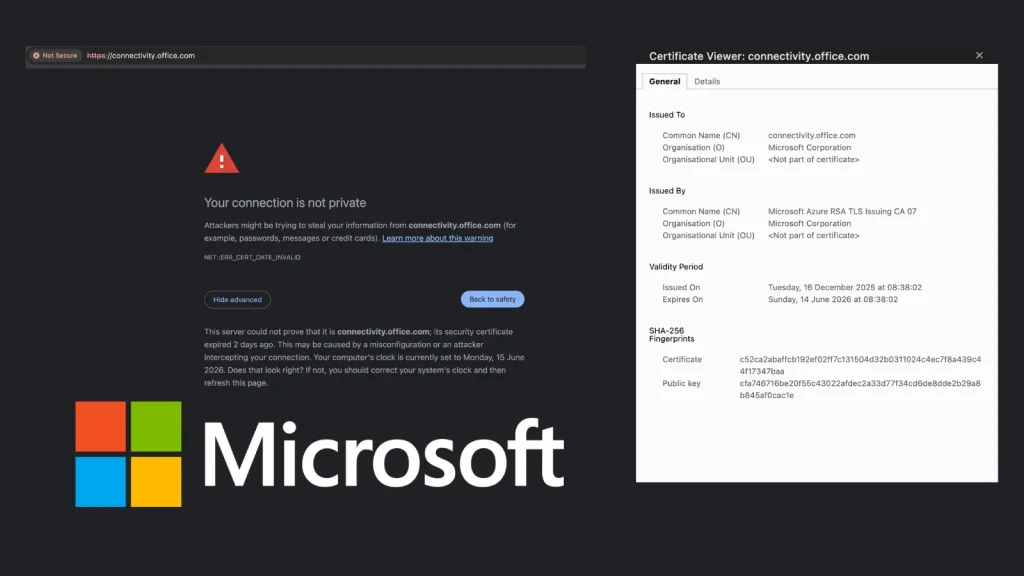
Microsoft Site Showing Warning Following Certificate Expiry
A fundamental pillar of secure online communication has recently faltered within a critical Microsoft domain, prompting widespread concern among IT professionals and underscoring the relentless importance of diligent certificate management. When a service relied upon globally for network health checks begins triggering untrusted connection warnings, it signals more than just an inconvenience; it points to a potential chink in the armor of digital trust.
This incident, specifically involving the connectivity.office.com domain, serves as a stark reminder that even tech giants can experience lapses in maintaining digital certificates – a cornerstone of secure socket layer (SSL) and transport layer security (TLS) protocols. For system administrators and security analysts, an untrusted connection warning isn’t just a browser pop-up; it’s a red flag indicating a compromised or expired certificate, potentially exposing users to man-in-the-middle attacks or, at best, significant operational friction.
Understanding the Microsoft Certificate Expiry Incident
The issue came to light on Monday when browsers began displaying untrusted connection warnings for connectivity.office.com. This domain is not just another Microsoft property; it’s a vital endpoint that IT professionals worldwide utilize to verify network connectivity to Microsoft 365 services. Its primary function is to allow administrators to confirm that their firewalls and network infrastructure are not inadvertently blocking access to essential Microsoft resources.
The core problem stemmed from an expired SSL/TLS certificate. Digital certificates are cryptographic assets that verify the identity of a website and encrypt data exchanged between a user’s browser and the server. They have a validity period, and once this period expires, browsers no longer trust the website, leading to security warnings. For a domain as critical as connectivity.office.com, such an oversight can lead to significant disruption and erode trust.
Impact on IT Professionals and Microsoft 365 Connectivity
The immediate impact on IT professionals was the inability to reliably use the connectivity.office.com domain for its intended purpose. Browsers, acting on behalf of user security, rightfully blocked or warned against connecting to a site with an untrusted certificate. This compromised the ability of administrators to quickly diagnose network issues, confirm firewall configurations, and ensure seamless access to Microsoft 365 services for their organizations.
Beyond the immediate diagnostic challenges, the incident raised questions about Microsoft’s internal certificate management processes. Given the scale and criticality of Microsoft’s infrastructure, an expired certificate on such a public-facing, widely-used diagnostic tool highlights a potential vulnerability in their operational security framework. While not a direct exploit in the traditional sense, an untrusted connection can be manipulated by malicious actors if users are compelled to bypass security warnings.
The Role of Digital Certificates in Cybersecurity
Digital certificates are foundational to modern internet security. Issued by trusted Certificate Authorities (CAs), they bind a cryptographic key to an organization’s identity, enabling secure communication. They are essential for:
- Authentication: Verifying that a website is legitimate and not an impostor.
- Encryption: Protecting data in transit from eavesdropping and tampering.
- Integrity: Ensuring that data has not been altered during transmission.
When a certificate expires, all these security assurances break down. Browsers correctly interpret this as a security risk, as the identity of the server can no longer be cryptographically verified, and the connection is no longer guaranteed to be secure. This is why expired certificates are treated with the same severity as self-signed or invalid certificates.
Remediation Actions for Administrators
While Microsoft would typically resolve an expired certificate issue on their end by renewing or replacing it, this incident serves as a pertinent reminder for all organizations and IT professionals to fortify their own certificate management practices. There is no specific CVE associated with an expired certificate, as it’s an operational oversight rather than a software vulnerability like CVE-2023-35618 or CVE-2023-36036, which describe actual code flaws. Nonetheless, its impact can be significant.
- Implement Certificate Lifecycle Management (CLM): Utilize automated tools and processes to track certificate expiry dates, renew them proactively, and revoke compromised certificates.
- Monitor Publicly Exposed Certificates: Regularly scan your public-facing domains for certificate validity, ensuring all are current and correctly configured.
- Educate End-Users: Reinforce the importance of never bypassing browser security warnings for untrusted connections, as this could expose them to malicious activity.
- Maintain Redundant Monitoring: For critical services, have multiple independent checks for certificate validity and network connectivity.
- Review Vendor SOC 2 Reports: For third-party services, examine their Security Operations Center (SOC) 2 reports for details on their certificate management practices.
Tools for Certificate Management and Monitoring
| Tool Name | Purpose | Link |
|---|---|---|
| ACME (Let’s Encrypt Client) | Automated certificate management (issuance, renewal) | https://letsencrypt.org/docs/client-options/ |
| KeyTalk Certificate Manager | Enterprise-grade Certificate Lifecycle Management (CLM) | https://www.keytalk.com/certificate-manager/ |
| SSL Labs Server Test | Analyze SSL/TLS certificate configuration and health | https://www.ssllabs.com/ssltest/ |
| Certbot | Free, open-source tool to automate certificate use with Let’s Encrypt | https://certbot.eff.org/ |
| OpenSSL | Command-line tool for managing SSL/TLS certificates | https://www.openssl.org/ |
Conclusion
The brief but impactful incident with Microsoft’s connectivity.office.com domain serves as a powerful illustration that foundational security elements, like digital certificate validity, require unwavering attention. For IT professionals and organizations, this event underscores the critical need for robust Certificate Lifecycle Management (CLM) policies and proactive monitoring. Overlooking certificate expiry dates can lead to service disruptions, security warnings, and a potential erosion of trust, even for the most established digital platforms. Maintaining a vigilant stance on certificate health is not just good practice; it’s an imperative for preserving secure and uninterrupted digital operations.




