
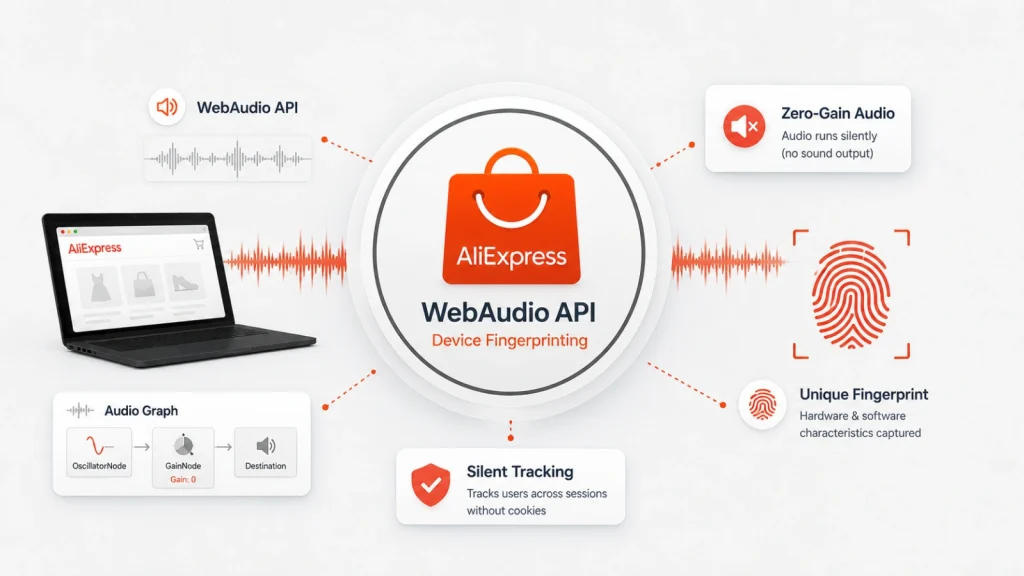
AliExpress Uses WebAudio API and Zero-Gain Audio Graphs for Silent Device Fingerprinting
The Silent Snoop: How AliExpress Uses WebAudio for Covert Device Fingerprinting
Imagine browsing your favorite online marketplace, completely unaware that your device is being silently scrutinized, its unique digital signature etched into a profile without your explicit consent. This isn’t a scene from a dystopian novel; it’s a real-world technique being employed by major e-commerce platforms. Recent findings reveal that AliExpress, a global online retail giant, is leveraging the WebAudio API and zero-gain audio graphs for aggressive and covert device fingerprinting. This sophisticated method not only raises significant privacy concerns but also introduces an unexpected functional side effect for users of multipoint Bluetooth audio devices.
Understanding WebAudio API and Zero-Gain Audio Graphs
The WebAudio API is a powerful JavaScript interface designed for processing and synthesizing audio in web applications. It allows developers to perform complex audio operations, such as creating audio effects, analyzing sound, and even generating music directly within the browser. The API operates by constructing an “audio graph,” where audio sources (like an HTML audio element or an oscillator) are connected to various audio nodes (such as gain nodes, filters, or convolvers) before finally being routed to the destination (your speakers or headphones).
The technique identified on AliExpress involves creating “zero-gain audio graphs.” A gain node controls the volume of an audio signal. Setting its gain to zero effectively mutes any sound passing through it. Therefore, a zero-gain audio graph is one where an audio source is connected to a gain node with zero gain, meaning no audible sound is produced. This renders the entire audio processing chain completely silent to the user.
The Mechanics of Silent Fingerprinting
So, how can a silent audio graph be used for device fingerprinting? The magic lies in the subtle variations in how different hardware and software configurations process audio. Even with zero-gain, the audio engine on your device still performs computations. These computations, while inaudible, can exhibit unique characteristics based on:
- Hardware differences: Sound cards, CPUs, and GPUs all contribute to the timing and precision of audio processing.
- Operating system specifics: How the OS handles audio buffers and scheduling can vary.
- Browser implementations: Different browsers might have subtle distinctions in their WebAudio API engines.
- Driver versions: Audio drivers play a crucial role in how audio is handled at a low level.
By carefully constructing complex audio graphs and measuring minute timing discrepancies or other properties of the “silent” signal processing, websites can infer a unique fingerprint for your device. This fingerprint is far more persistent and harder to evade than traditional cookie-based tracking, as it’s rooted in the intrinsic properties of your hardware and software.
AliExpress’s Implementation and the Bluetooth Conundrum
Security researcher Laserphile first brought this aggressive fingerprinting technique to light. Laserphile, using multipoint Bluetooth headphones, noticed an unusual disruption. Multipoint headphones are designed to stay simultaneously paired to multiple devices (e.g., a PC and a phone), allowing for seamless audio switching. When browsing AliExpress’s homepage, Laserphile observed that the website’s silent WebAudio processing was interfering with this Bluetooth multipoint functionality. This real-world side effect inadvertently exposed the presence of these hidden audio graphs.
The interference suggests that even silent audio processing consumes system resources and interacts with the device’s audio stack in a way that can be detected by other audio-related components, like Bluetooth audio drivers. This discovery highlights the pervasive nature of this fingerprinting method and its potential to impact user experience in unexpected ways.
The Privacy Implications of WebAudio Fingerprinting
The use of WebAudio API for silent device fingerprinting presents significant privacy challenges. Unlike cookies, which users can easily clear or block, a hardware-based fingerprint is much more difficult to circumvent. This allows platforms like AliExpress to:
- Track users across sessions and devices: Even if you clear your cookies or use incognito mode, your device’s fingerprint might still identify you.
- Build persistent user profiles: This data can be used for highly targeted advertising, behavioral analysis, and even price discrimination.
- Bypass traditional privacy controls: Most ad blockers and privacy extensions are not designed to detect or block this form of fingerprinting.
While AliExpress might argue this is for security purposes or to prevent fraud, the lack of transparency and the covert nature of the operation are deeply concerning for user privacy. This practice underscores the ongoing cat-and-mouse game between privacy-enhancing technologies and increasingly sophisticated tracking methods.
Remediation Actions and User Defenses
Given the stealthy nature of WebAudio fingerprinting, complete remediation can be challenging. However, users and developers can take several steps to mitigate the risk:
- Browser Privacy Settings: Some browsers offer stricter privacy settings that may limit WebAudio API access or introduce noise into the output, making fingerprinting harder. Experiment with your browser’s experimental features or flags related to WebAudio.
- Privacy-Focused Browsers: Browsers like Brave or Tor Browser are designed with strong anti-fingerprinting measures, often including specific protections against WebAudio-based tracking.
- Browser Extensions: While not foolproof, some advanced anti-fingerprinting extensions might offer partial protection by injecting noise or faking certain WebAudio parameters.
- Developer Awareness: Web developers should be aware of these techniques and advocate for ethical data collection practices. If you’re building a web application, consider the privacy implications of any WebAudio API usage.
Tools for Detection and Mitigation
While direct blocking of WebAudio fingerprinting is difficult, some tools can help in detecting its presence or enhancing overall browser privacy:
| Tool Name | Purpose | Link |
|---|---|---|
| Privacy Badger | Blocks hidden trackers and learns which domains are tracking you. | https://privacybadger.org/ |
| uBlock Origin | A wide-spectrum content blocker, capable of blocking many tracking scripts. | https://ublockorigin.com/ |
| Brave Browser | Built-in anti-fingerprinting and ad-blocking capabilities. | https://brave.com/ |
| CanvasBlocker | Specifically targets canvas-based and WebAudio-based fingerprinting. | https://addons.mozilla.org/en-US/firefox/addon/canvasblocker/ |
Conclusion: The Evolving Landscape of Digital Privacy
The discovery of AliExpress utilizing WebAudio API and zero-gain audio graphs for silent device fingerprinting is a stark reminder of the sophisticated methods employed to track users online. This technique, initially identified due to its interference with Bluetooth multipoint audio, highlights a new frontier in the ongoing battle for digital privacy. As technology advances, so do the means of surveillance. It is imperative for users to remain vigilant, understand the mechanisms behind these tracking techniques, and adopt proactive measures to protect their digital footprint. For developers and cybersecurity professionals, this serves as a critical case study in the ethical considerations surrounding powerful web APIs and the need for transparent, user-consented data collection practices.




