DCRat Campaign Hides Malware Archive Inside SVG Using HTML Smuggling
DCRat Campaign Leverages SVG and HTML Smuggling for Stealthy Malware Delivery
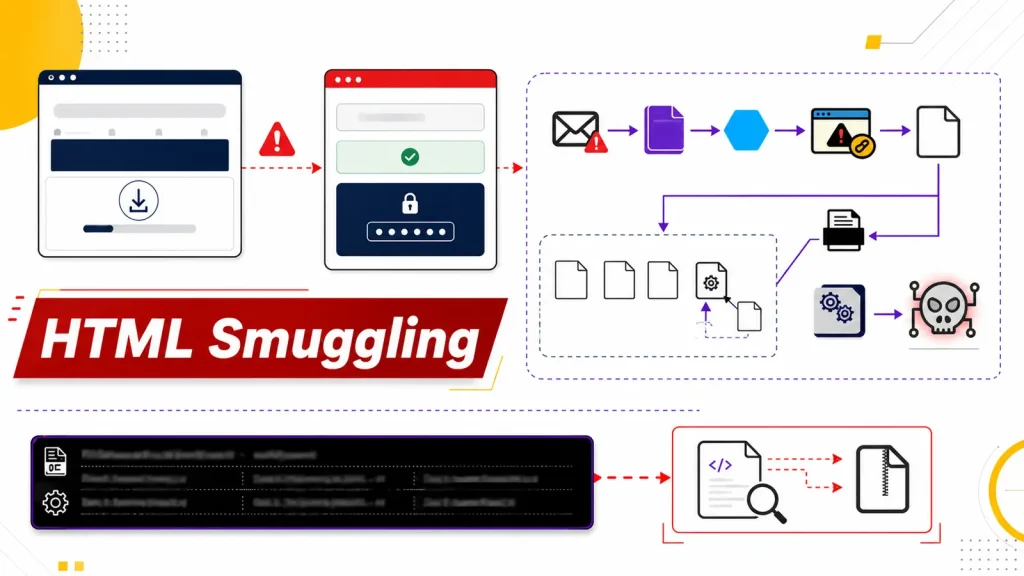
A sophisticated DCRat campaign has emerged, demonstrating an alarming level of stealth by concealing dangerous malware within seemingly innocuous SVG image files. This advanced technique, known as HTML smuggling, allows threat actors to bypass traditional security measures and deliver malicious payloads directly to unsuspecting victims. Understanding this new vector is critical for bolstering your organization’s defenses against evolving cyber threats.
Understanding the DCRat Campaign’s Modus Operandi
The campaign initiates with targeted phishing emails, meticulously crafted to appear as legitimate legal notifications. These emails are designed to induce a sense of urgency, compelling recipients to open an attached SVG file. On the surface, an SVG (Scalable Vector Graphics) file appears harmless, as it’s a common format for web graphics and images. However, in this particular campaign, the SVG file is not what it seems.
Instead of containing standard graphical data, the SVG file serves as a deceptive container. It houses malicious HTML and JavaScript code that, once opened in a web browser, initiates the HTML smuggling process. This technique dynamically creates a malicious file on the victim’s system, often bypassing network security and email gateways that might otherwise detect attached executables or archives.
The Role of HTML Smuggling in Evading Detection
HTML smuggling is a potent evasion tactic because it leverages the client-side rendering capabilities of web browsers. Instead of transmitting a malicious executable directly, the attacker sends a legitimate HTML file (in this case, embedded within an SVG). When the browser processes this HTML, it reconstructs the malicious file locally using JavaScript or other client-side scripting. This means the actual malware artifact is never directly transmitted across the network in its final, detectable form, making it difficult for perimeter defenses to identify and block.
The reconstructed payload in this DCRat campaign is typically a password-protected ZIP archive. Once extracted, this archive contains the DCRat executable, a versatile remote access trojan (RAT). DCRat is known for its wide range of capabilities, including remote desktop control, keylogging, screenshot capture, file exfiltration, and the ability to execute arbitrary commands, posing a significant risk to compromised systems.
Remediation Actions and Proactive Defense
Mitigating the risk posed by campaigns like this DCRat variant requires a multi-layered security approach. Organizations must focus on both preventative measures and rapid detection capabilities.
- Enhanced Email Security: Implement advanced email filtering solutions capable of detecting sophisticated phishing attempts, identifying suspicious attachments (even seemingly benign ones like SVGs), and analyzing email content for social engineering indicators.
- Browser Security Best Practices: Encourage and enforce the use of modern, patched web browsers. Configure browser security settings to block untrusted scripts and pop-ups. Consider implementing browser isolation technologies.
- Endpoint Detection and Response (EDR): Deploy EDR solutions that can monitor endpoint activity, detect anomalous behavior, and identify the execution of suspicious processes, even if the initial payload bypassed network defenses.
- User Awareness Training: Conduct regular and realistic cybersecurity training for all employees. Emphasize the dangers of opening unsolicited attachments, clicking suspicious links, and verifying the legitimacy of emails, even if they appear to be from trusted sources.
- Network Traffic Analysis: Implement deep packet inspection and network traffic analysis tools to detect unusual outbound connections or command-and-control (C2) communication patterns that DCRat might establish.
- Disable Unnecessary Scripting: Where feasible and not disruptive to operations, consider policies that restrict or disable client-side scripting (like JavaScript) in contexts where it’s not strictly necessary, especially for unknown or untrusted sources.
Tools for Detection and Mitigation
Leveraging the right tools can significantly enhance an organization’s ability to detect and respond to threats like the DCRat campaign.
| Tool Name | Purpose | Link |
|---|---|---|
| Advanced Email Gateway Solutions | Phishing and attachment analysis, URL rewriting, sandboxing. | (Specific vendor links vary, e.g., Proofpoint, Mimecast) |
| Endpoint Detection and Response (EDR) | Real-time endpoint monitoring, threat detection, incident response. | (Specific vendor links vary, e.g., CrowdStrike, SentinelOne) |
| Network Intrusion Detection/Prevention Systems (NIDS/NIPS) | Traffic analysis, signature-based and anomaly detection of malicious C2. | (Specific vendor links vary, e.g., Snort, Suricata) |
| Browser Security Extensions | Script blocking, ad blocking, privacy protection, phishing warnings. | (Varies, e.g., uBlock Origin, Privacy Badger) |
| Sandbox Environments | Safe execution and analysis of suspicious files and URLs. | (Specific vendor links vary, e.g., Any.Run, Cuckoo Sandbox) |
Key Takeaways for Cybersecurity Professionals
The DCRat campaign utilizing SVG files and HTML smuggling serves as a stark reminder that threat actors continuously innovate their delivery methods. Relying solely on traditional signature-based detection is no longer sufficient. Organizations must prioritize robust email security, proactive endpoint protection, comprehensive user awareness training, and network visibility. Staying informed about emerging tactics and adapting defenses accordingly is paramount in protecting digital assets from such sophisticated attacks.