
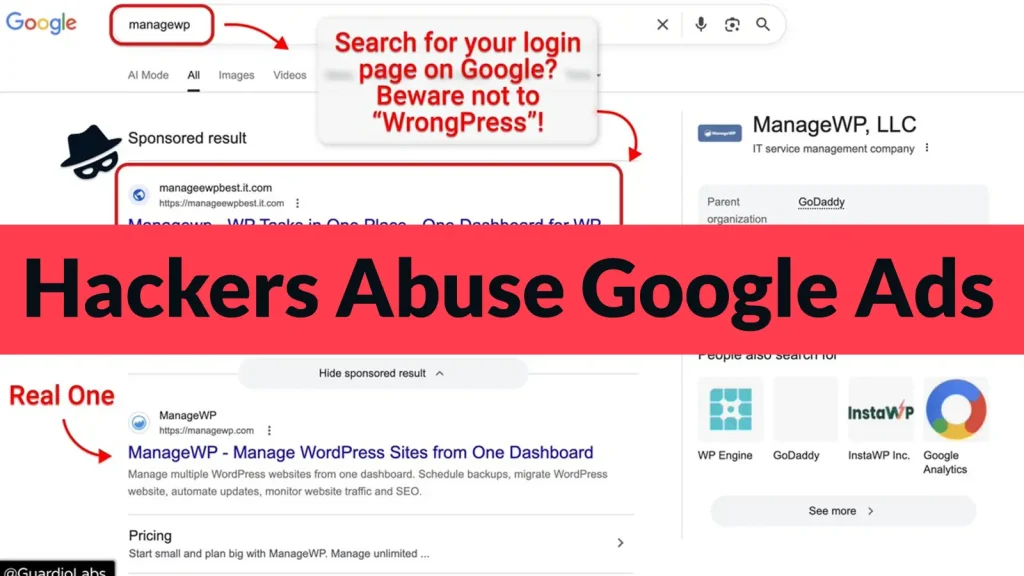
Hackers Abuse Google Ads to Steal Users GoDaddy ManageWP login Credentials
The digital landscape is a battleground, and even seemingly trusted channels can become vectors for attack. A recent campaign, dubbed “WrongPress,” highlights a critical vulnerability in user perception: the abuse of Google Ads to siphon GoDaddy ManageWP login credentials. This sophisticated phishing scheme isn’t just a minor nuisance; it represents a direct threat to the integrity and security of countless WordPress websites managed through GoDaddy’s popular platform.
The “WrongPress” Campaign: A Deceptive Strategy
Cybersecurity researchers have identified a targeted attack leveraging fraudulent sponsored search results to trick users into revealing their GoDaddy ManageWP login credentials. The “WrongPress” campaign functions by injecting malicious advertisements directly above legitimate ManageWP listings in Google search results. For an unsuspecting user searching for “ManageWP login” or similar terms, these fake ads appear to be the official entry point, leading them to carefully crafted phishing pages.
The effectiveness of this method lies in its subtlety. Users, accustomed to clicking the top search results (often sponsored), are less likely to question the authenticity of a prominent ad. By mirroring the legitimate ManageWP login interface, the phishing sites seamlessly capture usernames and passwords, granting attackers unauthorized access to a user’s entire portfolio of WordPress websites.
ManageWP and GoDaddy: The Targeted Ecosystem
ManageWP, a GoDaddy product, is a widely adopted platform designed to simplify the management of multiple WordPress sites from a single dashboard. Its centralized control makes it an attractive target for threat actors. Gaining access to a single ManageWP account can potentially compromise dozens, if not hundreds, of interconnected WordPress installations, leading to widespread data breaches, malware injection, and website defacement.
The targeting of ManageWP login credentials underscores the strategic importance of this platform for its users. Its comprehensive features, including backups, security scans, and performance monitoring, make it an indispensable tool for many developers and agencies. Consequently, a compromise at this level can have cascading effects, impacting not only the individual user but also their clients and the end-users of their websites.
Remediation Actions: Protecting Your Credentials
Defending against phishing attacks, especially those leveraging seemingly legitimate channels like Google Ads, requires vigilance and proactive measures. Here are essential remediation actions to protect your GoDaddy ManageWP login credentials and enhance your overall security posture:
- Verify URLs: Always scrutinize the URL of any login page before entering credentials. Legitimate ManageWP login pages will reside on a domain controlled by GoDaddy or ManageWP (e.g.,
https://managewp.com). Look for subtle misspellings, additional subdomains, or unusual top-level domains. - Bookmark Official Login Pages: Instead of relying on search engine results for sensitive logins, bookmark the official ManageWP login page directly. This bypasses potential malicious ads altogether.
- Enable Two-Factor Authentication (2FA): This is arguably the most critical defense. Even if attackers obtain your password, 2FA prevents unauthorized access by requiring a second verification factor (e.g., a code from your phone). Ensure 2FA is enabled for both your GoDaddy and ManageWP accounts.
- Use a Password Manager: Password managers not only help create strong, unique passwords but also often offer features to detect phishing attempts by auto-filling credentials only on legitimate websites.
- Security Awareness Training: Educate yourself and your team about the prevalent tactics used in phishing attacks. Understanding the psychology behind these schemes can significantly reduce susceptibility.
- Monitor Account Activity: Regularly review your ManageWP (and GoDaddy) account activity logs for any suspicious logins or unauthorized changes.
- Report Malicious Ads: If you encounter a suspicious Google Ad, report it to Google immediately. This helps prevent future users from falling victim.
Tools for Detecting Phishing and Enhancing Security
Leveraging the right tools can significantly bolster your defense against “WrongPress” and similar credential-stealing attacks. Here’s a table of useful tools:
| Tool Name | Purpose | Link |
|---|---|---|
| UBlock Origin / AdBlock Plus | General ad blocking, reducing exposure to malicious ads. | https://ublockorigin.com/ |
| LastPass / 1Password | Password management and phishing detection. | https://lastpass.com/ |
| Google Safe Browsing | Browser-level protection against known malicious sites. | https://safebrowsing.google.com/ |
| PhishTank | Database of verified phishing URLs. | https://phishtank.com/ |
| ManageWP Two-Factor Authentication | Enhances login security for ManageWP accounts. | (Integrate through ManageWP account settings) |
Key Takeaways for Digital Security
The “WrongPress” campaign serves as a stark reminder that even seemingly secure channels like sponsored search results can be weaponized. Protecting GoDaddy ManageWP login credentials is paramount for anyone managing WordPress websites. The core defense lies in a combination of vigilance, technical safeguards like 2FA and password managers, and a healthy skepticism towards unexpected login prompts. Always verify, never assume, and prioritize strong authentication methods to safeguard your digital assets from these insidious attacks.




