
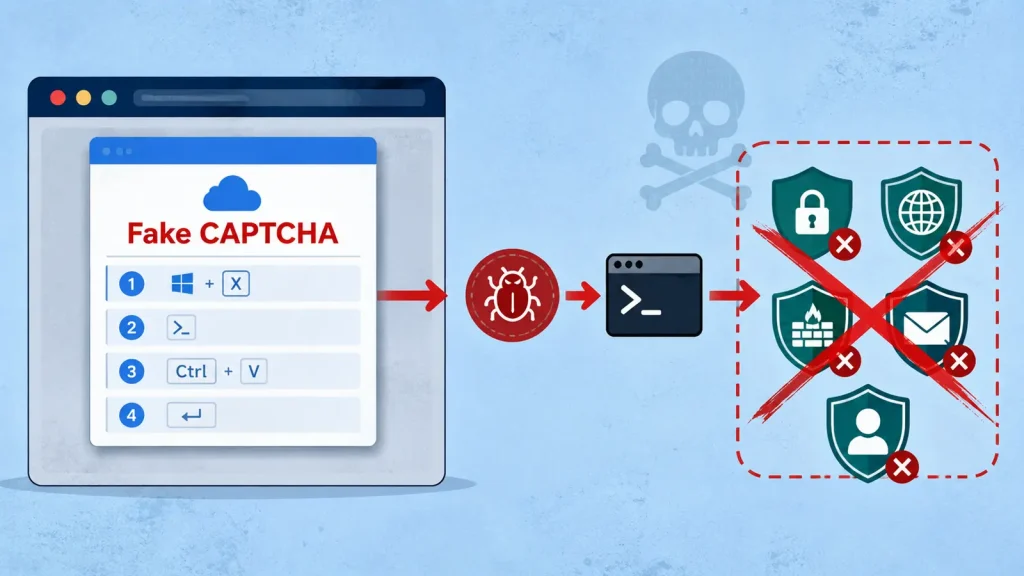
Hackers Use Fake CAPTCHA to Install Malware That Kills 145 Security Processes
A disturbing new campaign has emerged where sophisticated threat actors are leveraging fake CAPTCHA pages to deploy a potent malware loader. This loader, designed to disable crucial security processes, paves the way for subsequent, more damaging payloads. This intricate attack chain highlights a worrying trend in how adversaries are exploiting user trust and common web interactions to bypass defenses.
The Deceptive Lure: Fake CAPTCHA and Social Engineering
At the heart of this campaign is a deceptively simple yet highly effective social engineering tactic: a fake CAPTCHA verification prompt. Victims browsing compromised WordPress websites are presented with what appears to be a standard browser verification challenge. However, instead of a legitimate CAPTCHA, users are tricked into executing a Windows command themselves. This critical step bypasses typical download and execution protections, as the user initiates the malicious action directly.
The operation relies on a malware delivery service known as ErrTraffic, which facilitates the creation of a component referred to as ClickFix. This sophisticated infrastructure allows attackers to generate and distribute their malicious payloads efficiently, ensuring a wider reach and a higher probability of successful infections.
How the Malware Operates: Disabling Security Before Impact
Once a victim is persuaded to execute the malicious Windows command, a malware loader is installed. This loader isn’t designed for immediate destructive action; instead, its primary objective is to incapacitate the victim’s security software. Reports indicate that this malware can identify and terminate a staggering 145 security processes, effectively disarming the target system before the primary payload even arrives.
This pre-emptive strike is a critical phase of the attack, as it grants the threat actors an unobstructed path to deploy further malware, such as ransomware, information stealers, or remote access Trojans (RATs), with minimal risk of detection or intervention from endpoint security solutions. The effectiveness of this approach underscores the attackers’ deep understanding of defense mechanisms and their ability to craft highly evasive tactics.
The Role of Compromised WordPress Sites
The initial vector for this attack chain is often compromised WordPress websites. Threat actors regularly exploit vulnerabilities in out-of-date plugins, themes, or core WordPress installations to gain unauthorized access. Once a site is compromised, they inject malicious code that redirects visitors to their fake CAPTCHA pages or directly serves the malicious Windows command. This reliance on a widely used platform like WordPress allows for a broad attack surface and increases the likelihood of unsuspecting users encountering these traps.
Remediation Actions and Protective Measures
Defending against such sophisticated attacks requires a multi-layered approach that combines technical safeguards with user education. Organizations and individuals must be proactive in their cybersecurity posture.
- User Education: Train users to be suspicious of unexpected prompts, especially those asking to execute commands or download files. Emphasize verifying URLs and the legitimacy of CAPTCHA requests. Never execute commands provided by untrusted sources.
- Patch Management: Regularly update all software, operating systems, and especially content management systems like WordPress, along with their plugins and themes. This addresses known vulnerabilities that attackers frequently exploit.
- Endpoint Detection and Response (EDR): Implement and configure EDR solutions to monitor for suspicious process termination, unauthorized command execution, and unusual network activity. Even if the malware attempts to kill security processes, an effective EDR may log or alert on the attempt.
- Application Whitelisting: Consider implementing application whitelisting policies to prevent unauthorized executables from running on endpoints. This can effectively block the initial malware loader from executing.
- Network Segmentation: Segment networks to limit the lateral movement of malware should an infection occur.
- Strong Antivirus/Anti-Malware: While the malware aims to disable these, having robust, up-to-date antivirus and anti-malware solutions remains a foundational defense.
- Web Application Firewall (WAF): Employ WAFs to protect WordPress and other web applications from common web-based attacks, including those used to compromise sites for malicious injection.
- Browser Security: Advise users to use modern browsers with built-in security features that warn about suspicious downloads or website redirects.
Tools for Detection and Mitigation
| Tool Name | Purpose | Link |
|---|---|---|
| Endpoint Detection and Response (EDR) Solutions | Advanced threat detection, incident response, and behavior monitoring on endpoints. | Gartner Peer Insights (EDR) |
| Web Application Firewalls (WAF) | Protects web applications from various attacks, including SQL injection and cross-site scripting. | OWASP ModSecurity Core Rule Set |
| Vulnerability Scanners (e.g., Nessus, OpenVAS) | Identifies security weaknesses in web applications and network infrastructure. | Tenable Nessus |
| Microsoft Defender for Endpoint | Comprehensive endpoint security platform for enterprise. | Microsoft Defender for Endpoint |
Conclusion
The use of fake CAPTCHA pages to install malware that systematically kills security processes represents a significant escalation in attacker sophistication. This campaign, leveraging compromised WordPress sites and social engineering, underscores the critical need for robust cybersecurity defenses, vigilant user awareness, and proactive patch management. Organizations must prioritize continuous security education and deploy advanced detection and response capabilities to counteract these evolving threats and protect their digital assets.




