
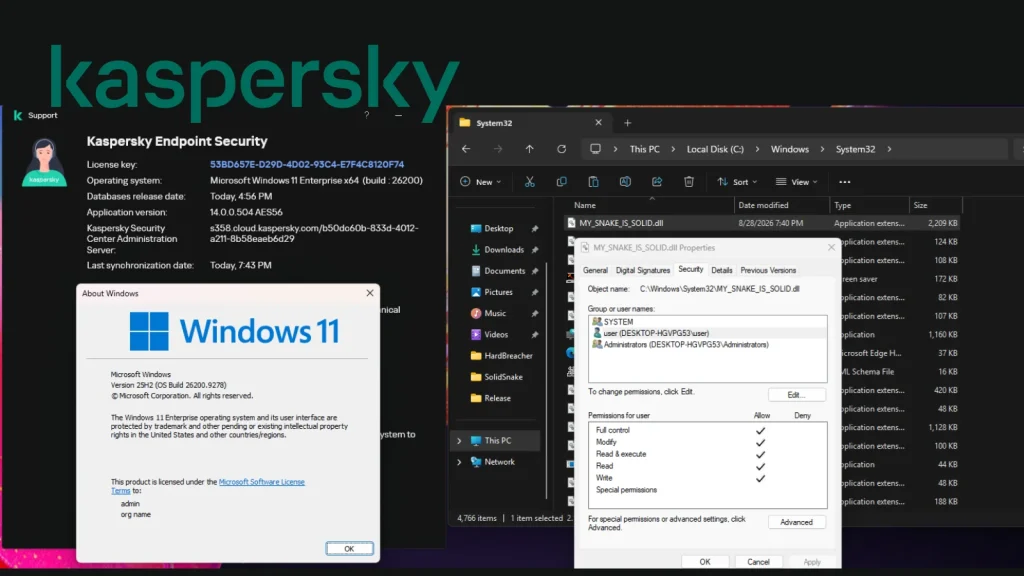
HardBreacher PoC Claims Kaspersky Endpoint 0-Day Privilege Escalation on Windows 11
Unpacking the HardBreacher PoC: Kaspersky Endpoint Privilege Escalation Claim on Windows 11
A new, unverified claim has sent ripples through the cybersecurity community: a Proof-of-Concept (PoC) dubbed “HardBreacher” purports a local privilege-escalation flaw in Kaspersky Endpoint Security (KES) running on fully patched Windows 11 systems. This alleged zero-day vulnerability, if validated, could allow an attacker with limited access to elevate their privileges to a higher level, potentially gaining full control over an affected system. While the cybersecurity news outlet Cyber Security News first reported on the PoC, it’s crucial to understand that Kaspersky has not publicly confirmed the flaw, nor has a CVE been assigned.
The HardBreacher PoC: What’s the Claim?
The HardBreacher PoC, published by a researcher identified as MSNightmare, describes what is claimed to be a zero-day elevation-of-privilege vulnerability within Kaspersky’s enterprise endpoint protection solution. The core of the allegation points to a weakness that could allow a lower-privileged process to escalate its permissions on a system where Kaspersky Endpoint Security is installed and active on Windows 11. Such vulnerabilities are particularly concerning because they allow attackers who have already gained a foothold (perhaps through a phishing attack or exploiting another weakness) to move laterally and gain deeper control, making system compromise much more severe.
Understanding Privilege Escalation Zero-Days
A “zero-day” vulnerability refers to a flaw that is unknown to the vendor, meaning there is no official patch or fix available. “Privilege escalation” refers to the act of exploiting a bug, design flaw, or configuration oversight in an operating system or software application to gain elevated access to resources that are normally protected from an application or user. When combined, a privilege escalation zero-day represents a significant threat as it allows an attacker to bypass security measures without the victim having any immediate means of defense. For an endpoint security product like Kaspersky Endpoint Security, which is designed to protect systems, such a flaw could be particularly damaging, undermining the very purpose of its deployment.
Why Verification is Key
At this stage, the HardBreacher PoC’s claims remain unverified. It is common for researchers to publish findings before official confirmation from the vendor. This allows for peer review and community scrutiny, but also means that the severity and even the existence of the vulnerability are not yet definitively established. Kaspersky, like most responsible vendors, would typically conduct its own investigation upon learning of such a claim. If the vulnerability is confirmed, they would then work to develop a patch and, in collaboration with MITRE, assign a CVE (Common Vulnerabilities and Exposures) identifier (e.g., CVE-2023-XXXXX) for public tracking and reference.
Remediation Actions and Best Practices (Until Verification)
While the HardBreacher claim is unverified, organizations running Kaspersky Endpoint Security on Windows 11 should consider the following proactive measures:
- Monitor Official Kaspersky Advisories: Regularly check Kaspersky’s official security advisories and news channels for any updates regarding this specific claim or new vulnerabilities.
- Implement Least Privilege: Ensure all users and applications operate with the absolute minimum necessary privileges. This principle limits the impact of any successful privilege escalation attempt.
- Patch Management: Maintain a rigorous patch management strategy for both operating systems and all installed software. While this is an alleged zero-day, keeping all other components up-to-date reduces the overall attack surface.
- Endpoint Detection and Response (EDR): Leverage EDR solutions to monitor endpoints for unusual activity, process anomalies, and suspicious privilege escalation attempts. EDR can often detect post-exploitation behavior even if the initial vulnerability is unknown.
- Network Segmentation: Segment networks to restrict lateral movement if an attacker does manage to compromise a system.
- Regular Backups: Maintain comprehensive and tested backup strategies to enable rapid recovery in the event of a successful attack.
Tools for Endpoint Monitoring and Security Posture Assessment
While awaiting official confirmation or remediation for specific alleged vulnerabilities, a robust set of tools can help maintain a strong security posture. These tools assist in detecting suspicious activities that might indicate a privilege escalation attempt or other forms of compromise.
| Tool Name | Purpose | Link |
|---|---|---|
| Sysmon | Advanced system monitoring and logging for detecting malicious activity. | Microsoft Learn |
| Osquery | Exposes an operating system as a high-performance relational database, allowing for powerful queries. | osquery.io |
| Windows Event Viewer | Native Windows tool for reviewing system, security, and application logs. | Microsoft Learn |
| Vulnerability Scanners (e.g., Nessus, Qualys) | Automated scanning for known vulnerabilities and misconfigurations across networks. | Tenable Nessus |
| PowerShell Remoting & Logging | Enabling and monitoring PowerShell logging for suspicious script execution. | Microsoft Learn |
Conclusion
The HardBreacher PoC introduces a potentially serious concern for users of Kaspersky Endpoint Security on Windows 11. However, it is vital to emphasize that these claims are currently unverified by Kaspersky and lack an official CVE assignment. Organizations should remain vigilant, follow best practices for endpoint security and privilege management, and closely monitor official communications from Kaspersky for further information. The cybersecurity landscape demands constant attention, and while unconfirmed reports can cause alarm, a measured and proactive approach is always the most effective response.




