
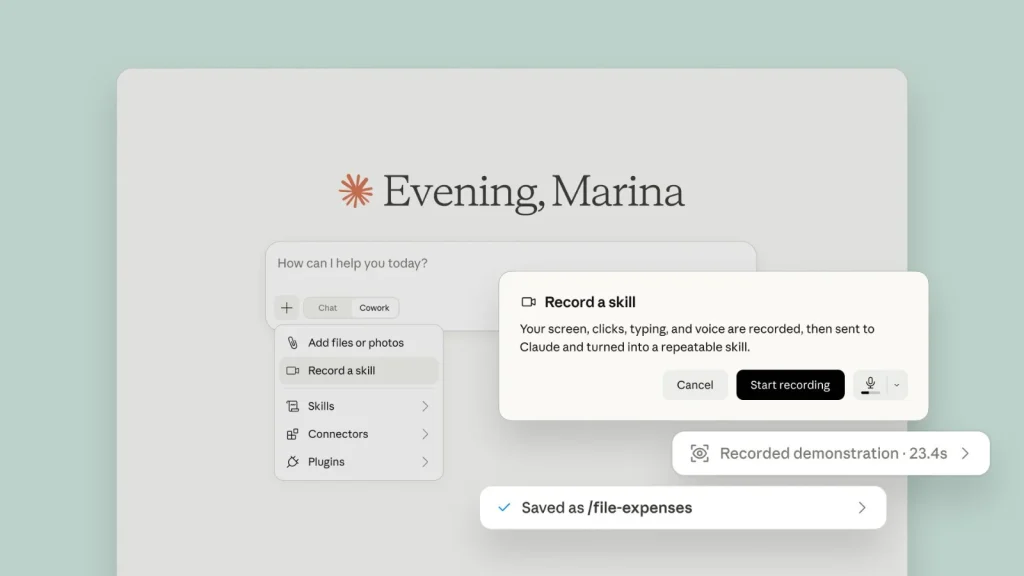
Now You Can teach a Skill to Claude by Just Recording your Screen
The landscape of artificial intelligence is evolving at an unprecedented pace, with new capabilities emerging that redefine how we interact with technology. One such advancement, poised to significantly impact productivity and skill transfer, comes from Anthropic’s Claude. Imagine teaching an AI a complex, repeatable task not through intricate code or tedious instructions, but simply by performing it yourself once. This is no longer a futuristic concept but a present-day reality, thanks to Claude’s new “Record a Skill” feature.
Claude’s “Record a Skill”: A Paradigm Shift in AI Training
Anthropic, a leading AI research company, has introduced a groundbreaking capability within Claude Cowork. This feature, aptly named “Record a Skill,” allows users to train the AI assistant on a specific task by merely recording their screen as they execute the desired workflow. This innovation dramatically simplifies the process of imparting skills to an AI, moving beyond traditional methods that often require extensive programming knowledge or meticulous manual instruction writing.
The core of this offering lies in its intuitive nature. Instead of relying on predefined scripts or complex API integrations, users can now demonstrate a sequence of actions directly to Claude. The AI observes the screen capture, understands the steps involved, and subsequently transforms this visual input into a repeatable workflow. This effectively empowers Claude to execute the task on demand, mimicking the user’s previously demonstrated actions.
How “Record a Skill” Works: From Observation to Automation
The mechanism behind “Record a Skill” is both elegant and powerful. When a user initiates the recording and performs a task – whether it’s navigating a complex software interface, filling out a form, or extracting specific data from a web page – Claude’s sophisticated algorithms analyze the visual and interactive elements. It identifies key actions, such as clicks, scrolls, text inputs, and menu selections, recognizing patterns and the logical flow of the operation.
Once the recording concludes, Claude processes this information, converting the raw screen capture into an executable sequence. This sequence becomes a “skill” that Claude learns and stores. Subsequently, when the user requests Claude to perform that specific skill, the AI can replicate the demonstrated steps, automating what was once a manual and time-consuming process. This significantly reduces the cognitive load on users and enhances overall operational efficiency.
Implications for Productivity and Cybersecurity Professionals
For IT professionals, security analysts, and developers, the “Record a Skill” feature holds immense potential. Consider the following applications:
- Automating Repetitive Tasks: Cybersecurity analysts frequently perform repetitive data extraction from logs, incident response platforms, or threat intelligence feeds. A security professional could record the process of navigating a SIEM, filtering specific event types, and copying relevant IOCs. Claude could then perform this task autonomously, freeing up valuable time for more complex analysis.
- Streamlining Onboarding: New team members often require extensive training on proprietary tools and workflows. By recording common operational procedures, organizations can create a library of Claude skills, allowing new hires to quickly grasp and even delegate routine tasks to the AI.
- Rapid Tool Integration: Integrating new security tools or platforms often involves custom scripting or API development. With “Record a Skill,” an analyst could demonstrate how to use a new vulnerability scanner or EDR solution, enabling Claude to interact with it for specific data retrieval or report generation.
- Enhancing Incident Response: In a fast-paced incident response scenario, quickly gathering information from disparate sources is crucial. An analyst could record the steps to query various threat intelligence platforms for a specific threat actor or malware signature. Claude could then execute this complex reconnaissance with a single command.
While this feature is a boon for productivity, it also introduces a new dimension to consider from a security perspective. Just as a human user can be tricked into performing malicious actions, an AI trained through screen recording could potentially be guided to perform unintended or harmful operations if the recording itself contains vulnerabilities or erroneous steps. While not a direct vulnerability in the traditional sense like CVE-2023-XXXXX, the integrity of the recorded skill becomes paramount.
Best Practices for Secure “Skill” Recording
To leverage “Record a Skill” effectively and securely, users should adhere to specific best practices:
- Verify Workflow Integrity: Before training Claude, thoroughly test the task manually to ensure it is accurate and free of errors or unintended consequences.
- Principle of Least Privilege: When recording tasks that involve sensitive systems or data, ensure the user account used for the recording has only the necessary permissions. This limits the potential impact if the recorded skill were ever misused.
- Avoid Recording Sensitive Information: Be cautious about recording sessions that display highly sensitive personal identifiable information (PII) or confidential corporate data. While Claude aims to replicate actions, the visual capture might inadvertently log sensitive details.
- Regular Review and Auditing: Periodically review the skills taught to Claude. Ensure they remain relevant, efficient, and do not pose any unforeseen security risks as systems and workflows evolve.
- Clear Naming Conventions: Use descriptive and unambiguous names for recorded skills to avoid confusion and ensure that the correct skill is invoked when needed.
Conclusion: The Future of Human-AI Collaboration
Anthropic’s “Record a Skill” feature marks a significant leap in human-AI collaboration. By allowing users to teach Claude complex tasks through direct demonstration, it democratizes AI skill acquisition, making powerful automation tools accessible to a broader audience. This innovation promises to unlock new levels of productivity and efficiency across various industries, including cybersecurity, by transforming how we approach repetitive workflows. As with any powerful technology, understanding its capabilities and implementing sound security practices will be key to harnessing its full potential responsibly.




