
Windows Bind Link Abuse Lets Attackers Blind EDR and Bypass AMSI, AppLocker, and Sysmon
Unmasking the Threat: Windows Bind Link Abuse Blinds EDR and Bypasses Key Defenses
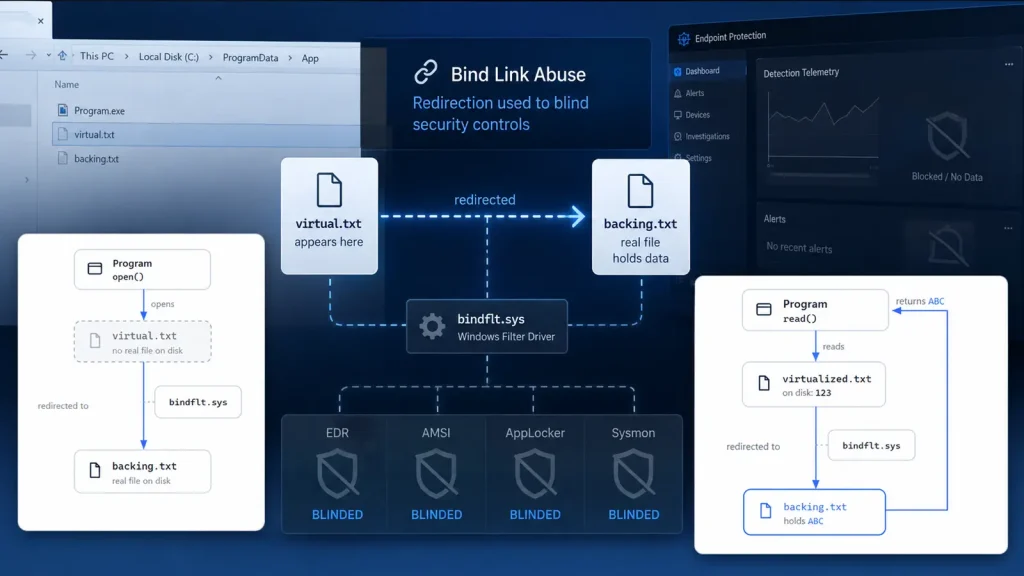
The digital threat landscape is in perpetual motion, presenting new challenges to even the most robust security architectures. A recent discovery reveals a sophisticated new technique that allows attackers to evade detection and maintain stealth on compromised Windows systems: the abuse of Windows bind links. This method leverages a legitimate operating system feature to effectively blind Endpoint Detection and Response (EDR) solutions and bypass critical security mechanisms like AMSI, AppLocker, and Sysmon, leaving organizations vulnerable to hidden adversarial activity.
For cybersecurity professionals, understanding and mitigating such novel bypass techniques is paramount. This post delves into how Windows bind links are weaponized, the impact on your security posture, and actionable steps you can take to defend against this insidious threat.
The Devious Mechanism: How Windows Bind Links Are Abused
Windows bind links, a feature typically used for legitimate file system redirection, have been creatively repurposed by attackers. Fundamentally, a bind link redirects one file path to another without altering the original file on disk or creating a visible replacement. Imagine a scenario where a critical system executable, say C:\Windows\System32\cmd.exe, is legitimately present. An attacker, having gained administrator privileges, can establish a bind link that redirects attempts to access this file to a malicious alternative, perhaps located in a hidden or obscure directory.
The brilliance (and danger) of this technique lies in its subtlety. Traditional detection methods, which often rely on file integrity checks, modification timestamps, or monitoring the creation of new files, are rendered ineffective. Since the original file is untouched and no new, suspicious file is overtly dropped in its place, security tools struggle to identify the clandestine redirection. EDR solutions, designed to monitor process execution and file access, might still see cmd.exe being executed, but the actual code running would be the attacker’s malicious payload, seamlessly swapped in by the bind link.
Blinding EDR and Bypassing Core Security Controls
The implications of this bind link abuse extend far beyond merely hiding malicious executables. This technique has proven effective in bypassing several cornerstone Windows security features:
- EDR Evasion: By redirecting legitimate binaries to malicious ones, attackers can execute their code under the guise of trusted processes. EDR systems, monitoring the execution of known good files, may fail to flag the underlying malicious activity, effectively blinding the detection capabilities.
- AMSI Bypass: The Antimalware Scan Interface (AMSI) is crucial for detecting script-based attacks, such as PowerShell or JavaScript. If an attacker can bind a legitimate PowerShell executable to a modified, malicious version, they can potentially subvert AMSI’s protective measures.
- AppLocker Workarounds: AppLocker enforces application control policies, allowing only authorized applications to run. By binding an authorized application’s path to an unauthorized malicious binary, attackers can bypass these strong controls, gaining execution privileges where they shouldn’t.
- Sysmon Circumvention: Sysmon (System Monitor) provides detailed information about process creations, network connections, and file modifications. While Sysmon logs might show the execution of the original, legitimate file name, the actual payload would be the malicious one, making forensic analysis significantly more challenging and potentially misleading.
This coordinated bypass capability presents a severe challenge. Attackers who achieve administrator access can quietly establish persistence, execute arbitrary code, and exfiltrate data, all while staying under the radar of critical security tooling.
Remediation Actions: Fortifying Your Defenses
Combating Windows bind link abuse requires a multi-layered approach, focusing on preventive measures, enhanced detection, and robust incident response. Since this technique relies on administrator privileges, the primary line of defense is preventing credential compromise and privilege escalation.
- Principle of Least Privilege (PoLP): Strictly enforce PoLP across your environment. Limit administrative access to only essential personnel and systems, and ensure regular audits of privileged accounts.
- Strong Authentication and MFA: Implement robust multi-factor authentication (MFA) for all administrative accounts and critical systems to significantly reduce the risk of credential compromise.
- Advanced EDR/XDR Capabilities: While some EDRs may be blinded directly, advanced solutions with behavioral analysis capabilities and machine learning models might detect anomalous process behavior or deviations from baseline activity, even when using legitimate process names. Focus on EDRs that provide deep insight into file system operations and process injection.
- Regular Security Audits: Conduct frequent audits of file system permissions and identify any unusual or unauthorized bind links. While Windows doesn’t provide a direct command to list all bind links, monitoring for unusual junction points or symbolic links can be a starting point.
- Enhanced Logging and Monitoring: Improve logging for file system events, especially those related to directory junctions or symbolic link creation. While standard logs might not directly identify bind links, monitoring for unusual file system modifications in critical directories can provide clues.
- Proactive Threat Hunting: Regularly hunt for indicators of compromise (IOCs) related to privilege escalation and persistence. Look for processes executing from unusual locations or with unexpected parent processes. Consider tools that specifically check for various redirection techniques.
- Vulnerability Management: Keep all systems patched and up-to-date to prevent attackers from gaining initial administrative access through known vulnerabilities.
Detection Tools and Resources
While no single tool currently offers a silver bullet for detecting Windows bind link abuse, combining existing capabilities and proactive monitoring can significantly improve your detection posture. Here are some categories of tools and approaches:
| Tool Category | Purpose | Link/Description |
|---|---|---|
| Advanced EDR/XDR Solutions | Behavioral analysis, anomaly detection, process monitoring, file system event correlation. | Various commercial EDR/XDR products (e.g., CrowdStrike, SentinelOne, Microsoft Defender XDR). Focus on features that analyze process ancestry and unusual file access patterns. |
| Sysmon Configuration | Detailed logging of process creation, file events, and named pipe creation. Can be configured to capture fine-grained file system changes. | Microsoft Sysinternals Sysmon. Implement robust configuration from community resources (e.g., SwiftOnSecurity). |
| PowerShell/Scripting | Custom scripts to enumerate file system junctions, symbolic links, and detect unusual reparse points. | Get-Item -Path C:\path\to\check -Force | Select-Object * (look for LinkType). Requires administrator privilege. |
| Forensic Tools | In-depth analysis of disk images to uncover hidden file system structures and reparse points. | Various commercial and open-source forensic suites (e.g., Autopsy, FTK Imager). |
| Integrity Monitoring | Baseline and monitor critical system files and directories for unauthorized changes, even if the change is a redirection rather than modification. | File Integrity Monitoring (FIM) solutions. |
Conclusion: Staying Ahead in the Evolving Threat Landscape
The emergence of Windows bind link abuse as an evasion technique underscores the constant arms race between attackers and defenders. This method highlights that even legitimate operating system features can be weaponized to bypass sophisticated security controls. For IT professionals and cybersecurity teams, the takeaway is clear: rely on a holistic defense strategy that includes robust privilege management, advanced behavioral detection, diligent monitoring, and proactive threat hunting. Understanding how these sophisticated techniques work is the first step in building resilient defenses against tomorrow’s threats.




